Material spread across dozens of vehicles with no record of what each technician carries or who is responsible.
Invisible stock and duplicate purchasesDSA Core · Logistics & Warehousing
Logistics and warehousing, from supplier to installation.
The DSA Core WMS controls every item from the moment it arrives from the supplier until it is installed or delivered: locations, batches and expiry dates, serials and MACs, job reservations, PDA picking, vans as mobile warehouses and the real cost charged to every job.
- 1 recordevery movement with its batch or serial, location, job and cost
- Serialsand MACs of every device, from supplier to customer
- PDAto receive, pick, count and consume without typing
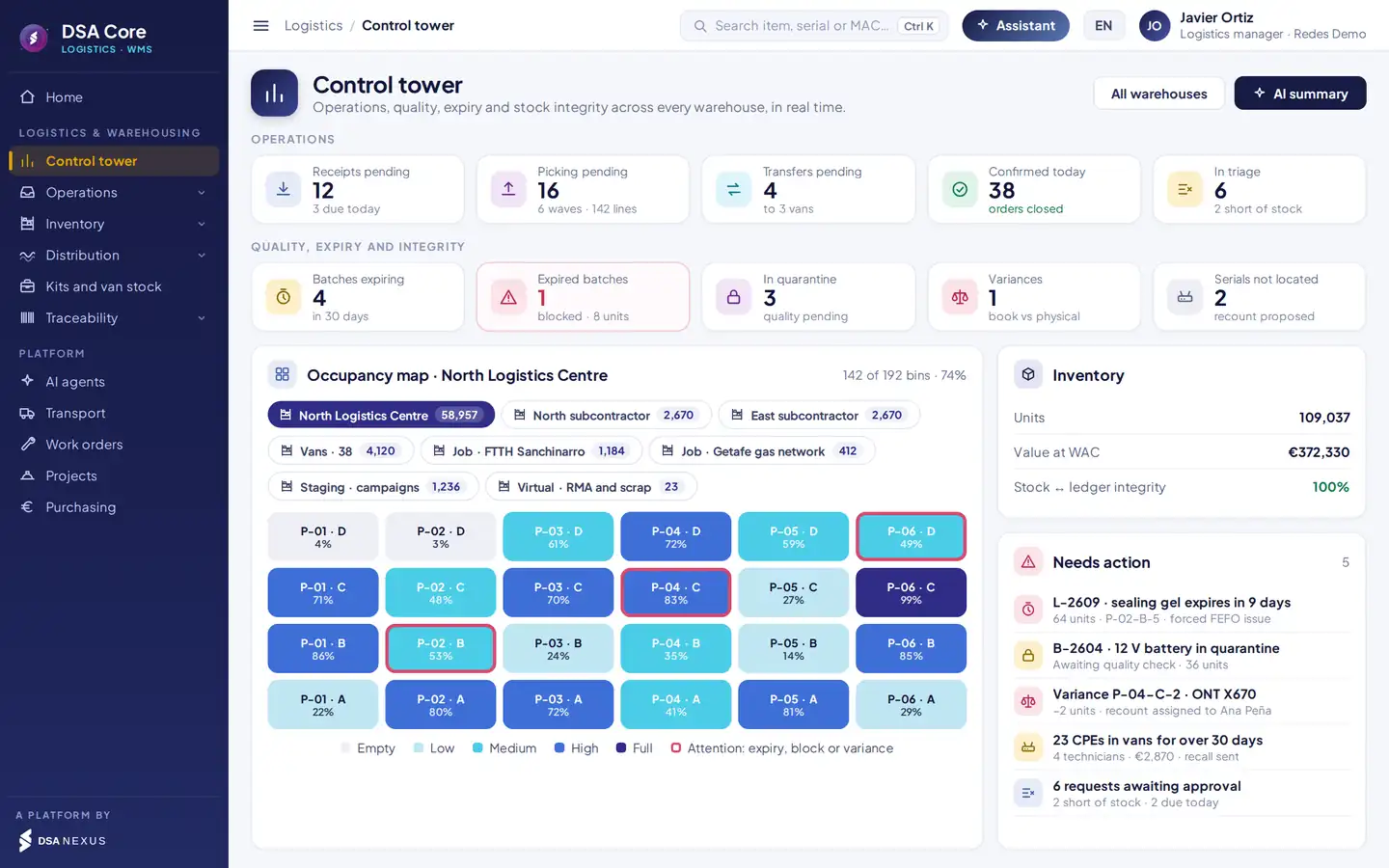
Operating context
Where material gets lost in a service company.
The warehouse does not end at the shelf: it carries on in every van, every subcontractor, every job and every store being restocked. That is where stock stops adding up and cost stops reaching the job.
Requests by phone or message, with no reservation: what was meant for one job ends up on another.
Jobs stopped for lack of materialWhat is consumed is not charged to the job or work order that used it.
Margins that are not realRouters, ONTs and set-top boxes with no controlled serial or MAC.
Losses and customer penaltiesGels, resins and batteries expire because the last in goes out first.
Write-offs and unusable materialAnnual stocktake with the warehouse closed and variances nobody can explain.
Accounting adjustments and lost daysWhat is missing is bought late and slow movers pile up, without looking at planned jobs.
Urgent purchases and tied-up capitalWithout a stock ledger or average cost, the cost of every issue is a guess.
Unreliable stock valuationAn ERP tells you what was bought. A spreadsheet tells you what people think is there. Neither knows what each technician carries or which job it was installed on.
The full material cycle
From supplier to installation, with a single reference record.
Every stage records a stock movement. Those movements drive stock, cost, traceability and what needs replenishing.
- 1ReceiveAgainst the PO, with serials, batches and quality control
- 2Put awaySuggested bin, FIFO or FEFO and cross-docking
- 3ReserveBy job and by work order, with priorities
- 4PickWaves, optimal route and PDA validation
- 5Deliver and consumeVan, subcontractor or transport; usage on the WO
- 6ReturnSurplus, customer cancellations and RMA to the supplier
Reference record
The stock movement.
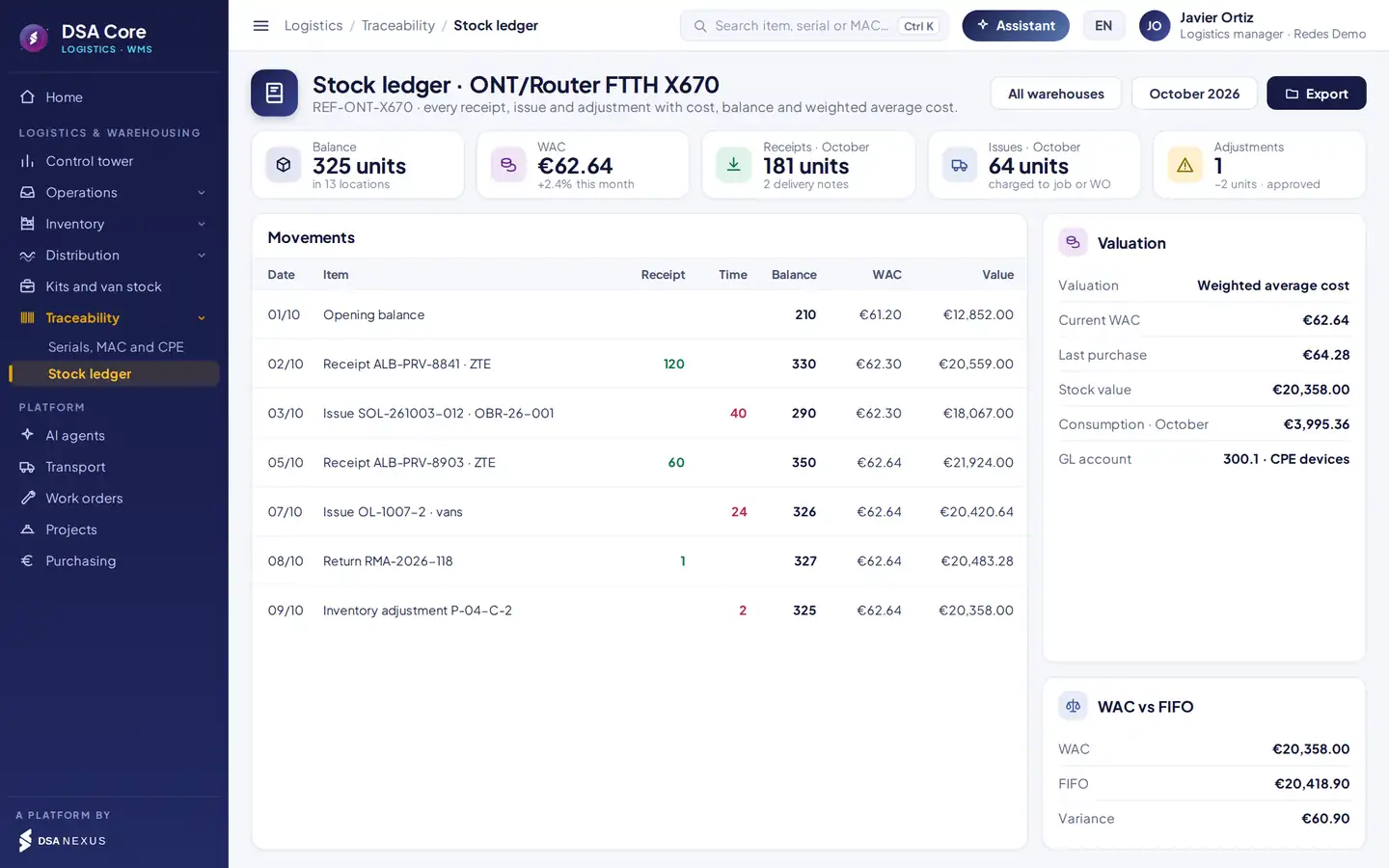
Item, batch or serial and MAC, source and destination location, job or work order, quantity and cost. That record drives:
- The stock in every warehouse, van and job.
- The stock ledger with its weighted average cost.
- The cost charged to the job or work order.
- The traceability of every device, batch and serial.
- What needs replenishing before it runs out.
Warehouses, locations, batches and expiry.
All your warehouses in the same system, each with its owner.
Central, branches, subcontractors, jobs, staging and virtual.
Every vehicle is a mobile warehouse in its technician’s charge.
Aisle, level and bin, with occupancy map and capacity.
FIFO, FEFO by expiry date or individual serial.
What expires first goes out first; expired stock is blocked.
Batches and serials blocked until they pass quality control.
Inbound stock with a pending reservation goes straight to its job.
Location, package and item labels with barcode or QR.
Requests and reservations
Every job’s material, reserved before work starts.
Technicians, site managers, stores and subcontractors order from the app, from the job or by importing a spreadsheet. The approval centre decides with real availability in front of it, and what is approved is firmly reserved.
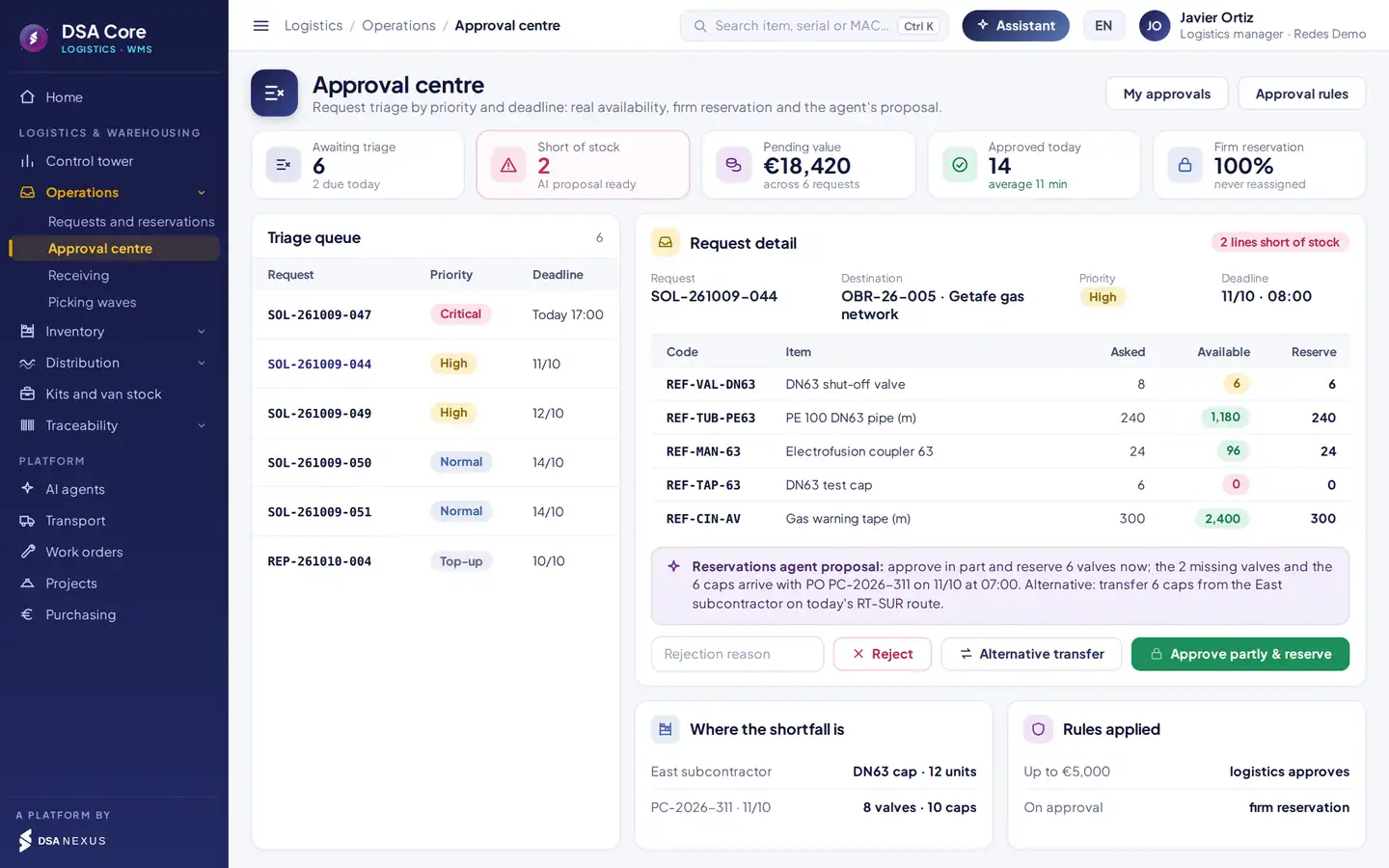
- 1Triage queue by priority and deadline.
- 2Real availability of each line against the quantity requested.
- 3Agent proposal: partial approval, transfer or wait for the PO.
- 4Where the missing stock is: other warehouses and open POs.
From the job budget or schedule and from each work order. Whatever is missing triggers a purchase or a transfer.
A breakdown with a service deadline, a job with a certification date or a top-up. If a date changes, the reservation is reassigned.
Receipts, issues, usage and transfers as orders with a route, an owner, evidence and a signature.
Firm reservation. Stock reserved for one request cannot be assigned to another, and every rejection is logged with its reason.
Picking, PDA and transport
Pick faster and without errors.
Requests are grouped into waves by departure time and destination, the route is sequenced by aisle, level and bin, and every line is validated with the scanner.
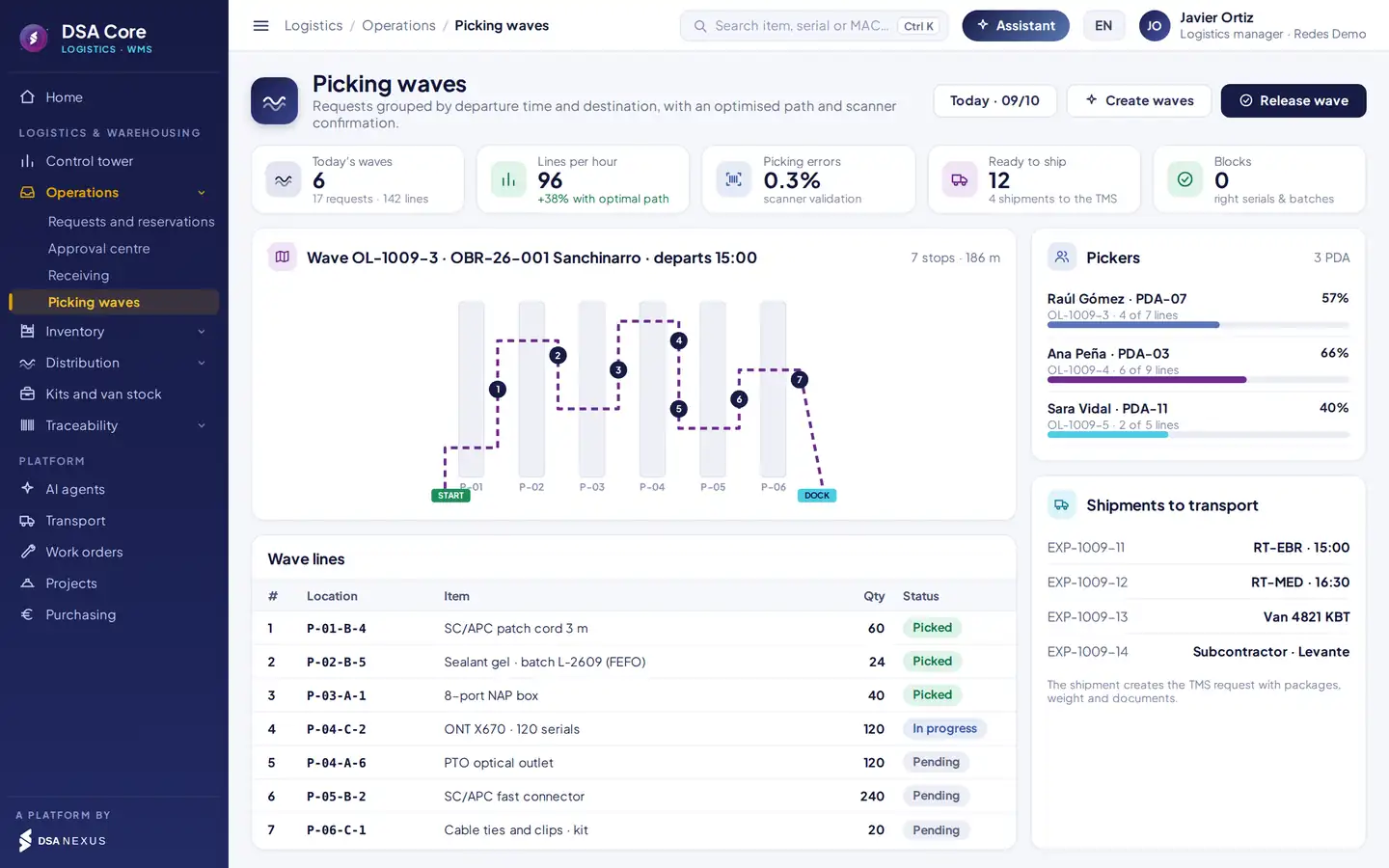
- 1Wave route sequenced by location, from the start to the dock.
- 2Progress of each picker and their PDA.
- 3Lines with location, item, batch and status.
- 4Shipments created in the TMS with packages, weight and documents.
Serial and batch capture, quality control and discrepancies with photos.
By rule and free bin, or straight to the job if a reservation is pending.
Location, item, quantity and serial validated with the scanner.
The issue creates the transport request without retyping.
Mobile app and PDA
The warehouse and the van, on the phone.
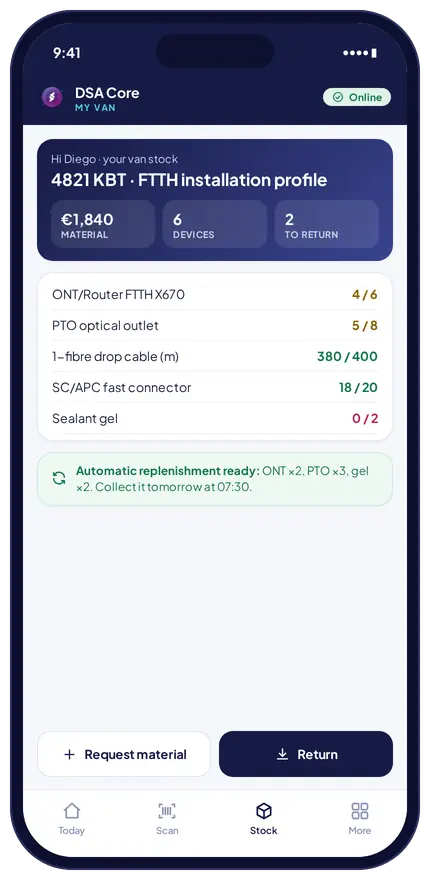
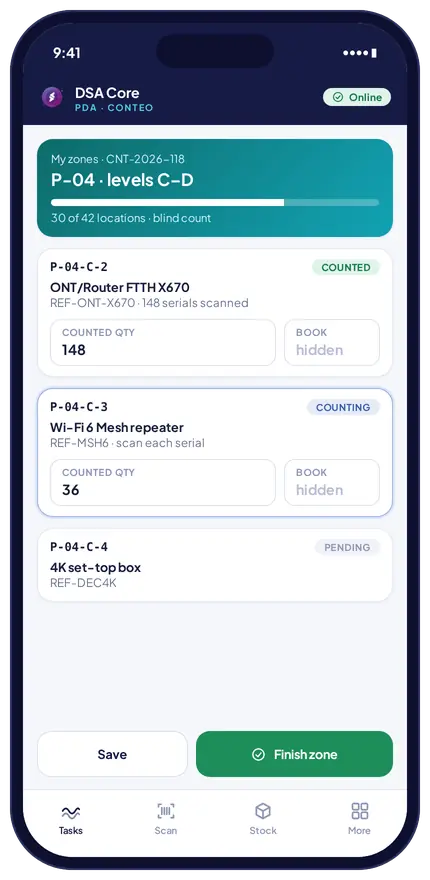
Pickers receive, pick and count with the PDA. Technicians see the stock in their van, order material, return it and record usage on the work order by scanning the installed device.
- My van. Stock against the stock profile, a top-up ready for the next day and the technician’s signature on the material in their charge.
- Usage on the WO. The scanned device leaves the van and is charged to the work order at average cost.
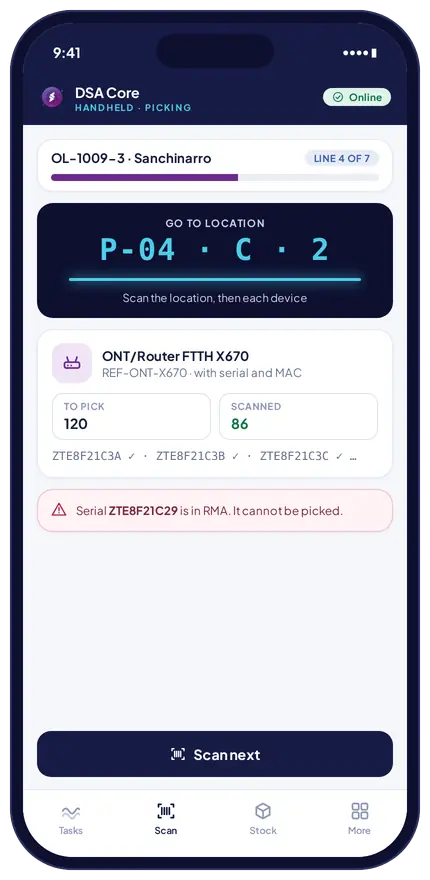
Automatic controls.
They stop what should not leave and alert the person in charge to whatever does not add up.
Blocked: cannot be reserved or picked.
The PDA only accepts the FEFO batch.
The device cannot be picked or delivered.
The scanner rejects the read.
Quality check pending: no reservation.
Not reassigned to another request.
Quantity against the PO, with photos.
CPE not installed, with its value.
Top-up proposed for the next day.
Stock-out risk within the supplier lead time.
Nightly integrity check.
Every stock change leaves its movement in the ledger, with user and date.
Cycle counting
Inventory that adds up, without closing the warehouse.
Rotating counts by ABC class or full counts, by warehouse, aisle or van. Each operator counts their zones from the PDA and every variance comes with its likely cause.
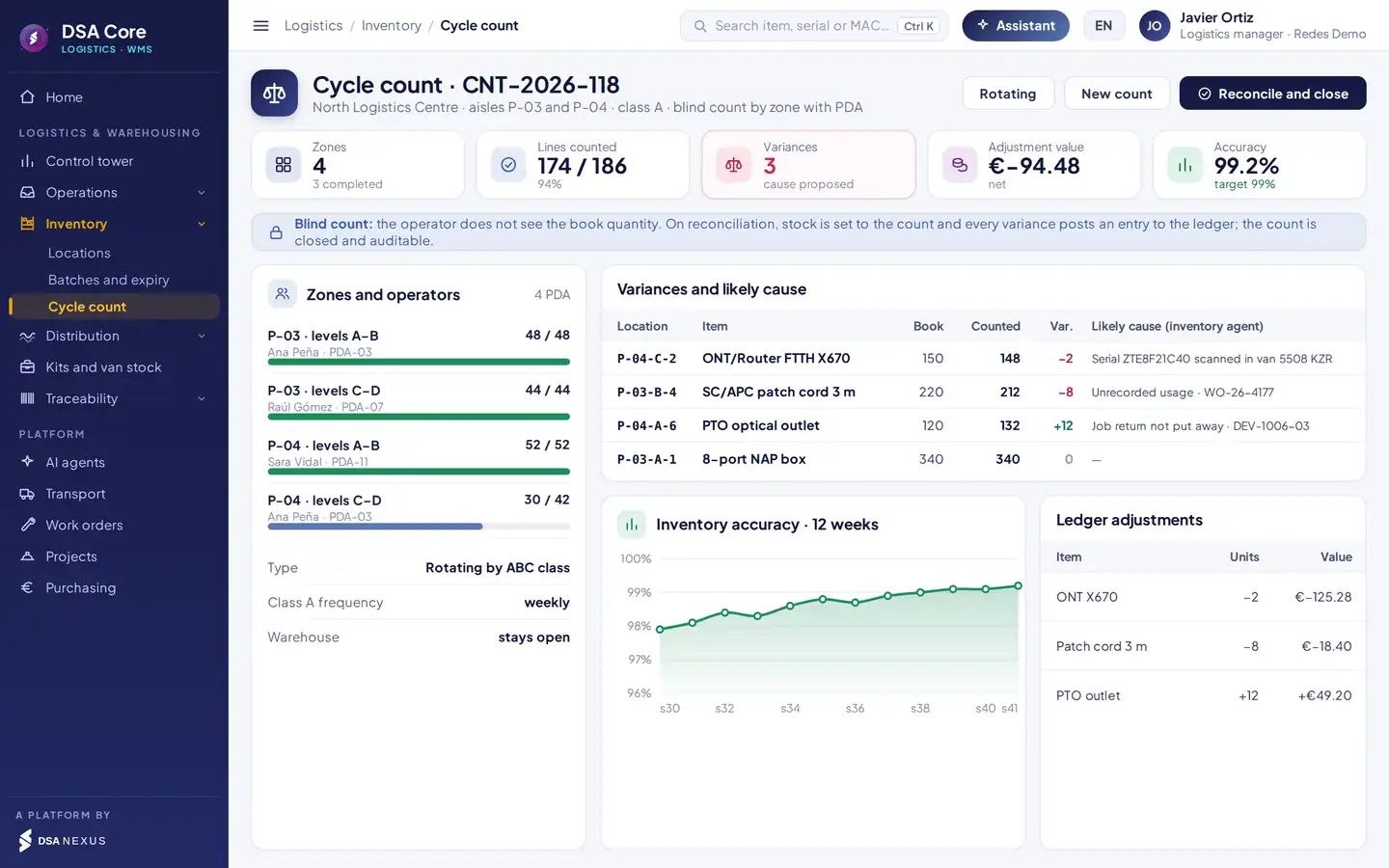
- 1Blind count: the operator does not see the expected quantity.
- 2Zones assigned to each operator and their progress.
- 3Likely cause of every variance, proposed by the inventory agent.
- 4Weekly accuracy and adjustments posted to the ledger.
Count little, often and by zone, while the warehouse keeps picking.
Each technician counts their mobile warehouse and signs the result.
Stock is adjusted to the count and the count is closed with its entries.
Distribution by campaign
Hundreds of destinations, one single pick.
Restocking a restaurant chain, launch material for 48 stores or merchandising for 300 pharmacies. You import the orders, DSA Core groups the identical ones, consolidates the picking and splits every order in staging.
- 1ImportSpreadsheet or API, one order per destination
- 2GroupIdentical orders, picked in series
- 3ConsolidateOne pick list, one single pass
- 4StagingSplit by order at the dock
- 5ServeRoutes in the TMS and signed delivery
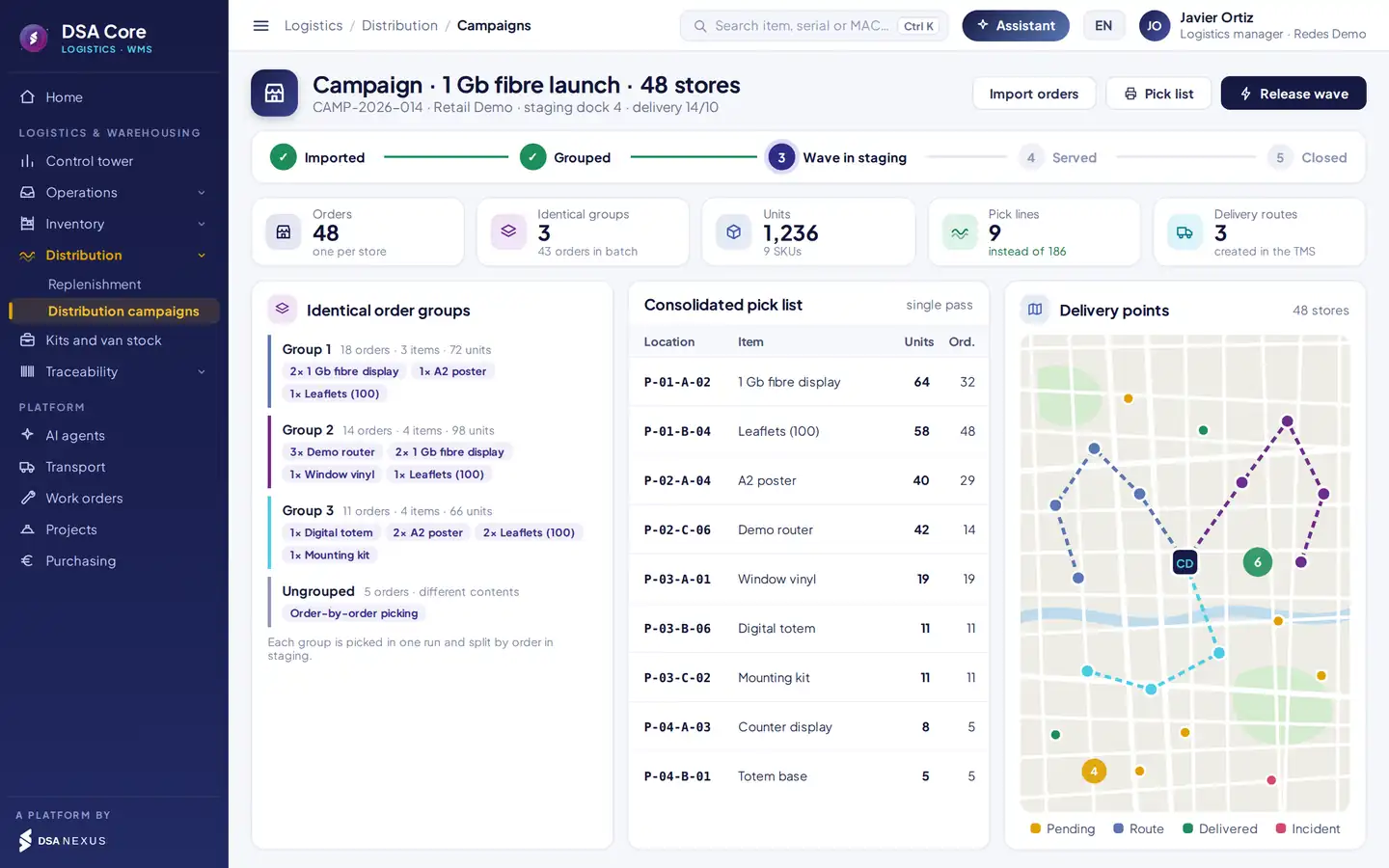
- 1Campaign status: imported, grouped, in staging, served and closed.
- 2Groups of identical orders picked in one run.
- 3Consolidated pick list: 9 lines instead of 186.
- 4Delivery points with their route and status on the map.
Kits and van stock
Every van carrying what it needs, without anyone asking.
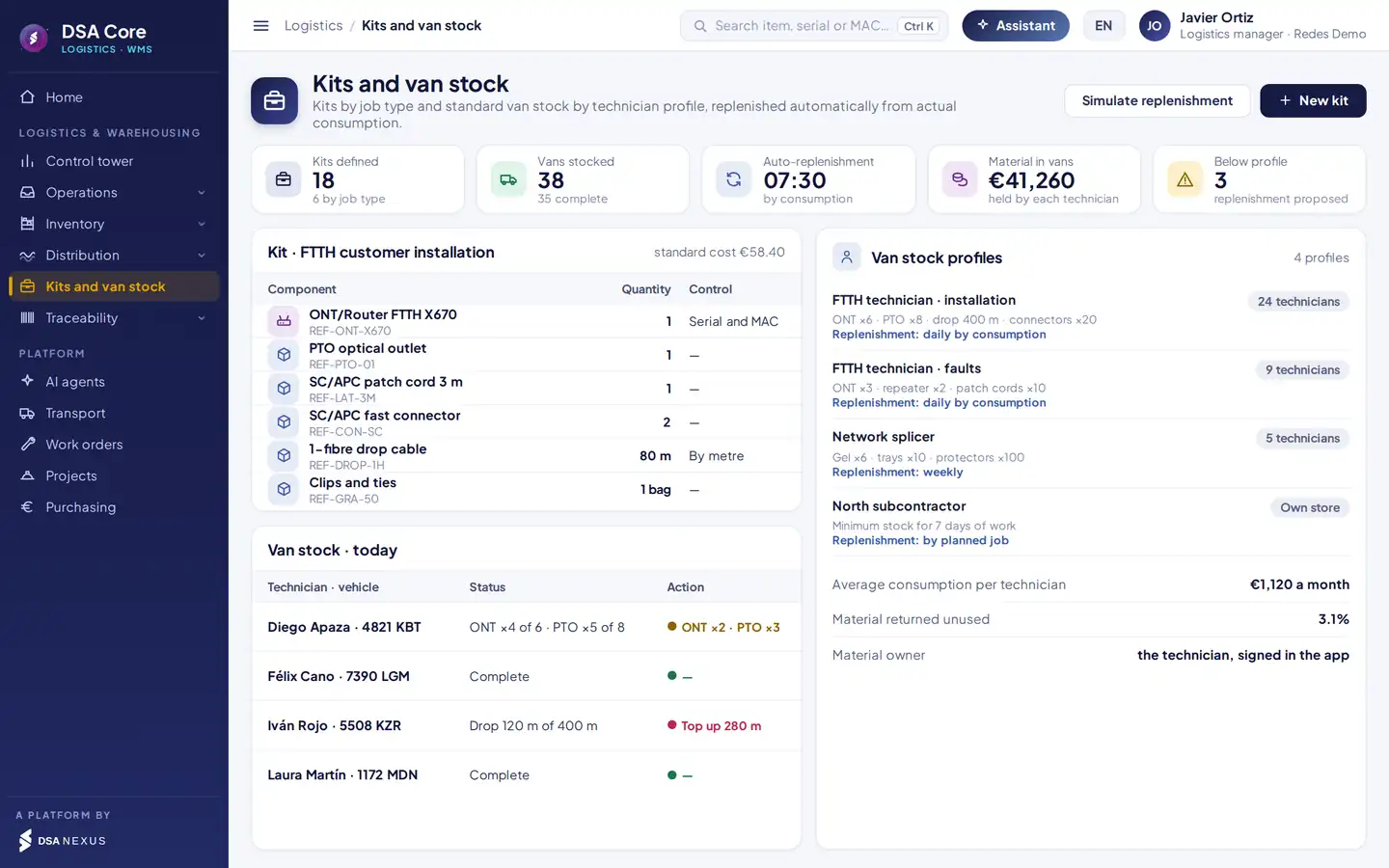
Kits by job type and stock profiles by technician and by subcontractor. Every morning the top-up for each van is prepared from what it used the day before.
Stock that tops itself up
What every van carries, in its technician’s charge.
- Kits by job type: customer installation, fault, splicing or maintenance, with their standard cost.
- Stock profile per technician and per subcontractor.
- Automatic daily top-up based on actual usage.
- Technicians sign for their stock in the app.
- Usage against kit: deviations by technician from the standard kit.
Serials, MACs and customer equipment
Every device located, from the box to the customer.
Routers, ONTs, set-top boxes and repeaters are tracked one by one by serial number and MAC: who has it, where it was installed, when it came back and in what condition.
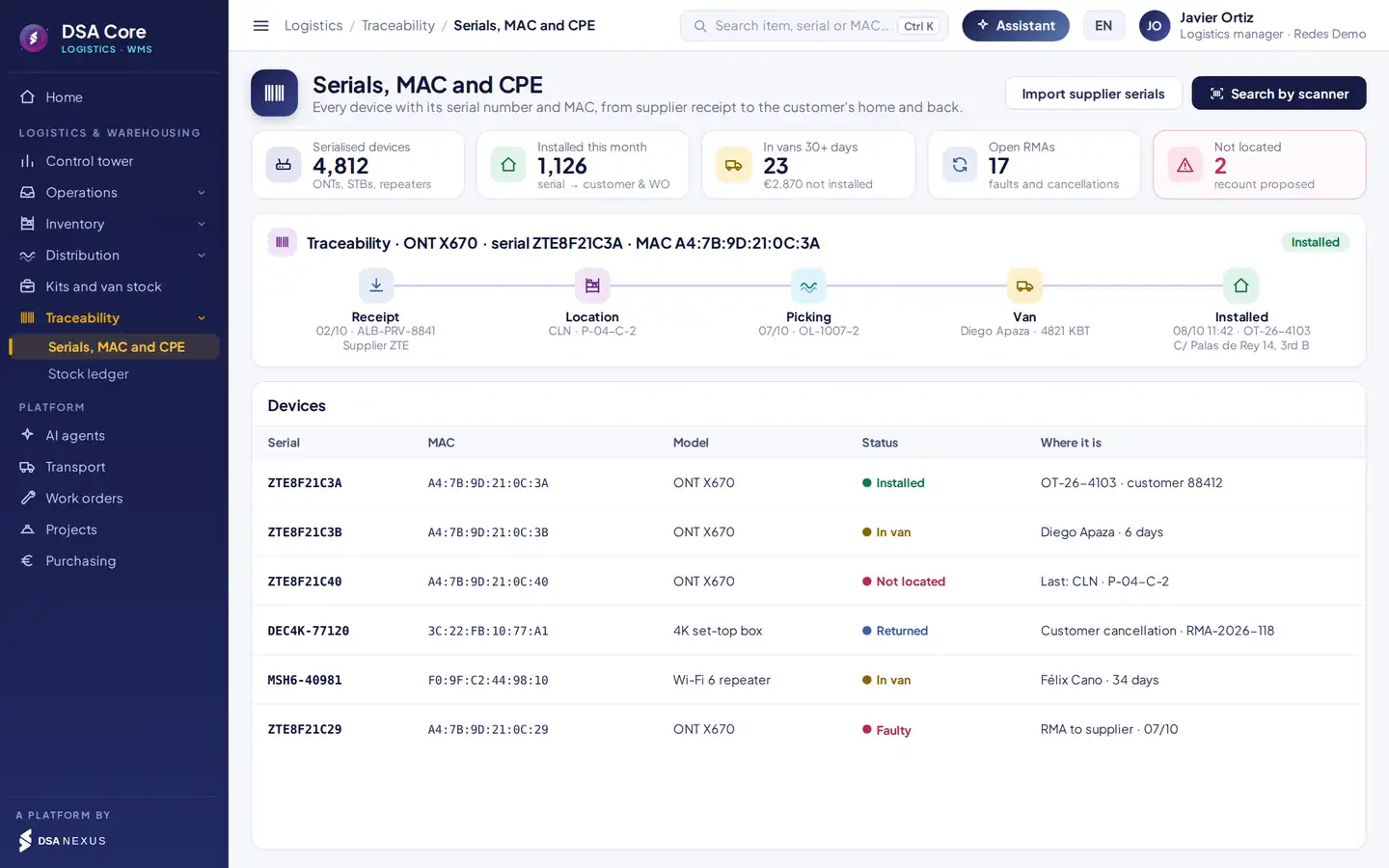
- 1Serials and MACs imported from the supplier’s file or read with a scanner.
- 2Traceability: receipt, location, picking, van and installation.
- 3Devices in a van for more than 30 days without installation, with their value.
- 4Status and location of every device, linked to customer and WO.
Every device is tied to the customer, the address and the work order where it was installed.
Customer cancellations, surplus and faulty units are sorted on return: back to stock, to inspection or to RMA.
Faulty devices with their return flow and credit note.
Devices that never come back. Automatic alert for devices that have been in a van for more than 30 days without installation, with their value, so you can request the return before they are lost.
Valuation and replenishment
The real cost of every issue and the purchase before you run out.
The weighted average cost is recalculated with every receipt and values every issue. Replenishment looks at usage and also at planned jobs and work orders.
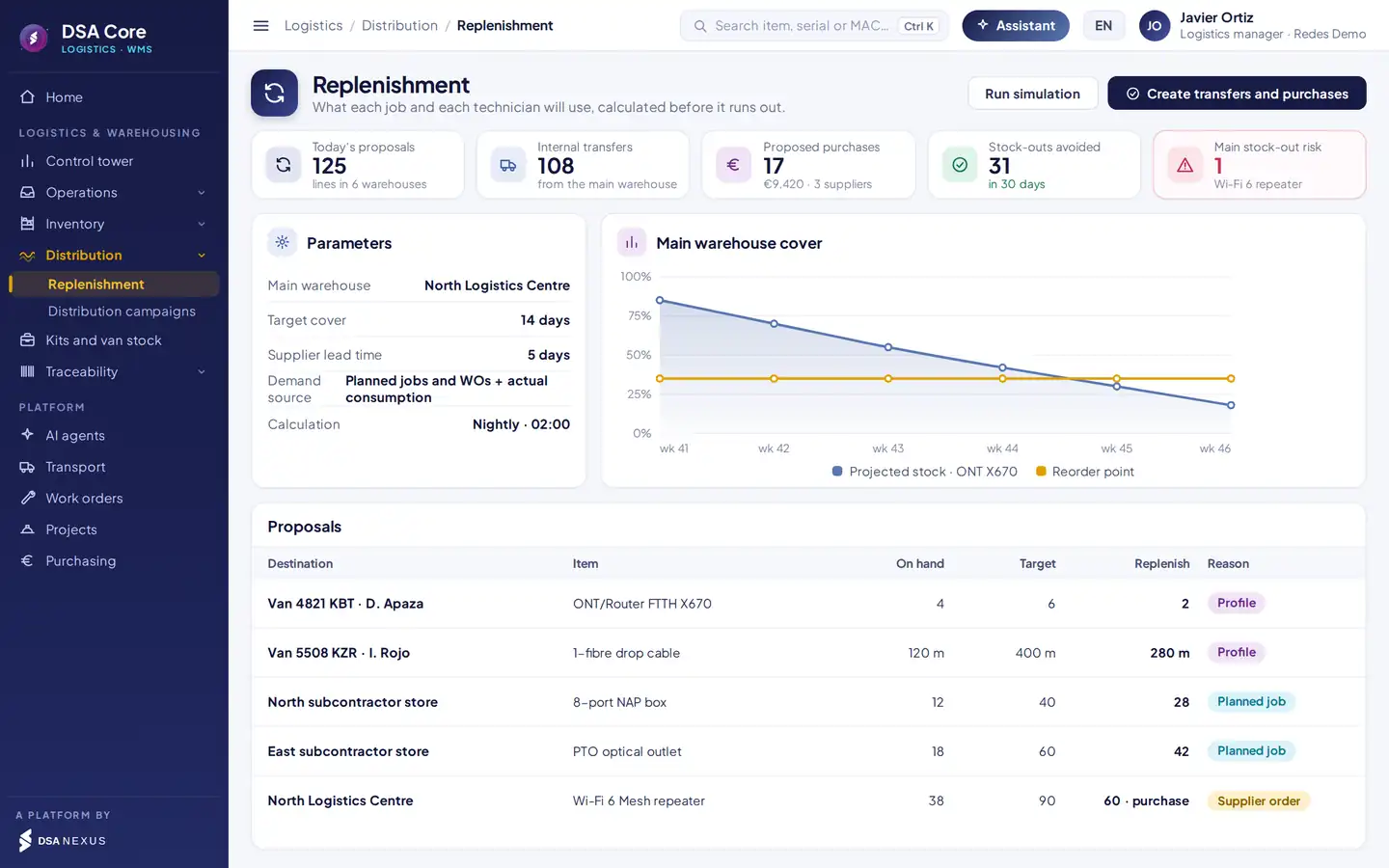
- 1Demand from planned jobs and WOs, plus actual usage.
- 2Projected coverage against the reorder point.
- 3Proposals by van, subcontractor and warehouse, with their reason.
- 4Internal transfers and purchases generated after your approval.
Recalculated with every receipt; values every issue to the job or WO.
Valuation at average cost against standard cost by item and warehouse, with the variance.
Usage, inventory and adjustments by account and cost centre, sent to your ERP.
Automation
Six agents working alongside the warehouse.
They monitor reservations, replenishment, inventory, expiry, serialised devices and purchasing. They work inside DSA Core, with each user’s permissions, and every proposal requires human approval.
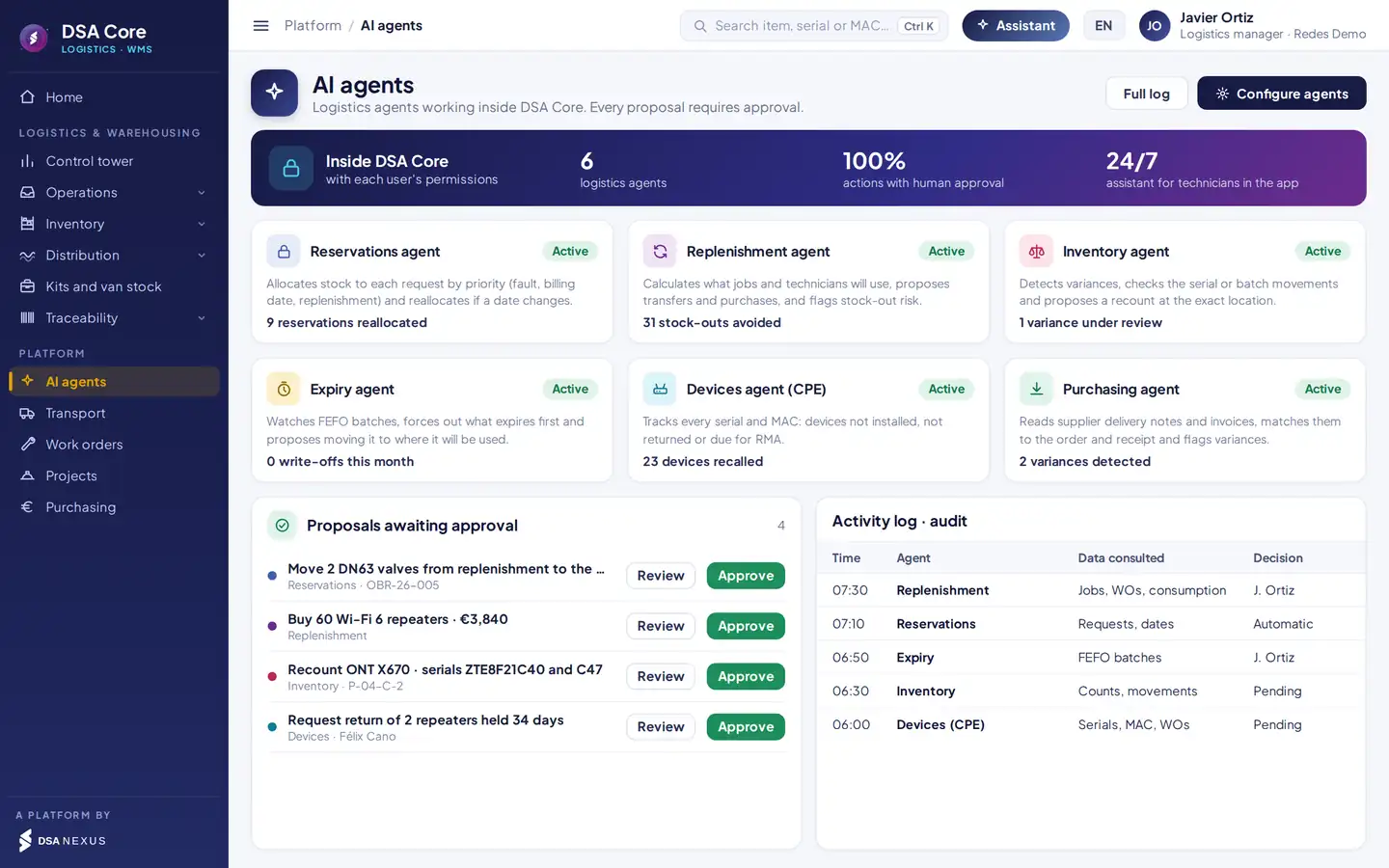
- 1Inside DSA Core, with each user’s permissions.
- 2What each agent does and what it has achieved.
- 3Pending proposals: review or approve.
- 4Activity log with the data consulted and who decided.
Available agents
Allocates stock to each request by priority and proposes reallocation if a date changes.
Calculates what jobs and technicians will use and proposes transfers and purchases before a stock-out.
Cross-checks movements, serials and work orders to explain every variance.
Monitors batches by FEFO and proposes moving what is about to expire to where it will be used.
Follows every serial and MAC: devices not installed, not returned or due for RMA.
Reads supplier delivery notes and invoices, matches them with the PO and the receipt and flags discrepancies.
Questions the assistant answers
- “Where is the ONT with this MAC?”
- “Do I have material for next week’s installations?”
- “Which technicians have had uninstalled devices for a month?”
- “Which batches expire before December?”
- “Why does bin P-04-C-2 not add up?”
AI governance
Stock, customer and cost data are processed within the DSA Core ecosystem, with logged access.
Each agent only accesses what is authorised; technicians see their van and their orders.
Agents propose; no purchase, reservation or adjustment is executed without approval.
Every query and proposal is logged; content is labelled under Art. 50 of the AI Act.
By sector
A version of the brochure for each sector.
The same WMS, explained with the warehouses, materials and use cases of your sector. Choose yours and we will email it to you.
Distribution, industry and trade: all your warehouses, including those outside the main one.
Request this sector’s brochureStock kept separate per customer, services measured from every movement and invoiced at their rate.
Request this sector’s brochureCritical spares at every mine site, serialised rotables and PPE per worker, before the unit stops.
Request this sector’s brochureMaterial by heat and certificate traced to the weld, and wind and solar O&M spares with serial and RMA.
Request this sector’s brochureConsumables across hundreds of sites, usage per contract against budget, and signed-for uniforms and PPE.
Request this sector’s brochureLifts, HVAC and fire protection: the part in the van before the job, with its warranty.
Request this sector’s brochureEvery restaurant stocked before the rush: suggested orders, cold chain and FEFO.
Request this sector’s brochureIn-store campaigns in kits by store type, with installation confirmed by photo.
Request this sector’s brochureEvery unit by serial, with availability, check-out and check-in checklists and damage charged.
Request this sector’s brochureImplants and surgical sets on consignment, traced by batch and serial to the surgery.
Request this sector’s brochureInputs by farm and block, packing to the export programme and every pallet traced.
Request this sector’s brochureAll 16 pages of the module, using telecoms, energy and installation as examples.
Request the full brochureBeyond a conventional WMS
What sets the DSA Core WMS apart.
A warehouse system stores the stock. DSA Core also follows the material to the job where it is used, detects what does not add up and proposes what to do.
Movements, serials and work orders cross-checked to explain every difference.
Class A items close to the exit; free bins where stock is not moving.
Lines sequenced by route and waves shared between pickers.
What each technician uses against the standard kit for the job.
Matched with the PO on receipt, with batches and serials preloaded.
The supplier announces the shipment with serials and batches, so receiving arrives prepared.
Consignment stock controlled and settled with its usage.
Who moved, adjusted or approved every item, batch or serial.
Why a standalone WMS cannot do this. All of this uses data DSA Core already holds: jobs, work orders, technicians and their vans, transport, purchasing and finance. Without them, the warehouse only sees receipts and issues.
Integration with DSA Core 360
The warehouse connected to the rest of your operation.
The WMS shares data with the other modules, so material and its cost reach every job automatically.
Budgeted material, reservations and actual usage.
Kit for every job and usage with serial and MAC.
Shipments and campaigns with signed delivery.
POs, delivery notes and replenishment proposals.
Inventory, usage and adjustments by cost centre.
Vans as mobile warehouses with their technician.
Owner of every stock and stock profiles.
Order material, confirm deliveries and return.
REST API connection, without replacing it.
Android PDAs and label printers.
See also Transport TMS, Work orders, Construction projects and Assets & Fleet.
Comparison
Versus the usual approach.
ERP, spreadsheets and messagesDSA Core Logistics & Warehousing
Stock in vansUnknownMobile warehouse per technician, with an owner
RequestsPhone calls and WhatsAppApp with job reservation and approval
PickingPaper listWaves with PDA and scanner validation
Shipping to many destinationsOrder by orderCampaigns with consolidated picking
Batches and expiryNo controlFEFO with expired stock blocked
Serialised devicesSpreadsheetSerial and MAC from receipt to customer
InventoryAnnual stocktake with the warehouse closedBlind cycle count with the cause of each variance
Charging usageManual or non-existentAutomatic to the job or WO
ReplenishmentWhen it has already run outForecast from jobs and usage
Artificial intelligenceNot availableSix agents with human approval
Packages
Three ways to get it.
Warehouses, locations, batches, FIFO and FEFO, requests, stock ledger and average cost.
All of the above plus approval centre, PDA picking, campaigns, kits and van stock, serials and MACs, cycle counting, replenishment and rule-based agents.
The complete packageWith jobs, work orders, transport and finance on the same platform.
SectorsTelecomsEnergy and utilitiesInstallation and maintenanceDistribution and retailLogistics providersMining
ScopeEspañol · English · PortuguêsMulti-currencyMulti-company and multi-country
Frequently asked questions
What people usually ask us before the demo.
Do I have to replace my ERP?
No. DSA Core connects to your ERP and sends it inventory, usage and adjustments by account and cost centre. Purchase orders and delivery notes can come from it.
Can I manage vans as warehouses?
Yes. Every van is a mobile warehouse in its technician’s charge, with a stock profile, a daily top-up based on usage, a signed count and usage charged to the work order.
How are devices with serial numbers and MACs tracked?
Serials and MACs are imported from the supplier’s file or scanned on receipt. From there each device is followed to the customer and the work order where it was installed, and to its return or RMA if it comes back.
Do I have to close the warehouse to count inventory?
No. Cycle counts are done by zone while the warehouse keeps working. The count is blind, every variance comes with its likely cause and every adjustment leaves its entry in the stock ledger.
What devices do I need?
Android PDAs with a scanner for the warehouse and the technician’s phone for their van and usage. Location, package and item labels are printed with barcode or QR.
Does it work if my company is not in telecoms?
Yes. The full brochure uses telecoms as its example, and there are versions for 3PL, mining, oil & gas and energy, facility services, technical maintenance, restaurant groups, trade marketing, equipment rental, medical supplies and agri-export.
How is the opening stock loaded?
Roll-out is in phases: we start with one warehouse and a group of technicians, load the stock, locations and serials, and then extend to the rest without stopping operations.
Do the rule-based agents act on their own?
No. The agents propose and no purchase, reservation or adjustment is executed without human approval. Each agent only accesses information the user is authorised to see, and every query and proposal is logged.
30-minute demo
We will show you in 30 minutes, with a case like yours.
- Demo with sample warehouses, vans and devices
- Pilot with one warehouse and a group of technicians
- Written proposal tailored to your operation
- Roll-out in phases, with stock and serials loaded
DSA Core connects to your ERP; it does not replace it.

The first meeting is with David Soler, founder.WhatsApp +34 615 160 114 · hola@dsanexus.com