The wrong technician, without the skill or the parts, goes to the job.
Repeat visitsDSA Core · Work Orders
Every work order, done right first time.
Control tower, automatic assignment by skill and capacity, a technician app with an AI assistant, clients kept informed by link, subcontractors, materials and the billable production of every order. All on one platform.
- Autoassignment by skill, capacity, SLA and stock
- Offlinethe technician app keeps working and syncs when signal returns
- 1 linkthe client tracks the visit with nothing to install
Operational context
Why a work order costs more than it should.
Technical service companies do not lose money by doing the work badly. They lose it in planning, repeat visits, unrecorded work and the time technicians spend looking for information.
Nobody sees which order will breach until it already has.
PenaltiesDemand peaks covered with last-minute overtime.
Labour costPhotos without location, missing signatures and data typed twice.
Unbilled workCalls asking when the technician will arrive, and visits with nobody home.
Failed visitsOrders sent by email and quality known only when the client complains.
ComplaintsThe technician arrives without the part or uses stock without recording it.
Invisible stockYou know how many orders close, not what each technician produces or costs.
Margin leakageAn ERP knows who gets invoiced. A spreadsheet knows what was planned. Neither knows what is happening on the street right now.
Work order lifecycle
From your client’s system to certification.
Each step starts from the previous one. The order is born in your client’s system and ends certified, with its evidence, materials and cost.
- 1ReceiveAPI, SFTP, client portal or AI-read email
- 2Plan and assignBacklog, capacity, skill, SLA and routes
- 3NotifyClient link with the confirmed slot
- 4ExecuteOffline app and AI assistant
- 5CloseTests, photos, materials, code and signature
- 6CertifyProduction, quality and invoicing
Reference record
The work order.
Order type, client and address, slot and SLA, technician or subcontractor, checklist and tests, geotagged photos, materials, closure code, signature and rate card points. From that record come:
- An informed client and their signed acceptance.
- Warehouse usage and van top-up.
- Each technician’s hours and output.
- SLA met and repeat visits, by contract and zone.
- Billable production as soon as the order closes.
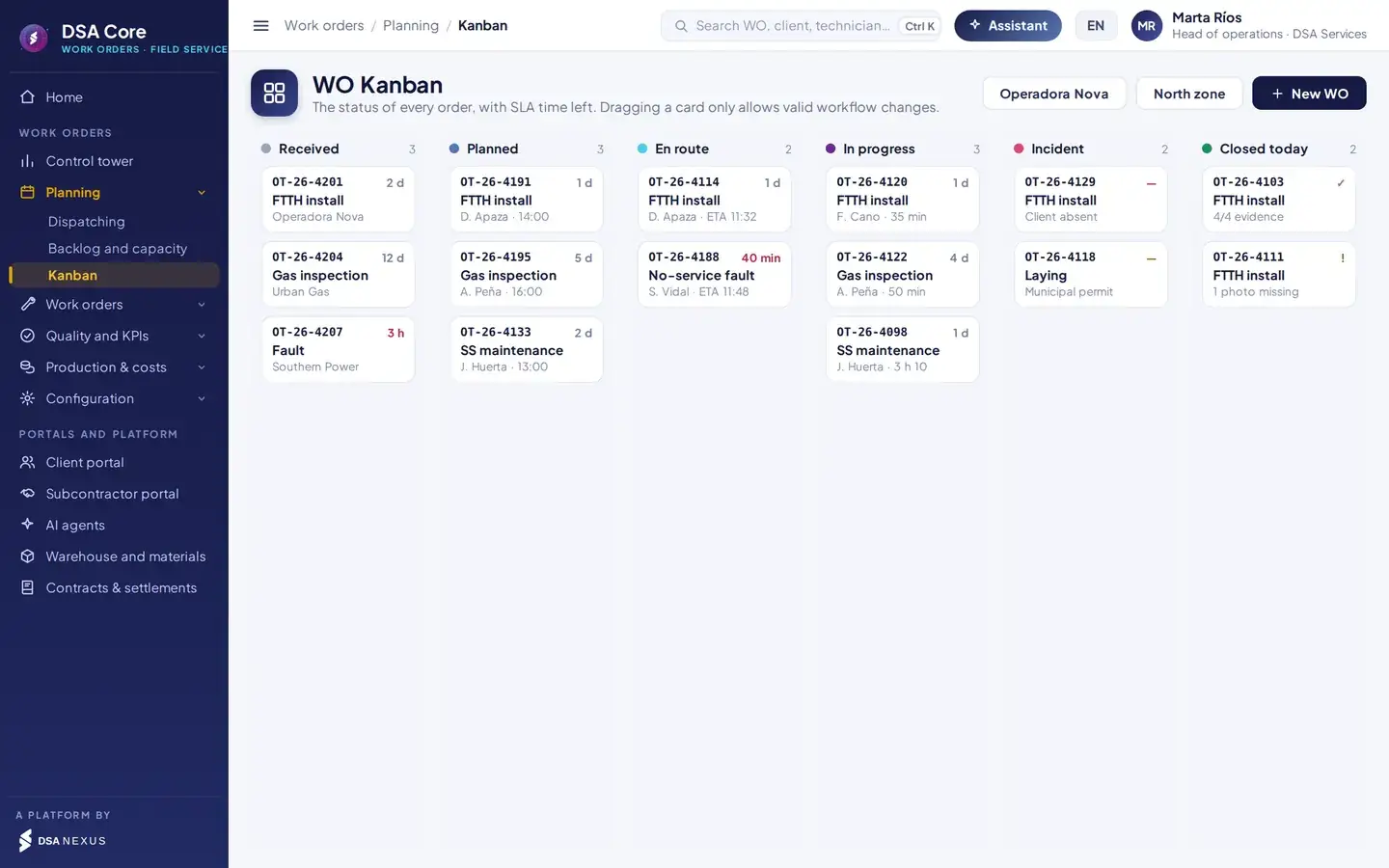
Valid transitions only. The Kanban does not let anyone skip a status: received, planned, assigned, en route, in progress, closed, validated and certified, with incident, cancelled or reopened as side statuses.
Control tower
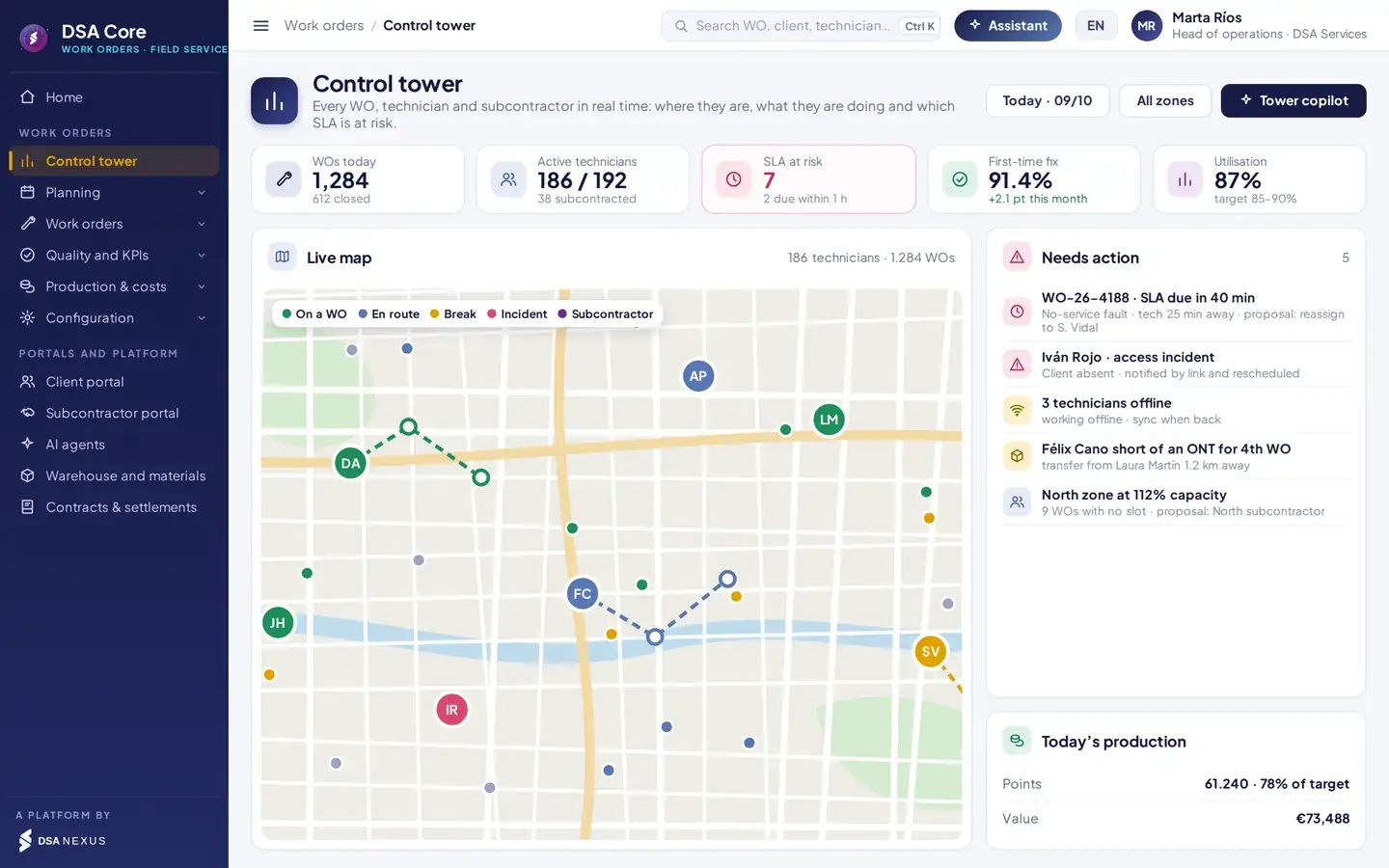
The whole operation, live and on one map.
The command centre sees what is happening on the street on one screen: where each technician is, what they are doing, which order is at risk and what to do about it.
- 1SLA clock: orders about to breach rise to the action list on their own.
- 2Position, status and route of every technician, including those working offline.
- 3Incidents, missing parts and overloaded zones, each with a proposed fix.
- 4Today’s production in points and euros against target.
Tower copilot. Ask which orders will breach today or why first-time fix is falling in a zone. It answers with data from your orders, close-outs and tests, and proposes actions you approve with one click.
Dispatching
The right technician, at the right time.
Queue to assign, day plan per technician with AI proposals, proposed route and the reasoning behind each assignment. The planner reviews and approves.
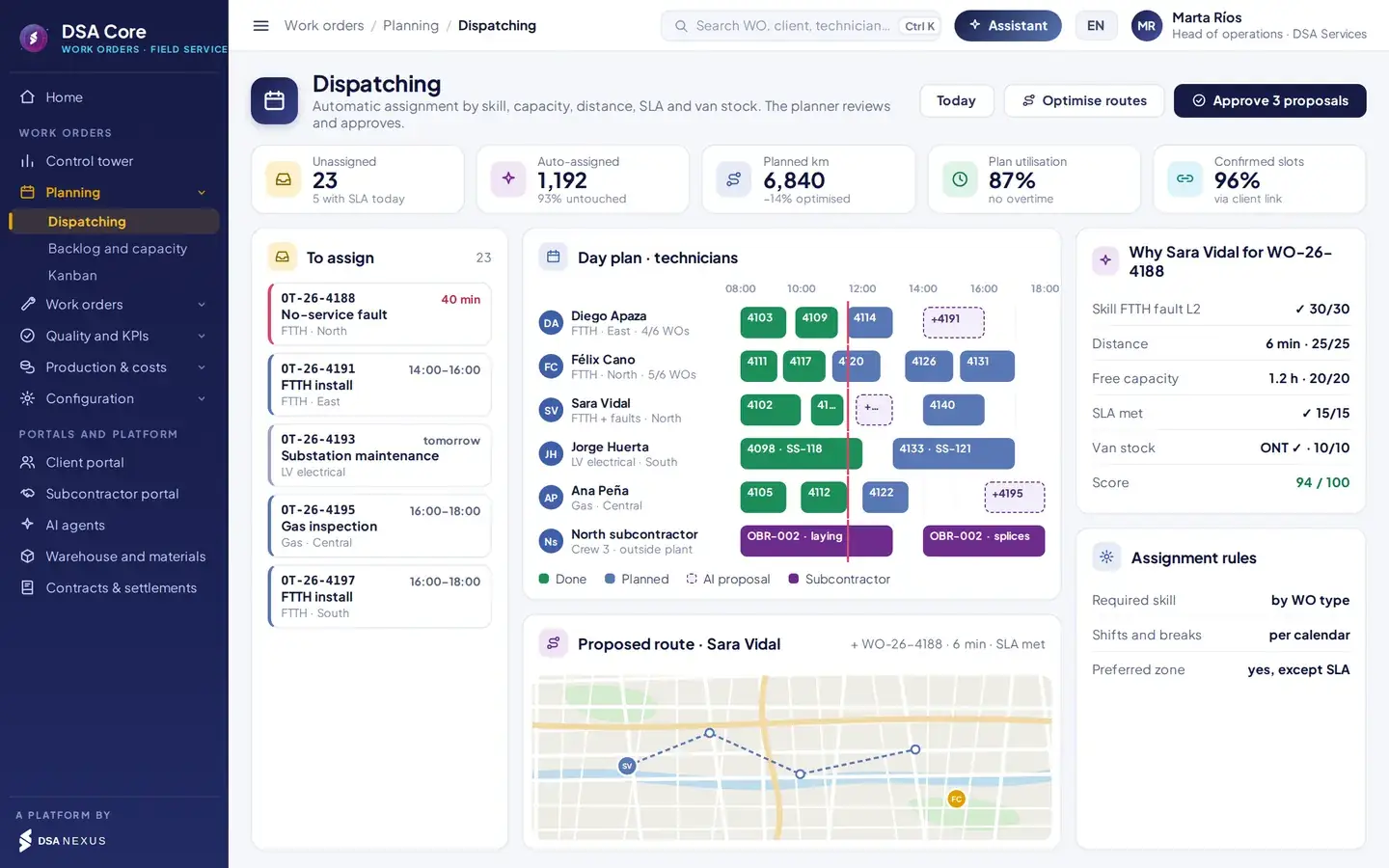
- 1Unassigned orders, sorted by SLA due time.
- 2Plan per technician; AI proposals show dashed until approved.
- 3Why this technician: score broken down by criterion.
- 4Proposed route ordered by slot and traffic.
How each candidate is scored.
Default weights, configurable per contract.
Skill and certification required by the order type.
Travel time to the address.
Free hours in the shift.
Arrives within the committed time.
The order’s kit is in the van.
Required skills, preferred zones, shifts, breaks and the weight of each criterion.
Orders visits by slot window and traffic and cuts kilometres across the fleet.
An urgent fault, a delay or an absence reshuffles the plan with the fewest changes. The planner approves it.
Hard filters. An order is never assigned to a technician without a valid skill, outside their shift, with expired documents or from a company not approved for that contract.
Capacity planning
Workload versus available capacity.
Compares pending and forecast workload with the net capacity of own technicians and subcontractors, by zone, skill and technician, over a 1 to 12-week horizon. An AI agent proposes how to cover each shortfall and the planner approves it.
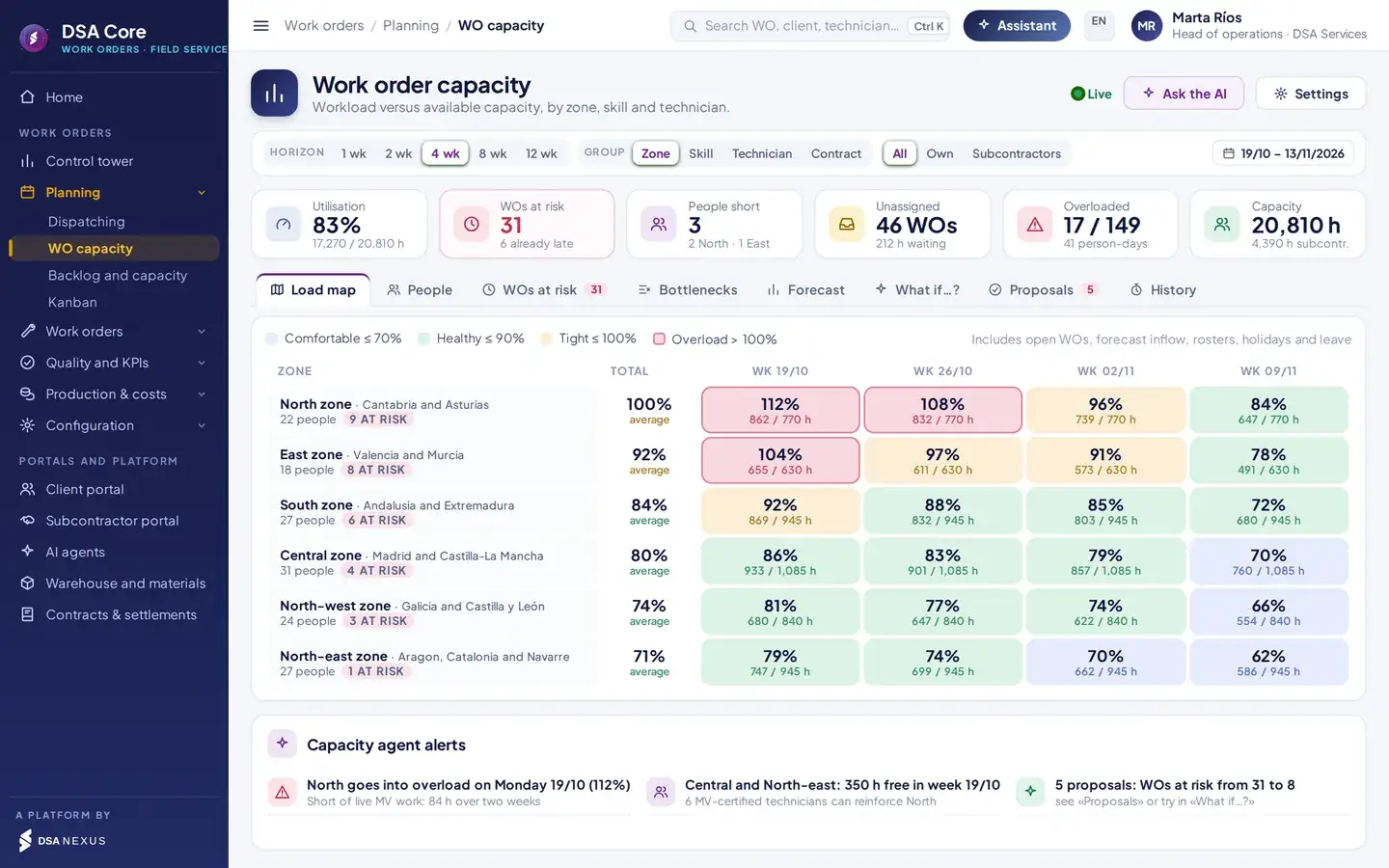
- 1Horizon indicators: utilisation, work orders at risk, people short, unassigned, overloaded and capacity.
- 2Views: load map, people, work orders at risk, bottlenecks, forecast, scenarios, proposals and history.
- 3Utilisation by zone and week with configurable thresholds: comfortable, healthy, tight and overload.
- 4Capacity agent alerts with zones in overload and the free capacity available.
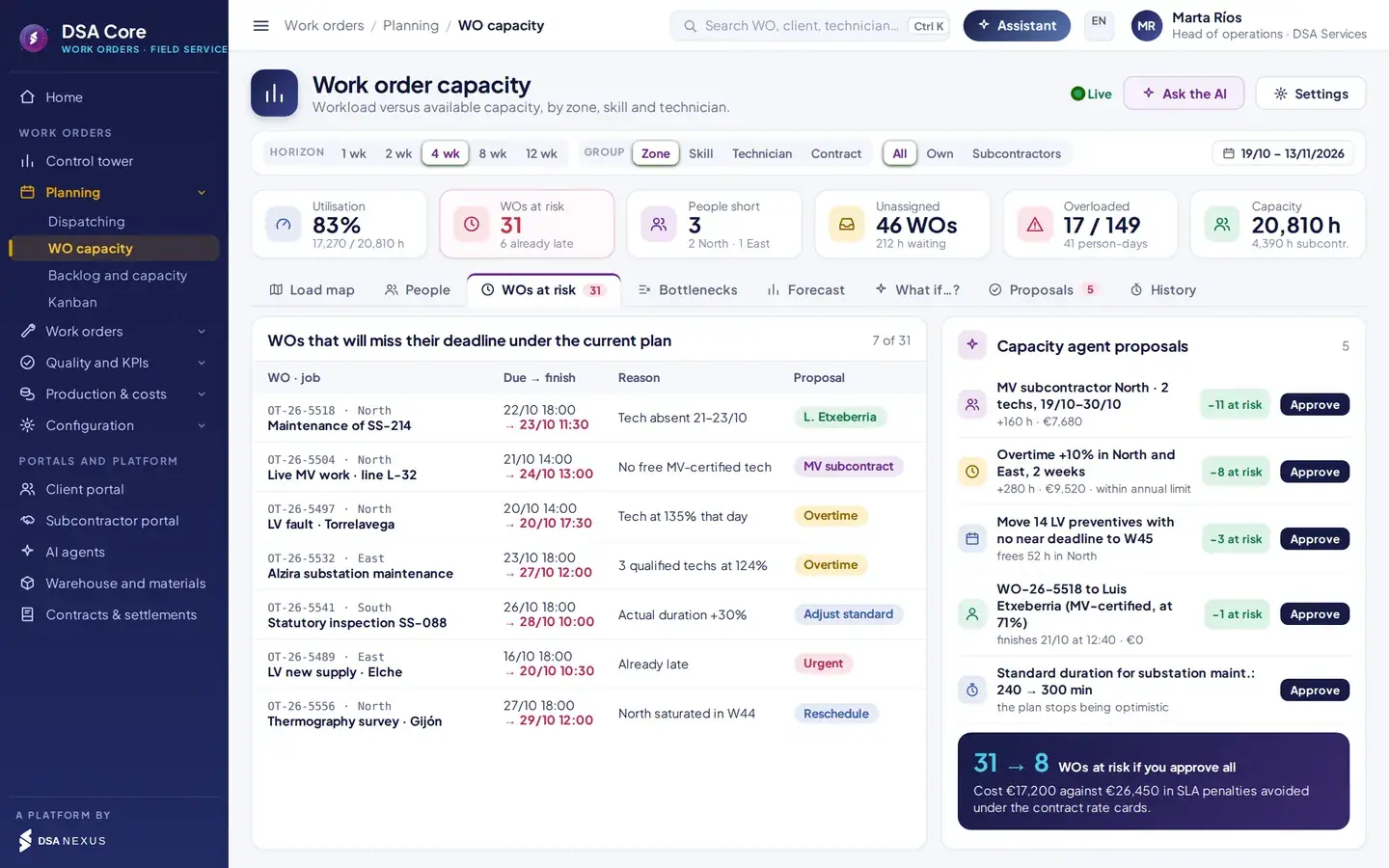
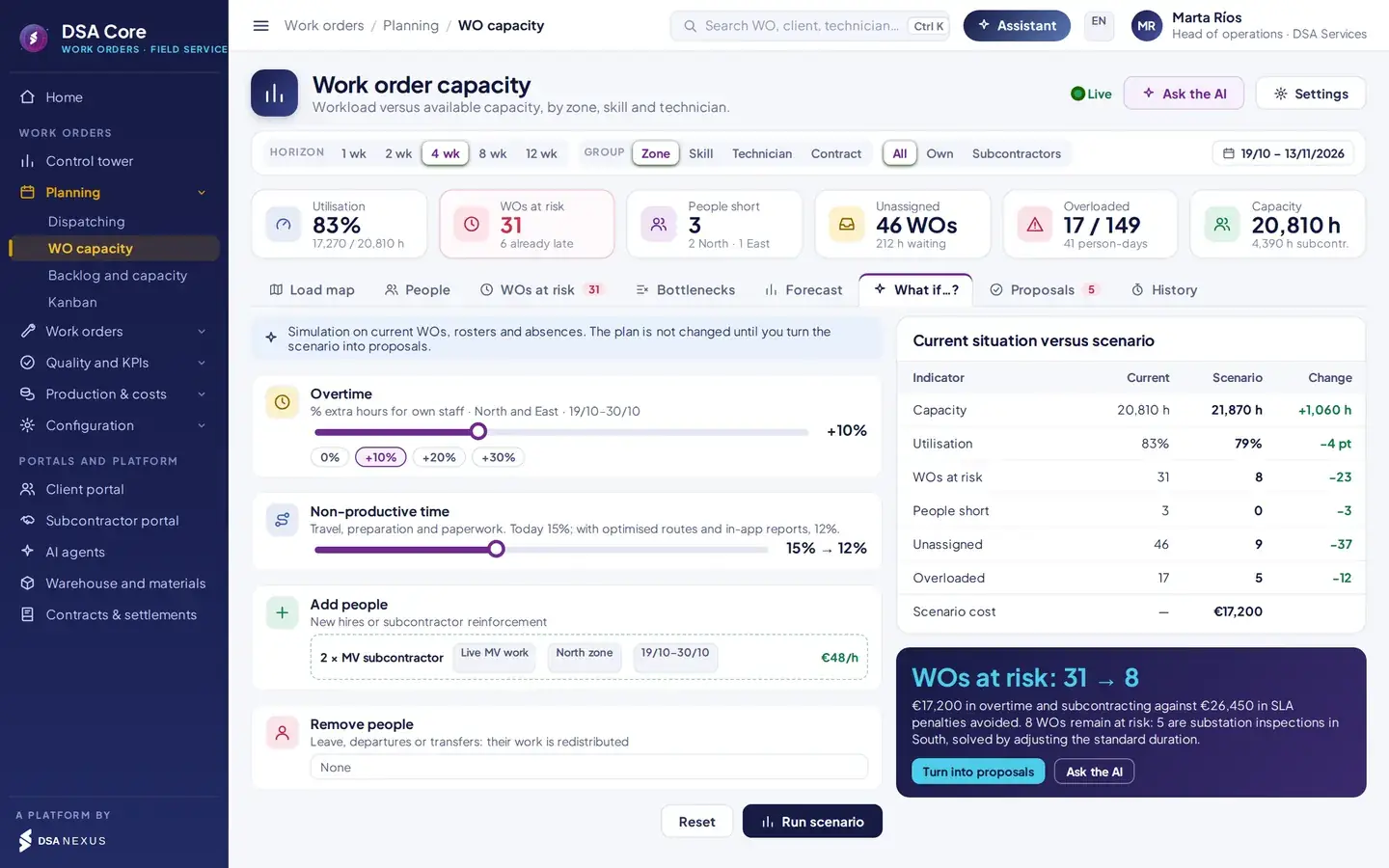
Shortfall by skill and zone: demand against certified staff, sorted by hours missing.
Pending work orders plus forecast inflow based on recent weeks, and standard durations that are not met.
Proposes reassignments, overtime or subcontractors and justifies them with certifications, load, distance, SLA and parts.
Target utilisation, not maximum. Planning at 100 % leaves no margin for urgent corrective work. The traffic light shows which zones keep reserve capacity and which go into overload in the coming weeks.
Order record and order types
Every order, with everything that proves the work.
Status, checklist and technical tests, geotagged photos, kit materials, closure code, signature and timeline in one record.
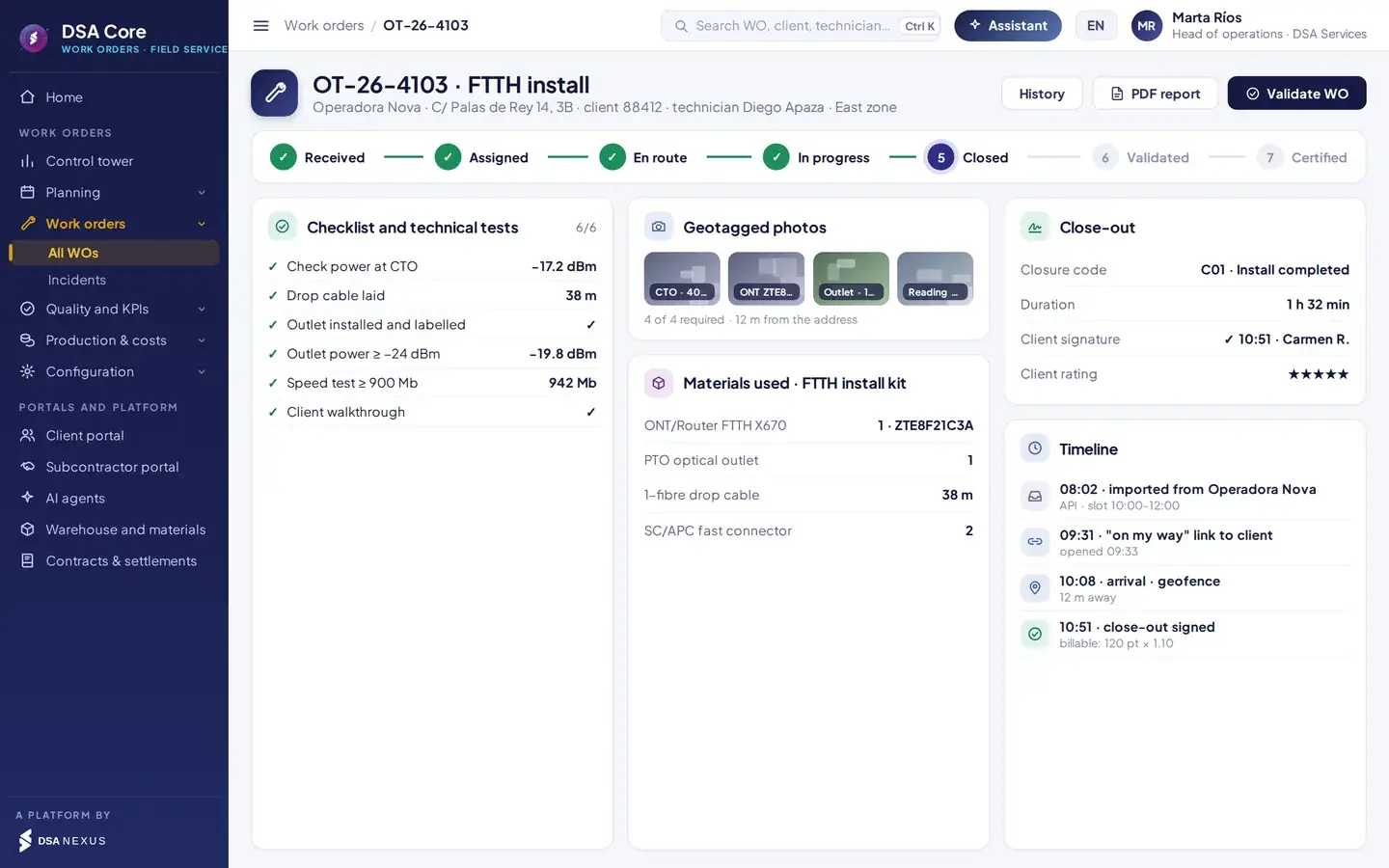
- 1The order’s status in its workflow, from received to certified.
- 2Checklist and technical tests with the actual reading against its threshold.
- 3Required photos with time, coordinates and distance to the address.
- 4Closure code, client signature and rating, with the timeline below.
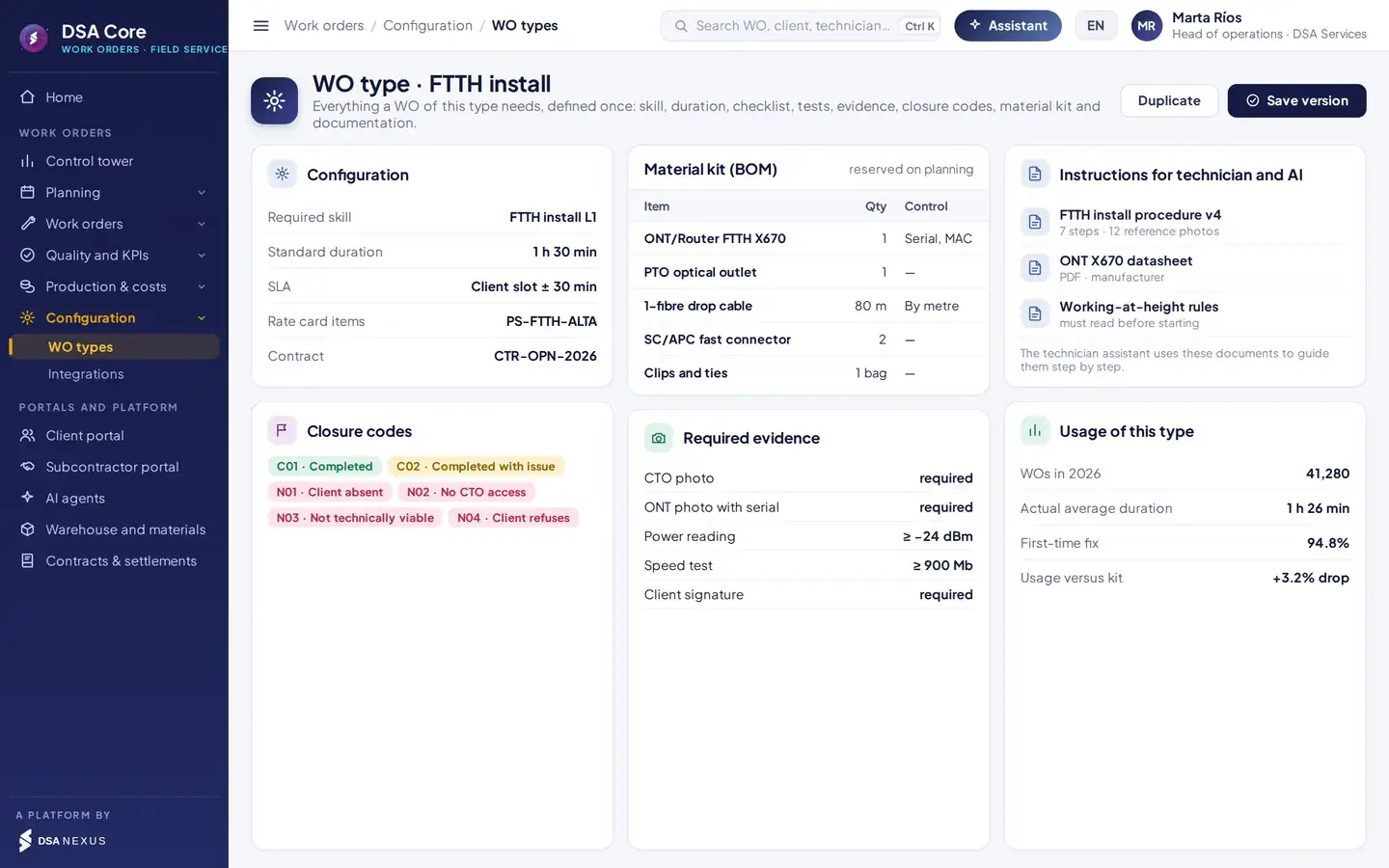
Order types
Define it once. It is applied to every order.
- Checklist and tests. Mandatory steps and readings with thresholds that block close-out if not met.
- Material kit (BOM). Reserved on planning, checked against the van and deducted on close-out.
- Closure codes. Each code decides whether the order is certified, rescheduled or opens an incident.
- Instructions and documents. Procedures, datasheets and safety rules the assistant uses to guide the technician.
- Versioned. Each order keeps the version of the order type it was carried out with.
Technician app
Everything they need, even without signal.
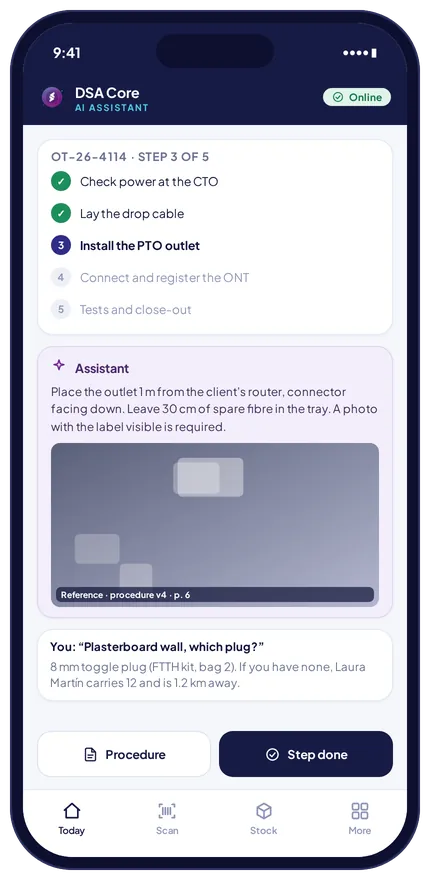
One app for own and subcontractor technicians, on Android and iOS, that guides the order from start to finish and records all the evidence.
- Stamped evidence. Every photo carries time, coordinates, order number and a digital fingerprint. If the order type requires it, gallery photos are not accepted.
- Offline mode. Basements, rural areas, tunnels: the app stores the order, photos and signature and sends them when signal returns, with no duplicates.
- Materials and transfers. The technician uses stock from the van by scanning serial or MAC, and if a part is missing, sees who has it nearby and receives it with a scan.
- Typed incidents. Client absent, no access or not technically viable: pick the code, take the photo and the order reschedules itself.
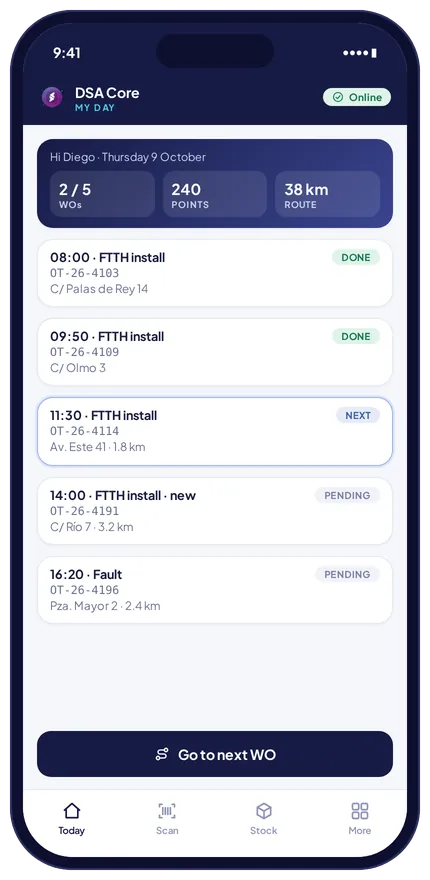
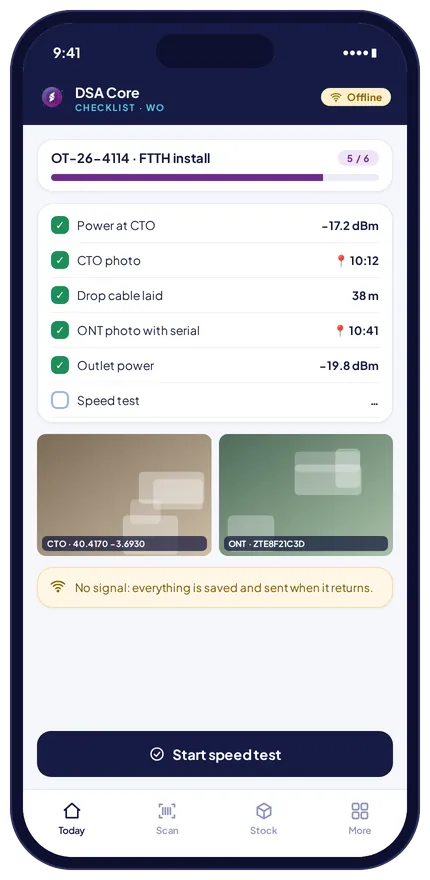
Automatic checks.
Some block close-out; others alert the tower without stopping the technician.
Close-out is blocked.
The order cannot close without it.
Requires a closure code with an incident.
Beyond the set distance, a reason is required.
Not accepted if the order type requires it.
Materials above or below what was planned.
The order rises to the action list.
Triggers replanning of the day.
The technician does not receive that order type.
Subcontractor or technician blocked for assignment.
Or a duplicate receipt: held for review.
With the fewest changes when an urgent job, a delay, an incident or an absence comes in.
Client and portal
The client knows when you arrive and sees what you did.
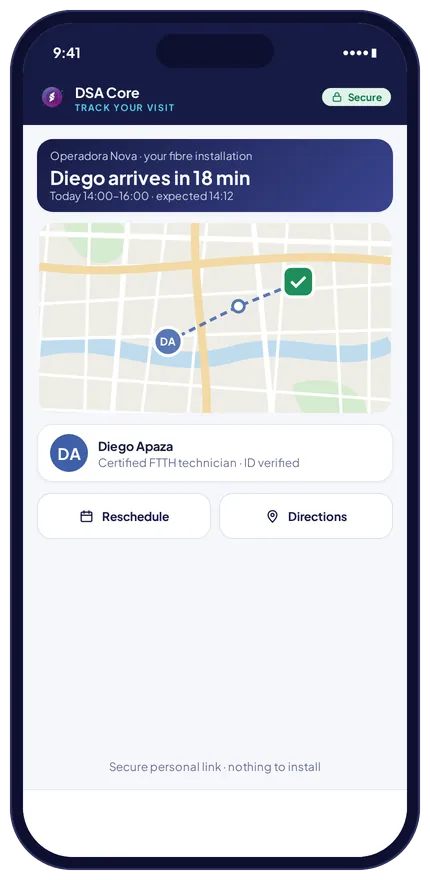
The end customer receives a secure link, with nothing to install. The operator, utility or client company has its own portal.
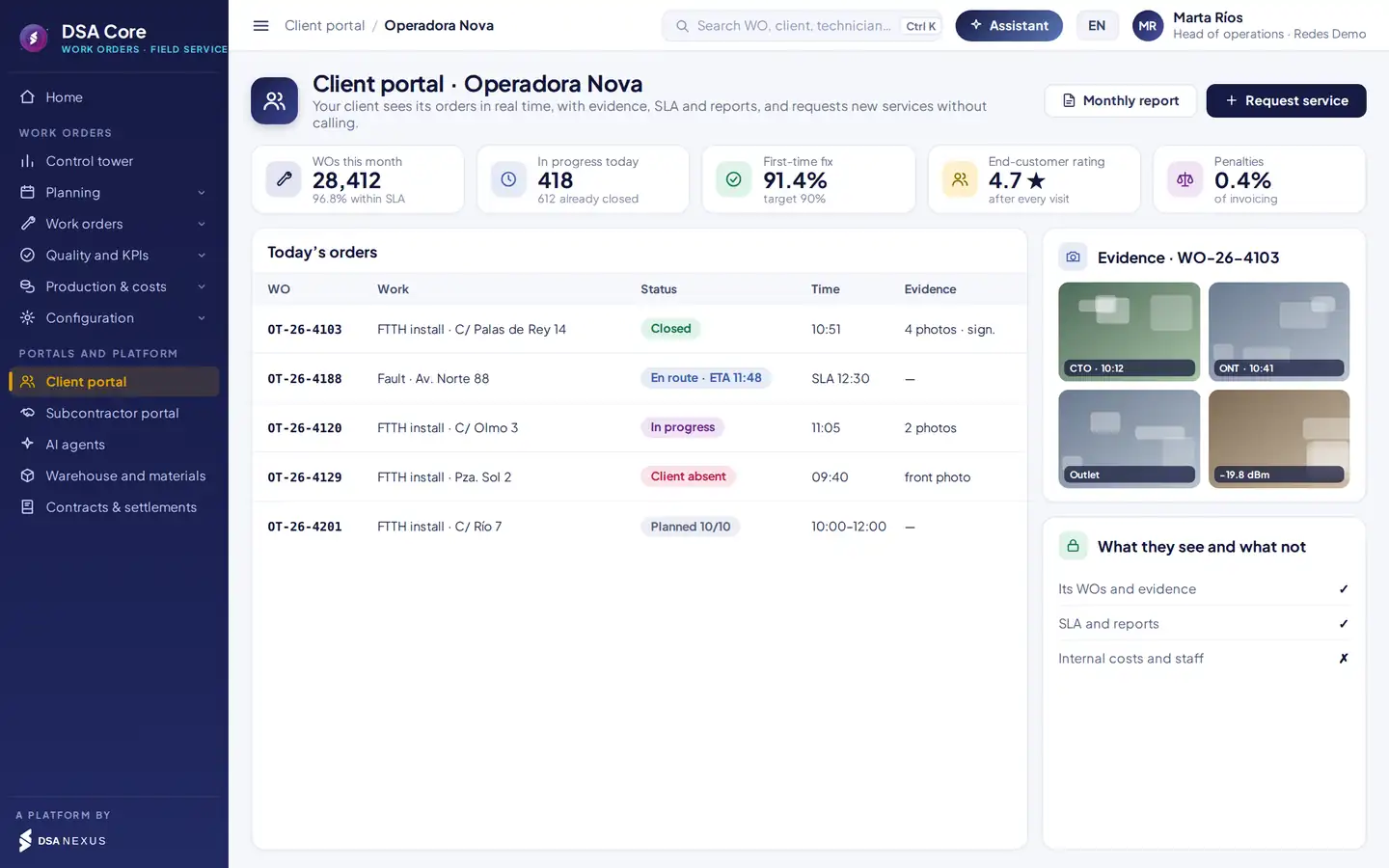
- 1Volume, SLA, first-time fix and subscriber rating.
- 2Status of each order in real time, with the estimated arrival time.
- 3Evidence for each close-out: photos, readings and signature.
- 4It sees its orders, SLA and reports; never internal costs or technician data.
By SMS, WhatsApp or email, with the option to change it before the technician sets off.
Estimated arrival time, map and the technician’s ID photo.
Visit report with photos, tests and signature, and a service rating.
Single-use link. It expires, shows no data from other orders and logs every access. If the client will be out, they reschedule before the technician leaves.
Subcontractor portal
Your subcontractors, held to the same standards as your team.
To your client there are no own or subcontracted technicians. There is one service, with the same app, the same checklist and the same quality.
The subcontractor accepts orders on time and assigns them to its technicians, who use your app and checklists.
SLA, repeats and audits per subcontractor, comparable with your own technicians.
Insurance, training and fitness, with assignment blocked if anything expires.
What it closes and the client approves goes into its settlement, at its contract price.
More detail in the DSA Core subcontractor portal.
Quality and production
What gets measured can be improved.
SLA, first-time fix, repeats, photo audits and client rating, by contract, zone, subcontractor and technician.
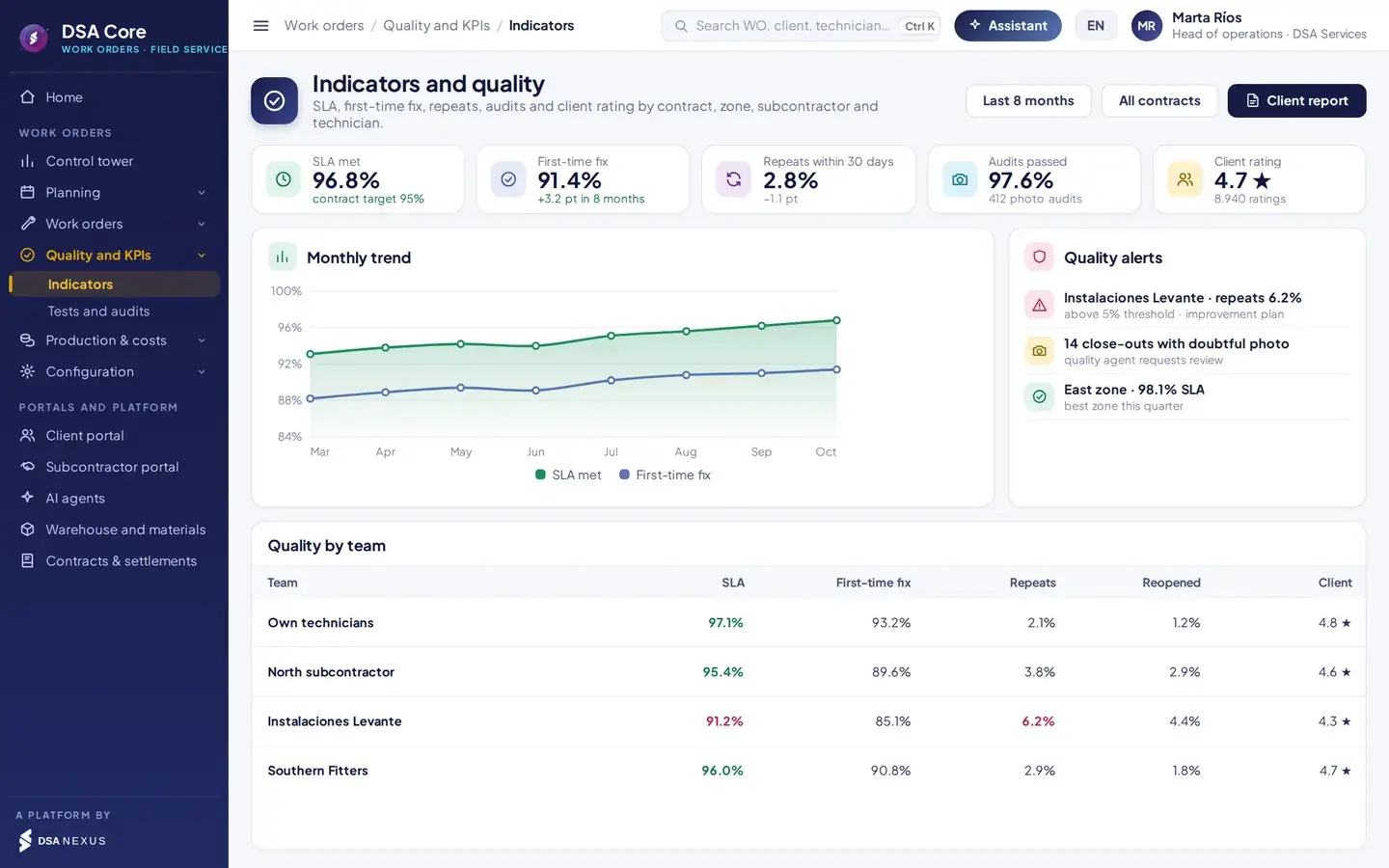
- 1SLA met against the contract target.
- 2Monthly trend of SLA and first-time fix.
- 3Quality alerts: repeats above threshold and close-outs with doubtful photos.
- 4Own technicians and each subcontractor, compared on the same metrics.
Audits on real photos and readings, not random samples.
Tells apart technician, material or network faults, with a monthly SLA and quality report generated for each contract.
Points and euros produced today per technician and team against target, hour by hour.
Expenses and integrations
No retyping, inside or outside.
Technicians’ receipts are read by AI and charged automatically. Orders come in from your clients’ systems and the close-out goes back in their format.
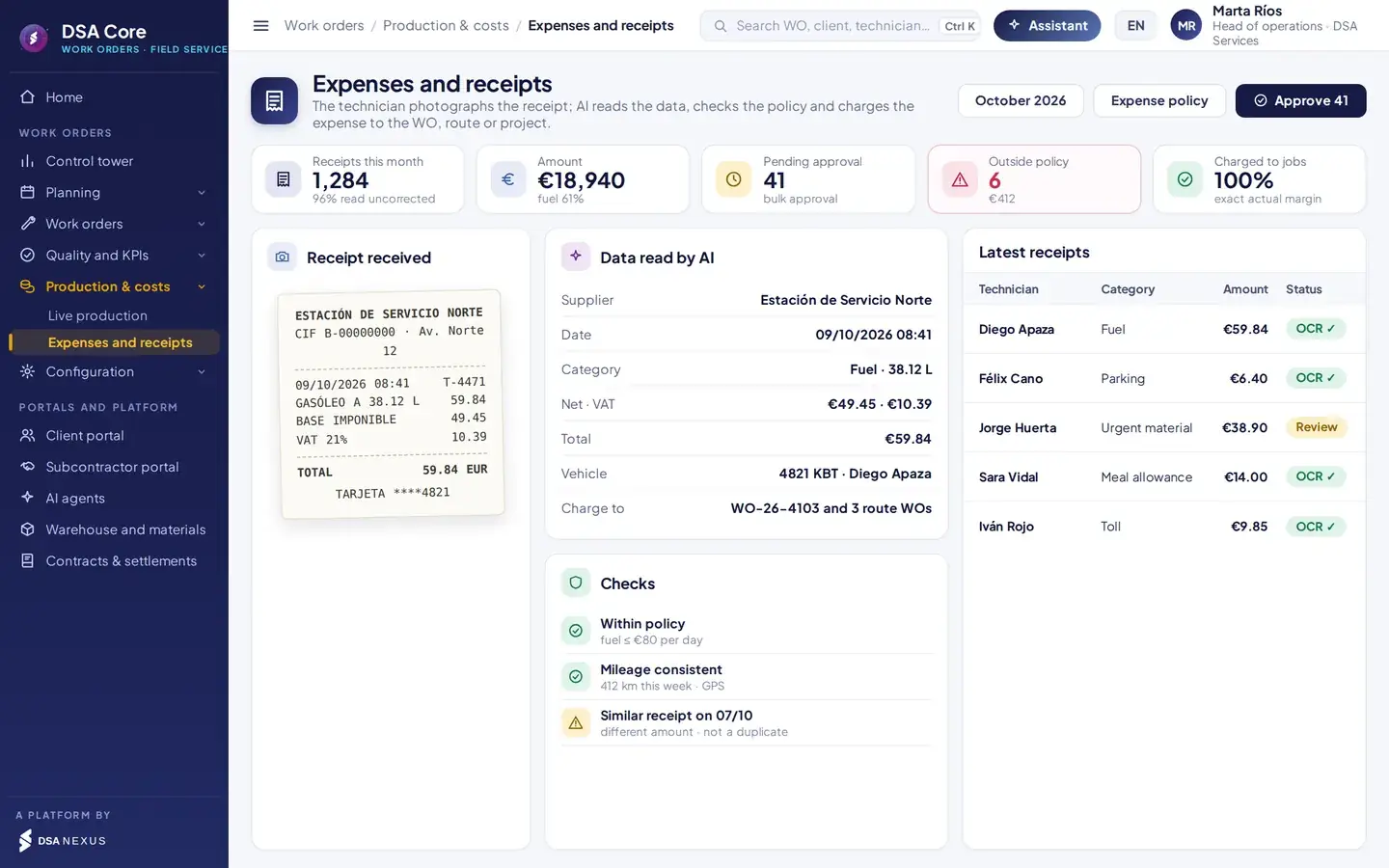
OCR expenses and receipts
The technician takes the photo. The rest is automatic.
- AI reads supplier, tax ID, date, net amount, tax and total.
- Expense policy check by category and day.
- Detection of duplicate receipts and inconsistent mileage.
- Charging to the order, the route or the project.
- Bulk approval of everything within policy.
Integrations
Order intake by API, SFTP, a robot on their portal or AI-read email, and close-out returned with photos and signature.
Clients, items, invoices and purchasing kept in sync.
Staff, skills, absences and calendars that feed capacity. Hours worked go back to the HR system.
Kit reserved on planning, usage, technician-to-technician transfers and van top-up.
Rejected orders with a proposed fix. If a client order arrives with data that does not match, it goes to a queue with the correction proposed from that client’s code table.
Automation
A team of agents for the tower and the technician.
Seven specialised agents work inside DSA Core, with each user’s permissions. No reassignment, purchase or close-out runs without human approval.
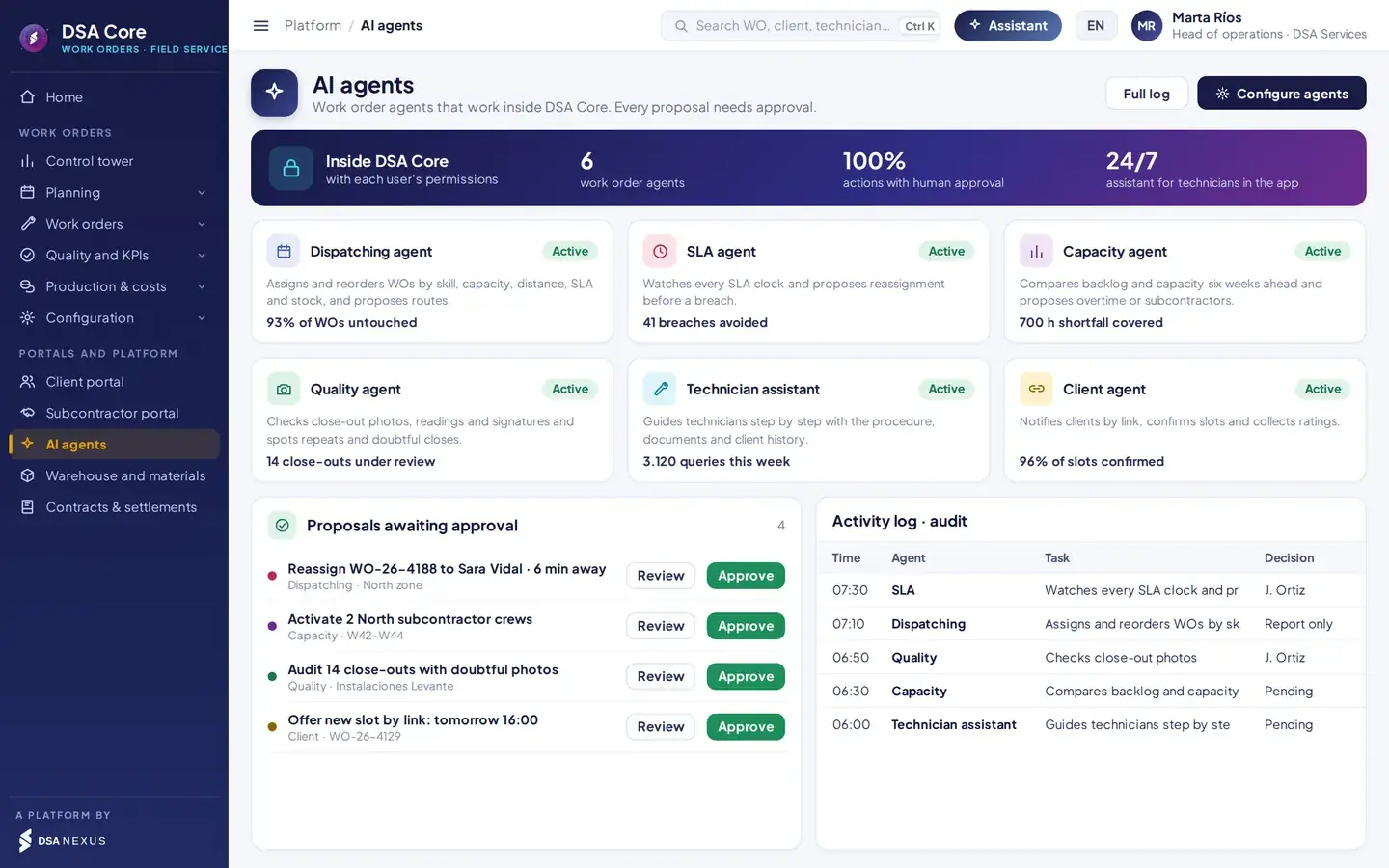
Questions they answer in seconds
In plain language, with your data.
- “Which orders will breach SLA today?”
- “Who can cover this fault within 30 minutes?”
- “Can we cope with the week 43 install campaign?”
- “Why are there so many repeats in the North zone?”
- “Which technician has the ONT Félix needs?”
- “How do I set this router to bridge mode?”
Available agents
Assigns and reorders work by skill, capacity, distance, SLA and stock, and proposes routes.
Watches every order’s clock and proposes reassignment before a breach.
Compares backlog and capacity six weeks ahead and proposes overtime or subcontractors.
Reviews close-out photos, readings and signatures and flags repeats and doubtful close-outs.
Notifies by link, confirms slots, offers new ones and collects the rating.
Guides step by step with your procedures and the client’s history, by voice or text, and checks the order before close-out.
07 · Tower copilot. The command centre asks in plain language and gets answers backed by data, with proposed actions. Offline, the technician assistant offers the step sequence and the stored documents.
AI governance
Client, technician and operations data are processed inside the DSA Core ecosystem, with logged access.
Technicians see only their orders; subcontractors, theirs.
Agents propose; no reassignment, purchase or close-out runs without approval.
Every query and proposal is logged; content labelled under Art. 50 of the AI Act.
Beyond managing orders
What it brings to operations, finance and management.
A technician with the right skill, parts and procedure from the first visit.
The client confirms or changes the slot before the technician sets off.
The assistant uses your procedures, not generic content.
Rate card points and evidence ready to certify and invoice.
Each usage creates exactly one warehouse movement.
History of statuses, photos, readings and signatures, ready for a dispute.
Multi-currency and in Spanish, English and Portuguese, with local formats.
Shares data with warehouse, fleet, people, contracts and invoicing.
Connects with certification and invoicing, the subcontractor portal, sites and projects and assets and fleet.
Comparison
Against the usual approach.
Spreadsheets, messaging and generic ERPDSA Core Work Orders
Order intakeRetyped from the client portalAPI, SFTP, portal or AI-read email
AssignmentManual, by experienceAutomatic by skill, capacity, SLA and stock
CapacityOvertime once you are already lateSix-week shortfall and scenarios
Work reportPaper or WhatsAppOffline app with checklist, photos and signature
Technician supportCall the supervisorAI assistant with your procedures
End customerCalls to askLink with slot, technician en route and report
SubcontractorsEmail and spreadsheetsPortal, same app and comparable quality
MaterialsUsage not recordedKit reserved, scanned and deducted from the van
Artificial intelligenceNot availableSeven built-in agents, with human approval
Packages
Three ways to get it.
Orders, order types, offline app with checklist, photos and signature, Kanban and subcontractor portal.
All of the above plus control tower, automatic assignment, capacity, client link, OCR expenses, integrations and rule-based agents.
The complete packageWith warehouse, fleet, people, contracts, certification and invoicing on one platform.
SectorsTelecomsEnergy and utilitiesGas and waterFacilities maintenanceLifts and HVACSecurity
ScopeEspañol · English · PortuguêsMulti-currencyMulti-company and multi-countryAndroid and iOS
Frequently asked questions
What people usually ask us before the demo.
How do my clients’ orders come in?
By API or webhooks, by SFTP file, through a robot on the client’s portal or by reading their email with AI. Each client has its own mapping and code table, and the close-out goes back to their system with status, photos and signature in their format.
Does the app work without signal?
Yes. The technician completes the whole order offline: checklist, tests, photos, materials and signature. Everything is stored encrypted on the phone and syncs with no duplicates when signal returns.
How does automatic assignment decide?
First it rules out anyone without a valid skill, current documents or available hours. Then it scores skill, distance, free capacity, SLA and stock in the van, with configurable weights, and shows the reasoning behind each proposal. You decide what is approved automatically and what the planner reviews.
Do my subcontractors use the same app?
Yes. The subcontractor receives and accepts orders in its portal, assigns them to its technicians, and they work with your app and checklists. Their quality is measured on the same metrics as your own team.
What does the end customer see?
A secure link, with nothing to install, showing the confirmed slot, the technician on the way with an estimated arrival time and photo, the option to change the slot and the visit report. The link expires and shows no data from other orders.
Do I have to replace my ERP?
No. DSA Core connects to your ERP and your clients’ systems; it does not replace them. It syncs clients, items, invoices and purchasing, and receives staff, skills and absences from the HR system.
Do the rule-based agents act on their own?
No. The agents propose and no reassignment, purchase or close-out runs without human approval. Each agent only accesses information the user is authorised to see, and every query and proposal is logged.
30-minute demo
We will show you in 30 minutes, with your work orders.
- Demo with a real day of your work orders
- Pilot with one zone and one team of technicians
- Integration with your client’s system
- Rollout by zone, with app training
DSA Core connects to your ERP and your clients’ systems; it does not replace them.

The first meeting is with David Soler, founder.WhatsApp +34 615 160 114 · hola@dsanexus.com