The technician swaps vehicle because of the workshop or a job, and nobody records when, with what mileage or in what condition.
Damage and fines with no one accountableDSA Core · Assets & Fleet
Asset and fleet management.
Vehicles, machinery, test equipment and keys on a single platform. Every assignment records who uses each asset, since when and for which job; fines, fuel, maintenance and the real cost of every kilometre all come from that record.
- 1 recordthe signed assignment, source of fines, consumption and cost
- Mobilefor technicians who change vehicle every week
- GPSconnected to the tracker you already use
Operational context
Where control is lost in a fleet on the move.
In technical services and transport companies, vehicles change hands every week, are spread across jobs and sites, and their cost gets lost in workshop invoices, fuel cards and fines that arrive weeks later.
The notice arrives weeks later and someone has to work out who was driving that day.
Extra penalty for not naming the driverCards never matched against mileage, tank size or the vehicle’s position.
Refuels that are not for that vehicleAction is taken after a breakdown, not when kilometres or hours say it is due.
Workshop days and stalled servicesInspections, insurance, tachographs, calibrations and driving licences in spreadsheets.
Assets in use with expired paperworkNobody knows what each vehicle costs per kilometre or how much each job takes.
Renewals based on gut feelingIn a drawer or on a board, with no record of handovers or returns.
Vehicles used without an assignmentGPS lives on another platform and its kilometres never reach management.
Duplicated, unused dataA tracker tells you where the vehicle is. An ERP tells you what has been paid. Neither tells you who was using it, for which job, and what each kilometre costs.
Asset life cycle
From onboarding to renewal, with a single reference record.
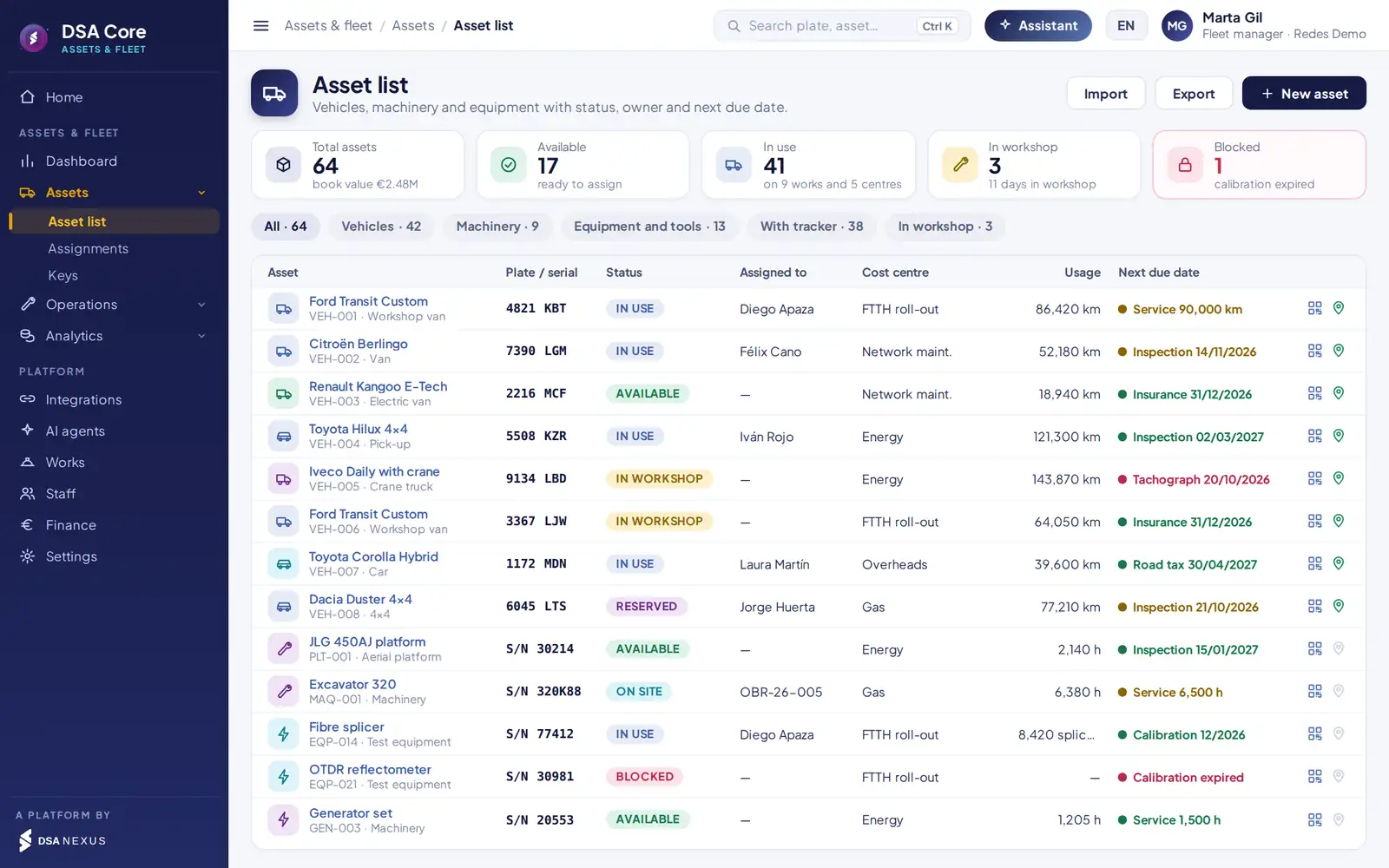
Vehicles, machinery and test equipment follow the same cycle. Each phase uses what was recorded in the previous one, with no spreadsheets in between.
- 1OnboardRecord, QR, documents, warranty, lease or purchase
- 2AssignDriver or job, bookings, vehicle swaps and keys
- 3OperateChecklist, refuels, breakdowns and GPS position
- 4MaintainPreventive, corrective and due dates
- 5ControlFines, consumption, allocation and TCO
- 6RenewKeep, replace, lease or dispose
Reference record
The signed assignment.
Asset, driver, date and time, mileage and fuel, job or cost centre, and key. From that record come:
- The driver behind each fine.
- The validation of each refuel.
- Real mileage for maintenance.
- The vehicle’s cost charged to each job.
- Accountability for each damage.
Assignments and keys
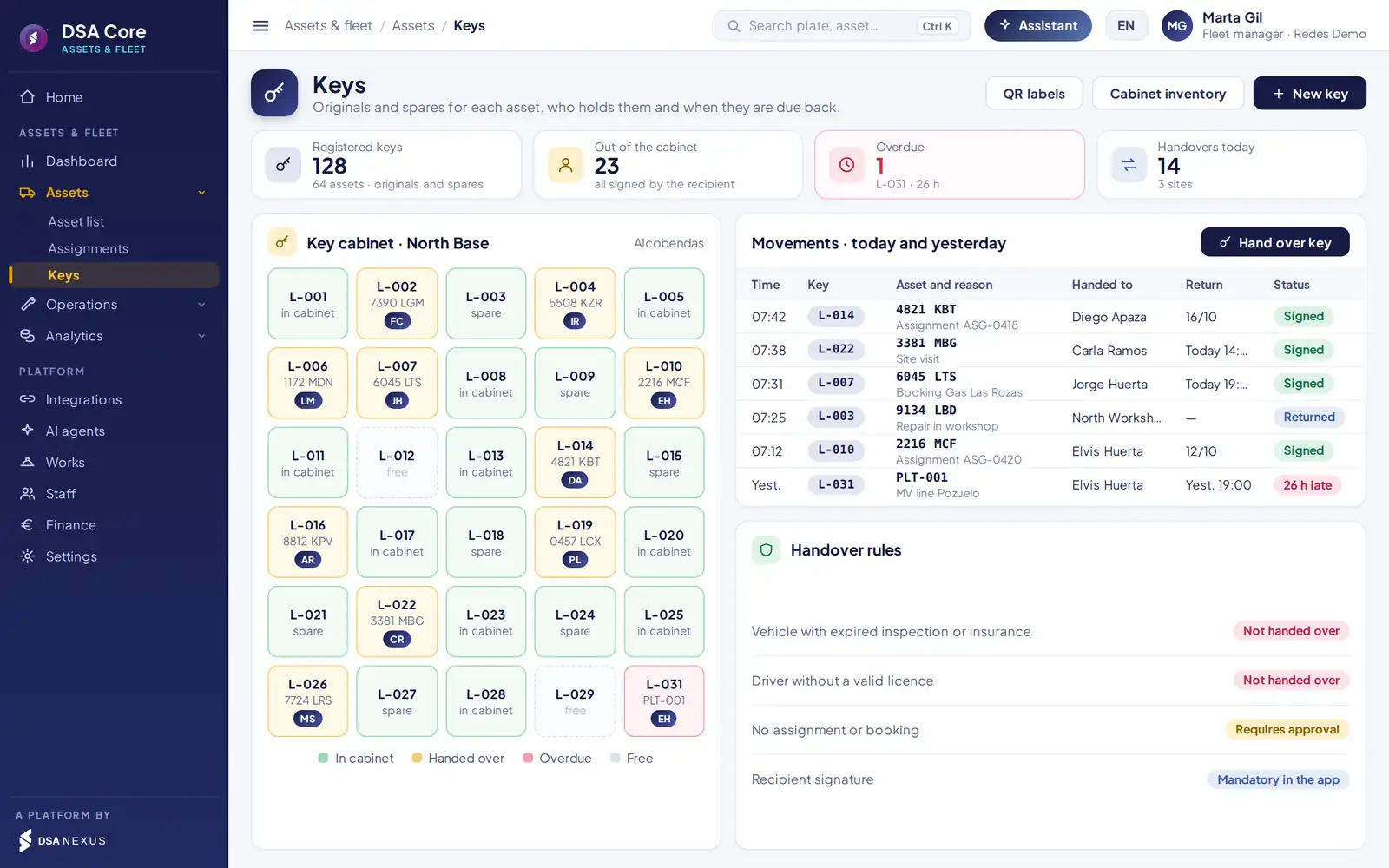
Who has each vehicle, since when and for which job.
Use, bookings and workshop time for each asset in one calendar. A vehicle swap closes one assignment and opens another with mileage, fuel, photos and signature.
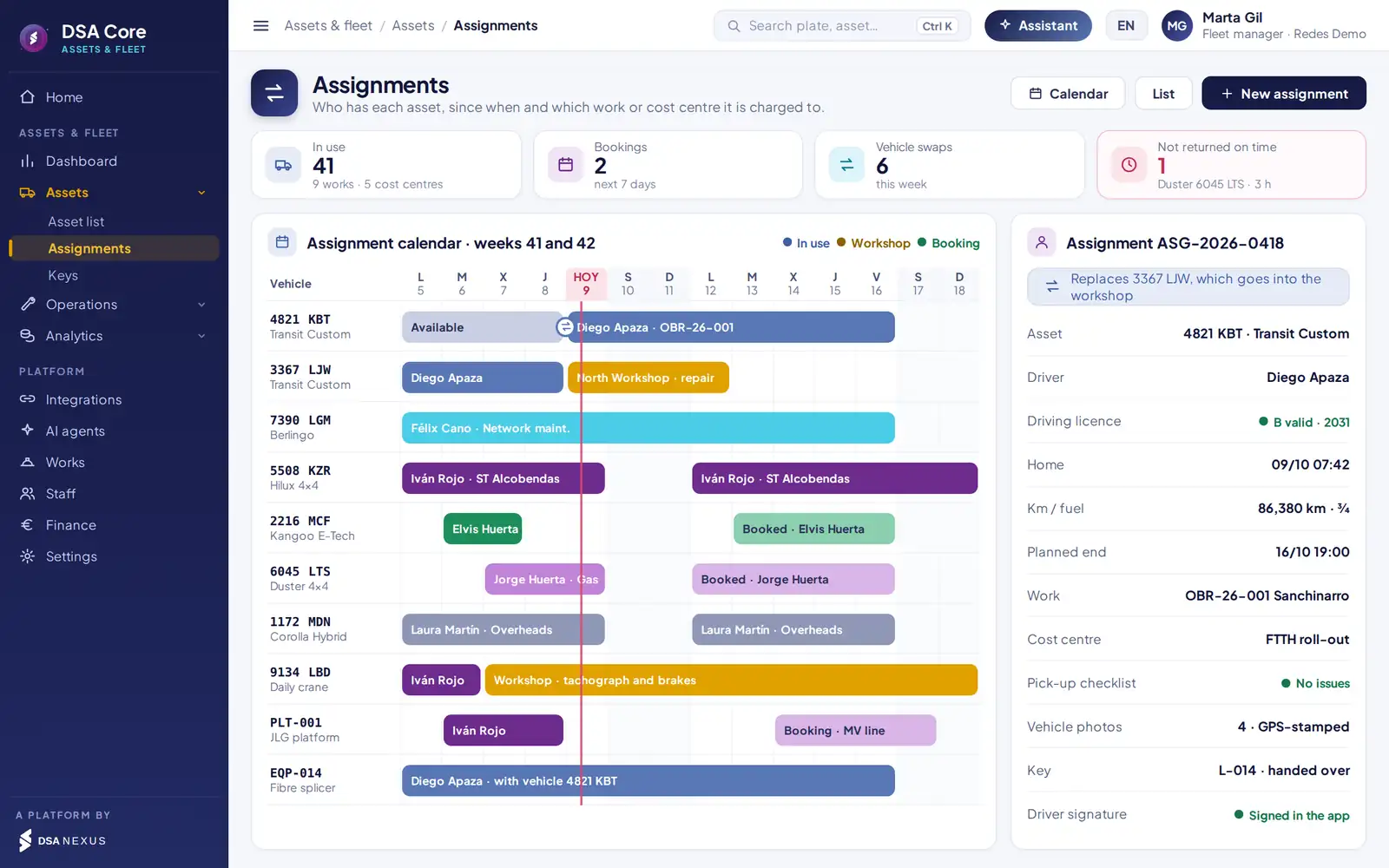
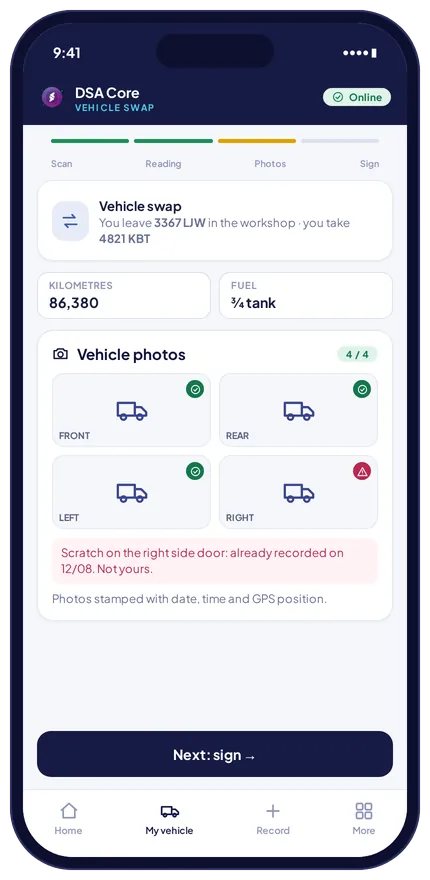
QR, mileage, fuel, photos and signature. The previous assignment closes itself.
Each assignment carries its job or cost centre and splits cost by days of use.
By job and date. Idle machinery is visible before you hire.
Handover lock. No vehicle is assigned and no key is released if the inspection or insurance has expired, or if the driver does not hold a valid licence for that category.
Mobile app for technicians
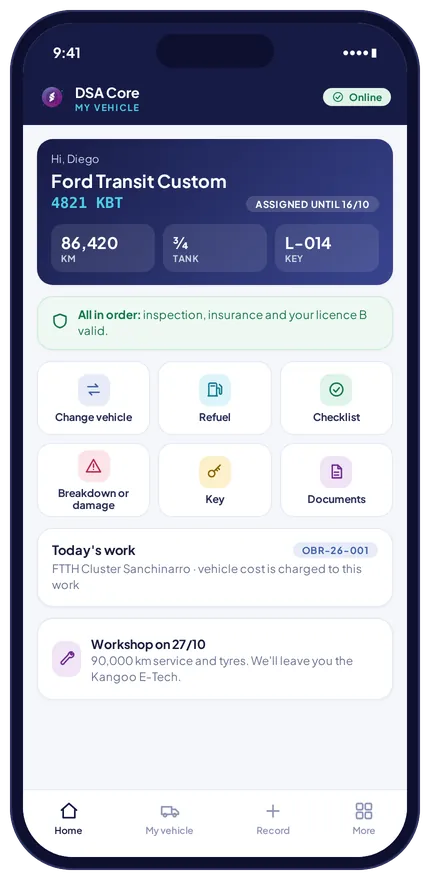
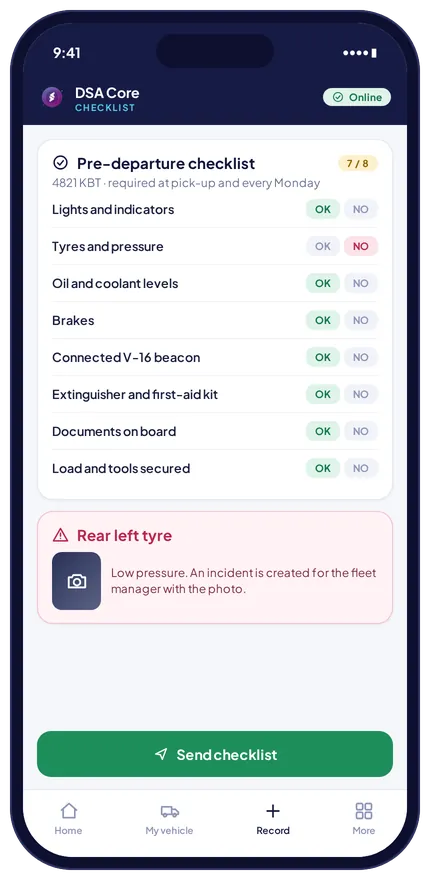
Pick up, check, refuel and report a breakdown in a minute.
The technician records it from the phone, and the company gets the driver behind every fine, the condition of every vehicle and its real mileage.
- Stamped evidence. Vehicle photos with date, time and GPS position at pick-up and return. Existing damage is recorded and not blamed on the next driver.
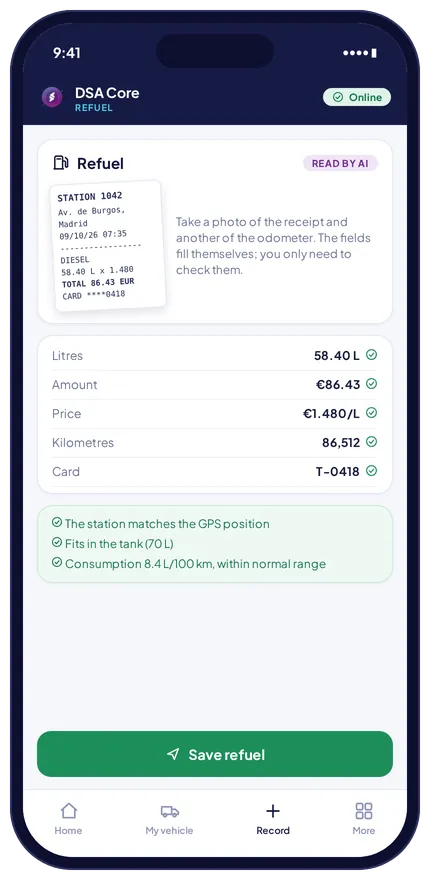
- Fields that fill themselves. The fuel receipt is read by AI and mileage comes from the tracker. The technician just checks and confirms.
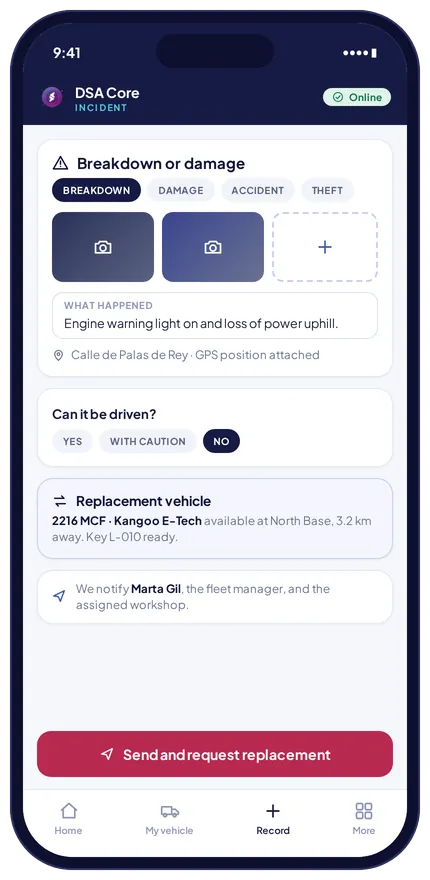
Automatic checks.
They alert the fleet manager without blocking the technician.
Litres above its capacity.
Station far from its GPS position.
Against the vehicle’s own average.
Wrong fuel or swapped card.
Reading lower than the last one.
Movement at night or on holidays.
Moving with no driver recorded.
Engine on while stationary.
Not returned at the expected time.
Incident created with its photo.
Inspection, insurance or calibration.
Proposed with its key ready when a vehicle cannot be driven.
Maintenance and due dates
Maintenance by real use and due dates that never slip.
Plans by kilometres, engine hours or time for vehicles and machinery, with the next service date calculated from the kilometres reported by the tracker.
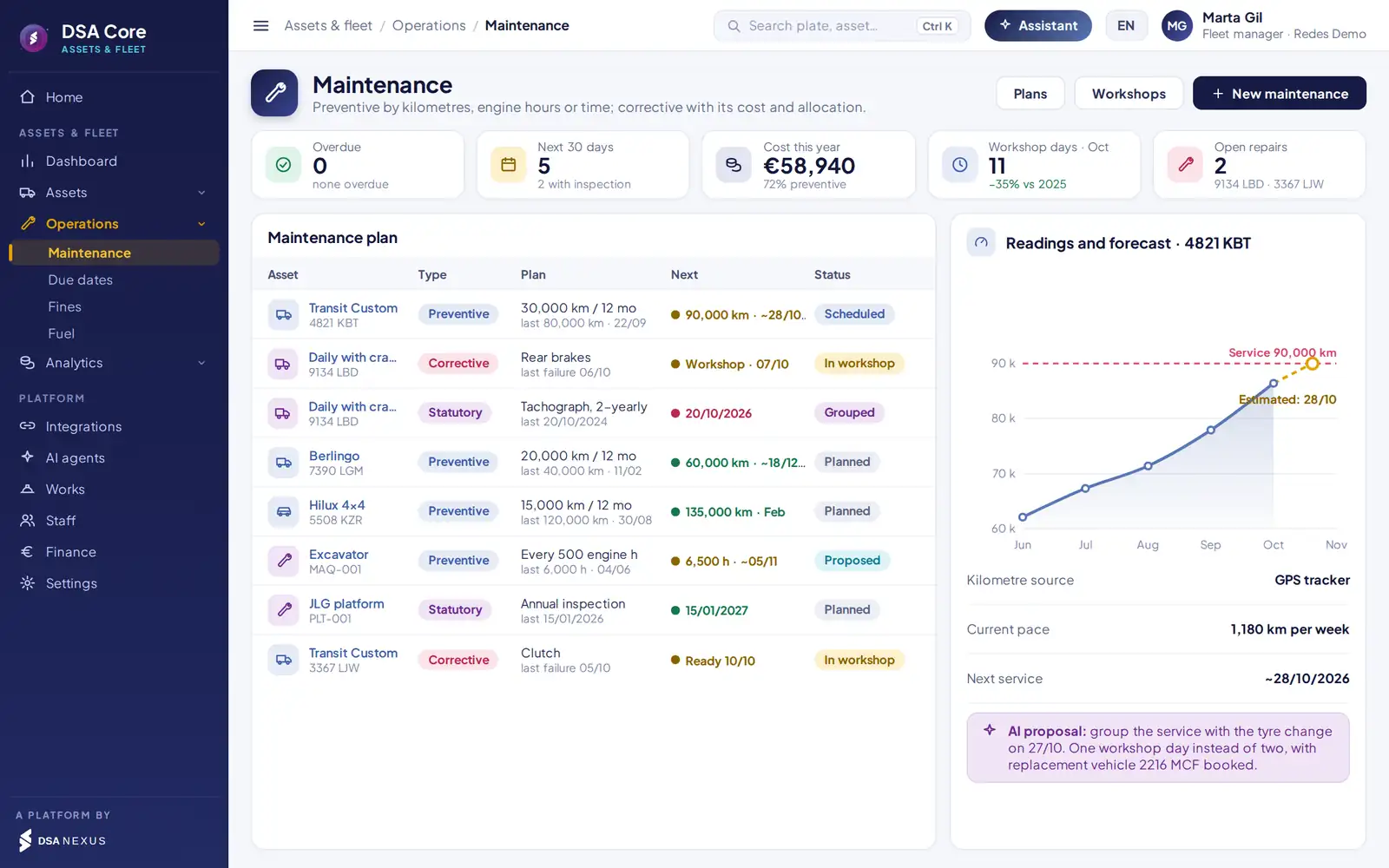
- 1Plans by kilometres, engine hours or time, with the last and next service.
- 2Estimated date of the next service from the vehicle’s real pace.
- 3AI proposal to group bookings and cut workshop days.
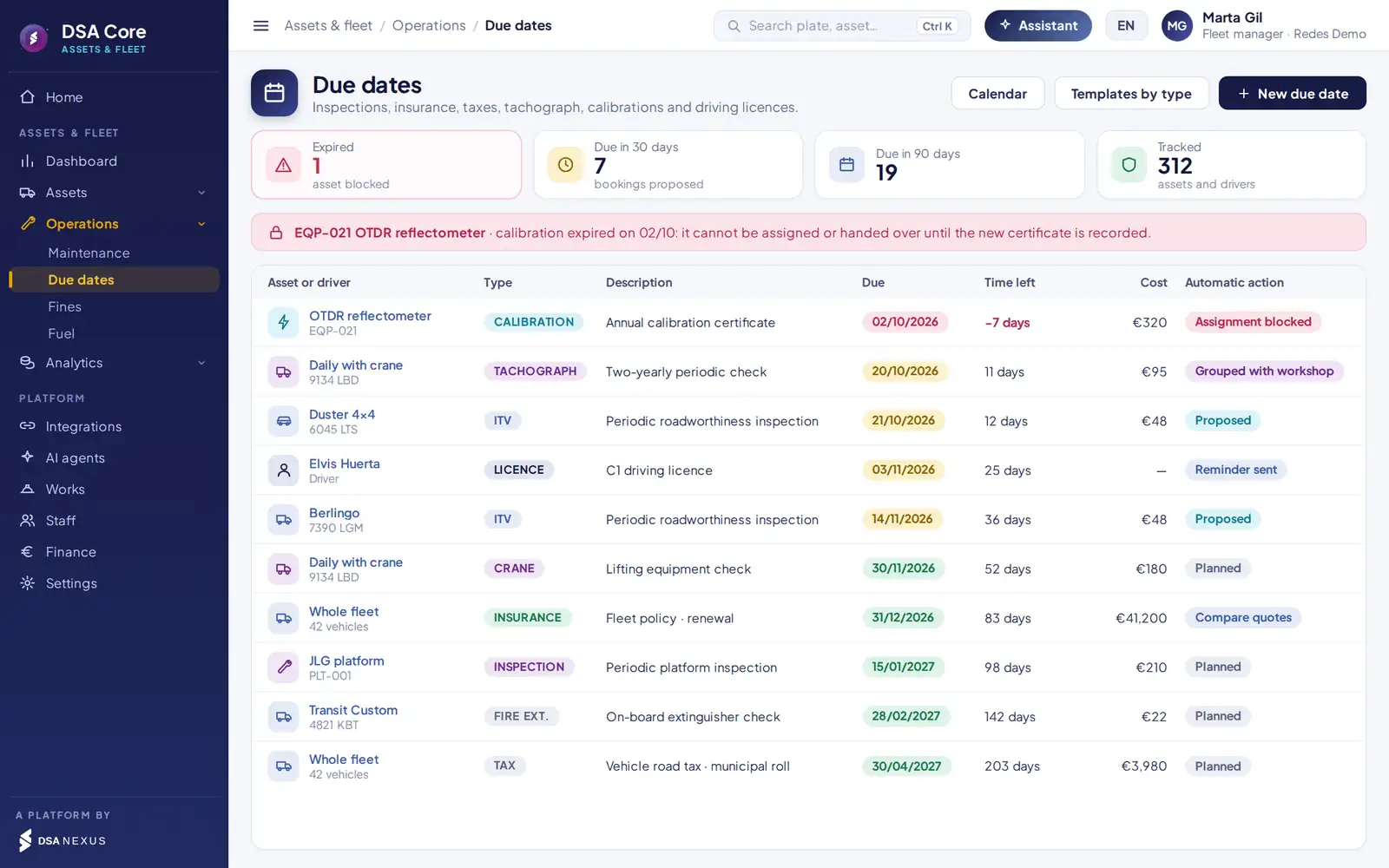
Preventive, corrective and statutory
For assets and drivers, with automatic action.
- Roadworthiness tests, insurance, taxes, tachographs, cranes, platforms and extinguishers.
- Test-equipment calibration: expired equipment does not go out on a job.
- Driving licences with their category and expiry.
- Proposed booking, reminder or lock depending on the type of due date.
- Repairs with workshop, quote, days off the road and cost charged to the job.
Fines and fuel
Every fine reaches its driver; every litre, its vehicle.
The PDF notice is read by AI and matched with the signed assignment, the key handed over and the tracker position at the time of the offence.
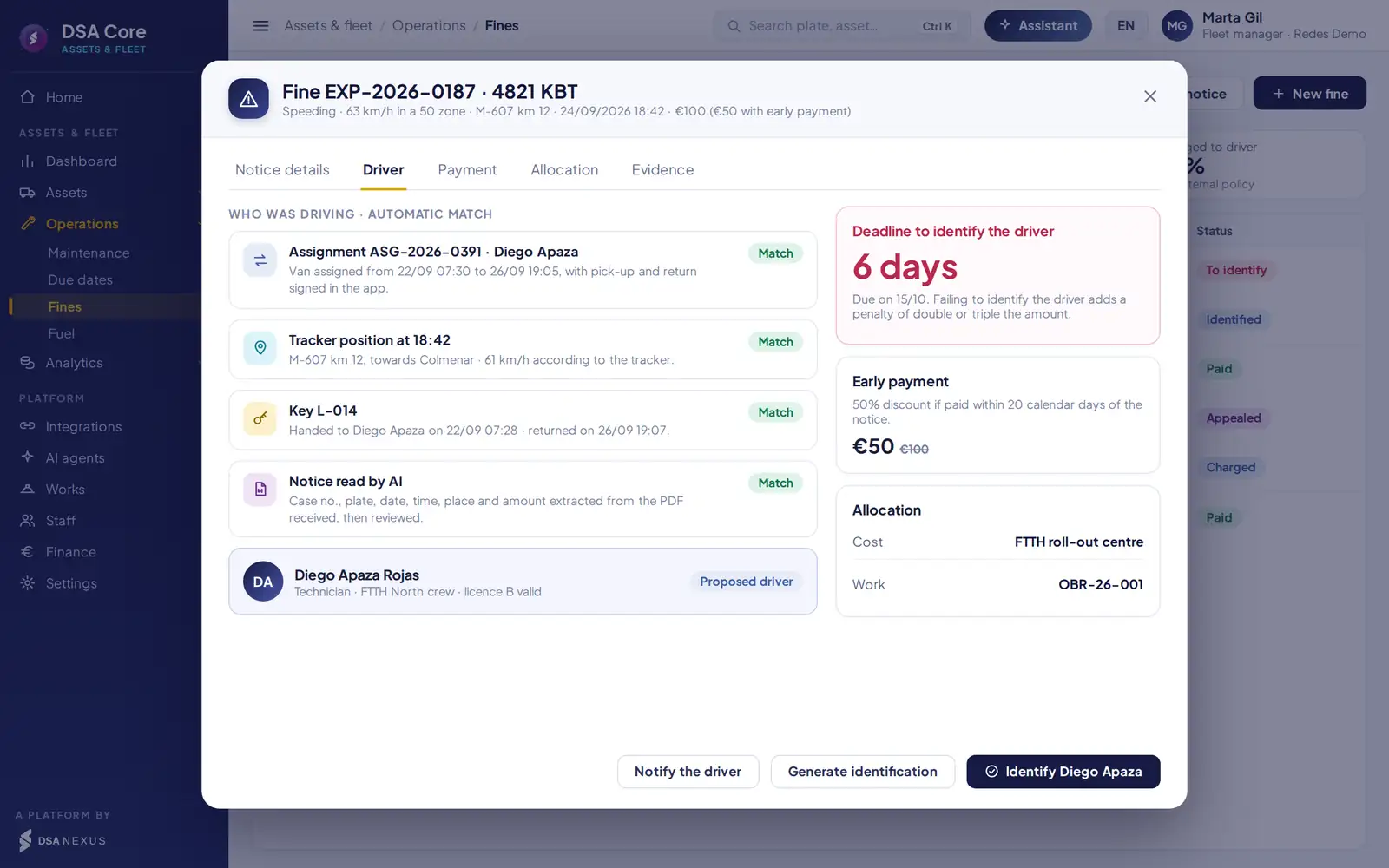
- 1Match with the signed assignment and the key handed over at that time.
- 2Tracker position at the moment of the offence.
- 3Deadline to name the driver and early-payment discount.
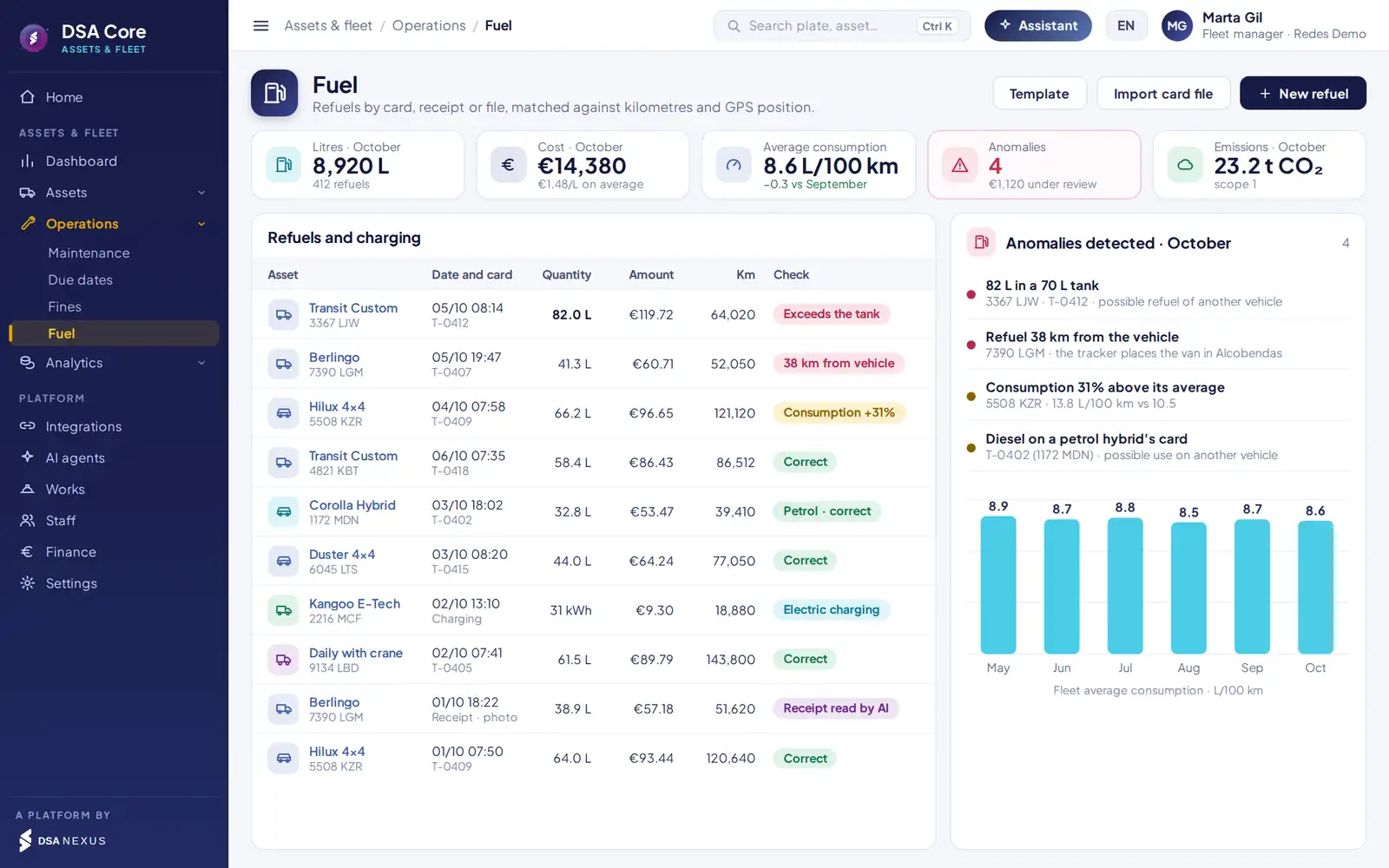
Fuel
Cards matched to tank, mileage and position.
- Import of the card issuer’s file or API, with a column template per provider.
- Receipt photographed in the app and read by AI when there is no card.
- Consumption per 100 km against the vehicle’s own average and its type.
- EV charging in kWh, with a comparable cost per kilometre.
- CO₂ emissions by vehicle, job and month, ready for the sustainability report.
Cost and allocation
The real cost of each asset, split across your jobs.
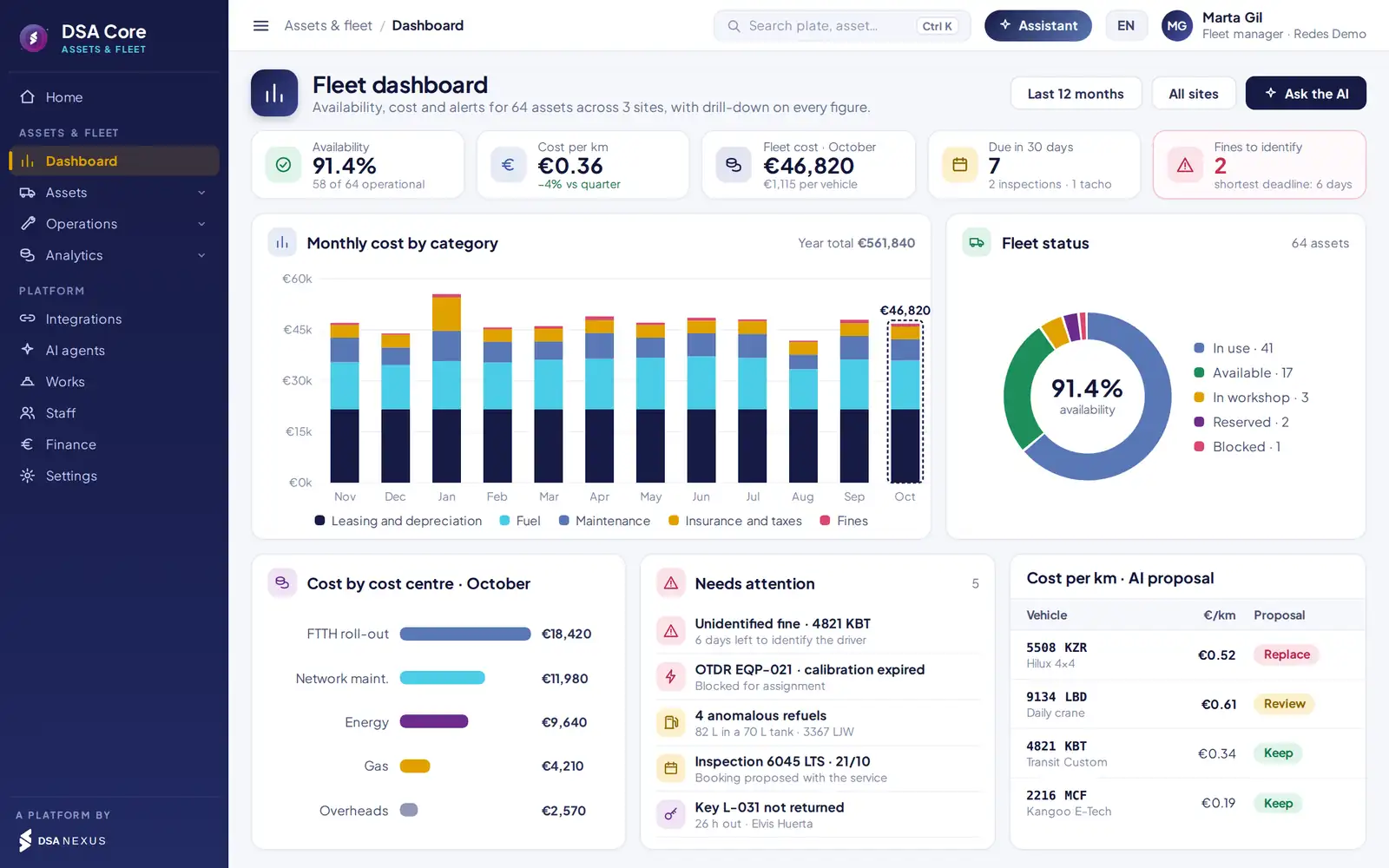
Leasing or depreciation, maintenance, energy, insurance, taxes and fines for each asset, with its cost per kilometre or hour and a proposal: keep, review, replace or share.
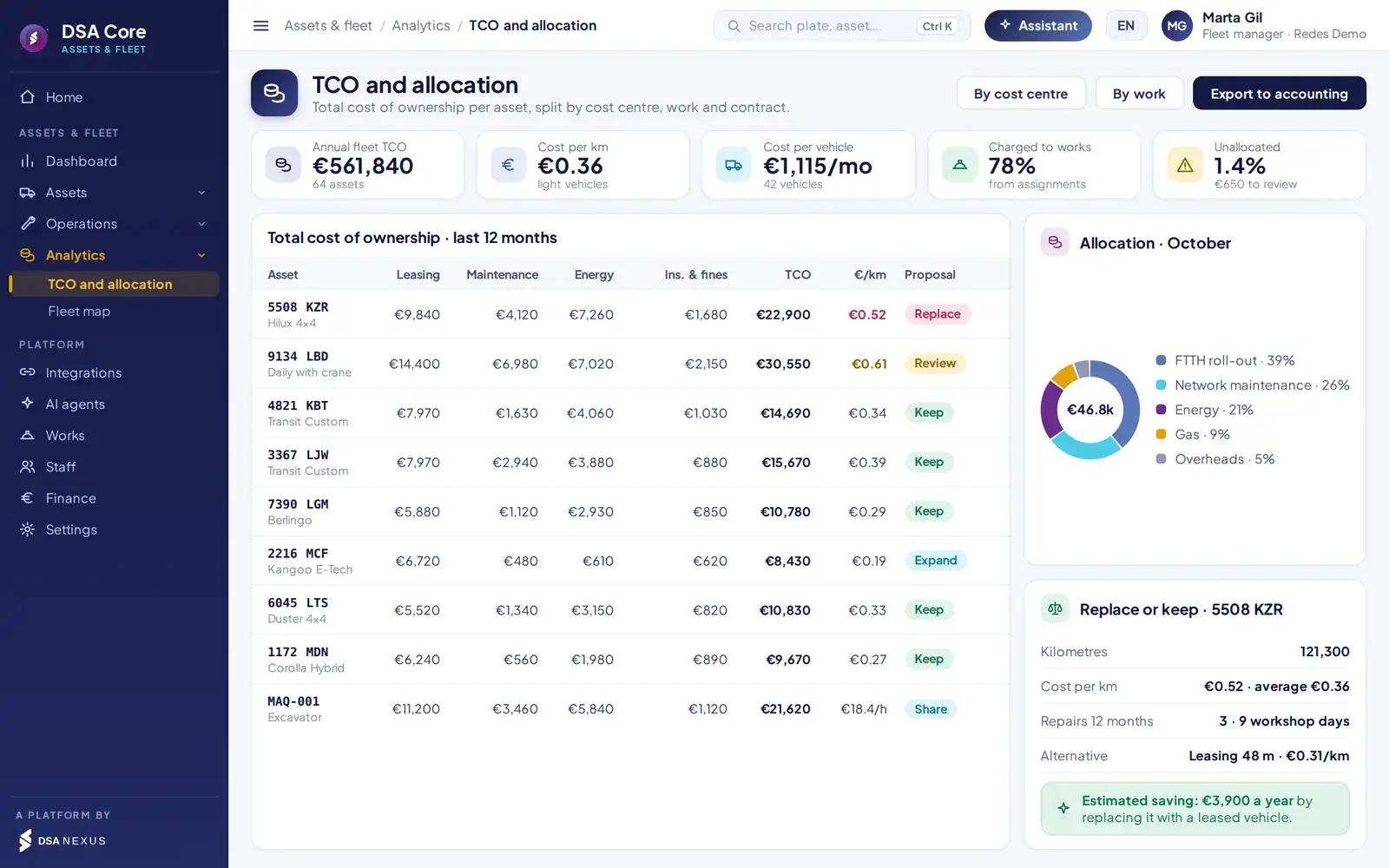
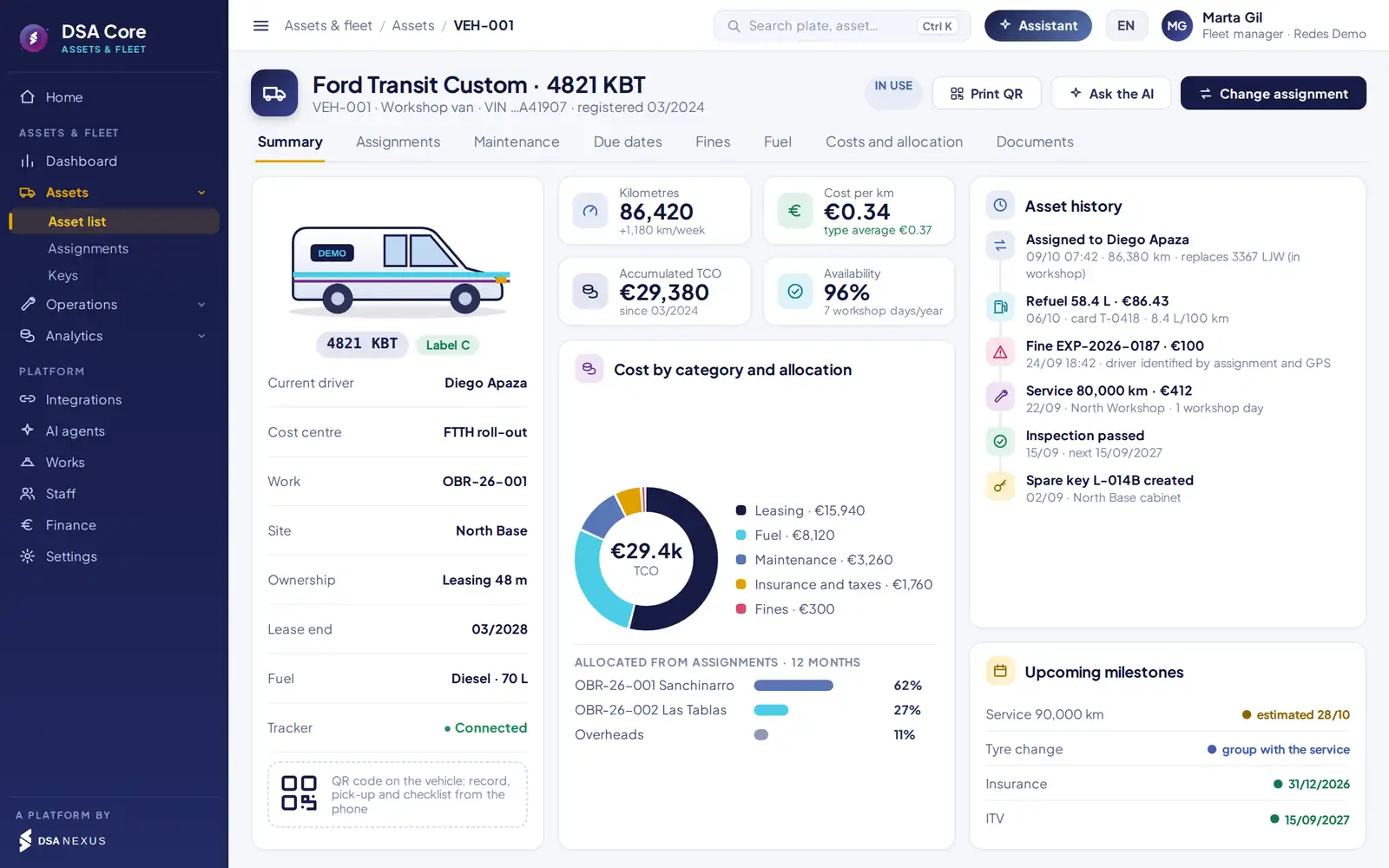
Fleet cost is charged by assignment days and reaches the job’s bottom line.
Cost per km against the alternative, with the estimated saving before you decide.
Availability, cost by category, workshop days, due dates, fines and anomalies, with drill-down on every figure.
Tracking and integrations
Connected to the tracker and the fuel cards you already have.
DSA Core integrates by web service with the leading vehicle tracking providers. No need to change provider or install new devices.
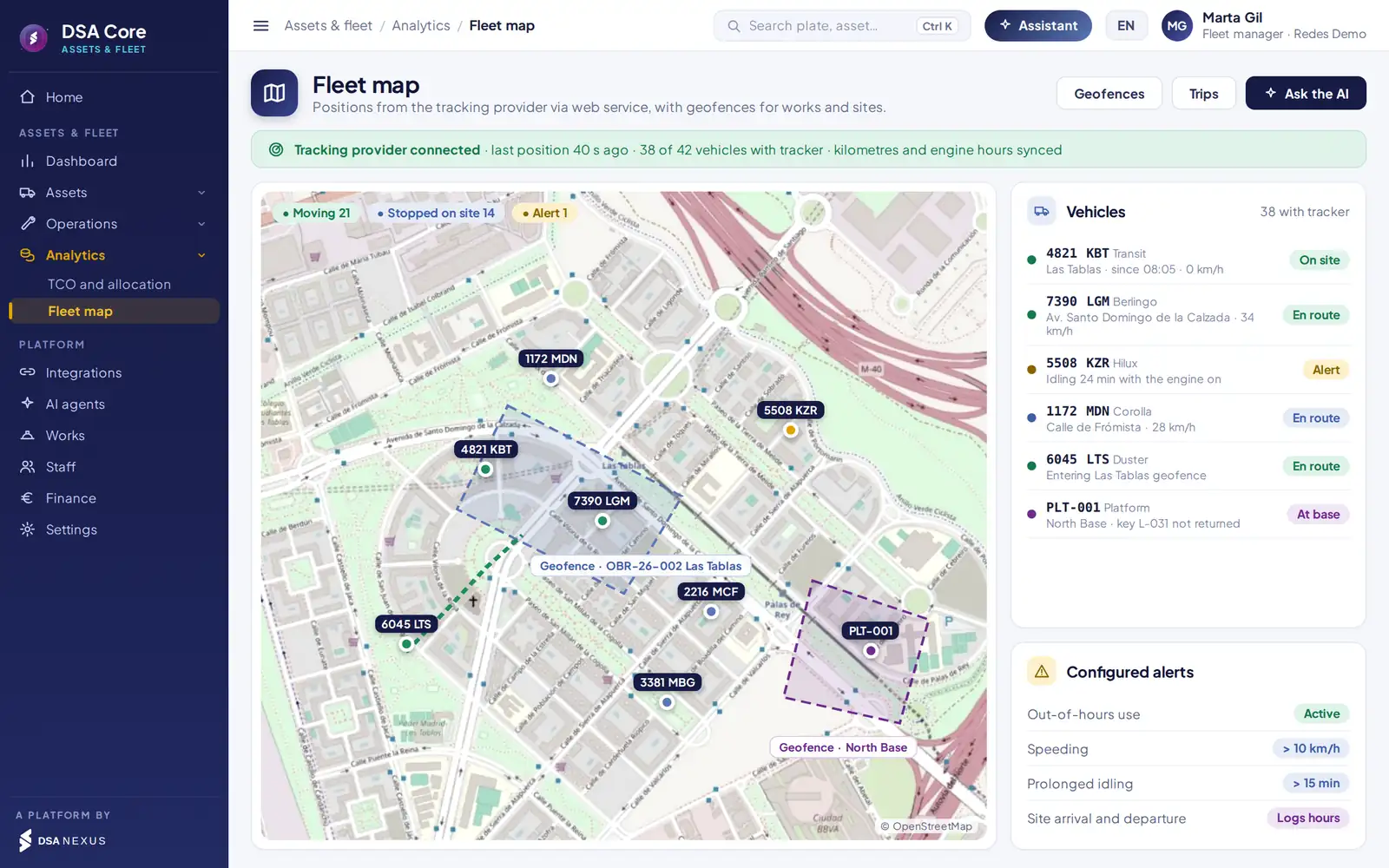
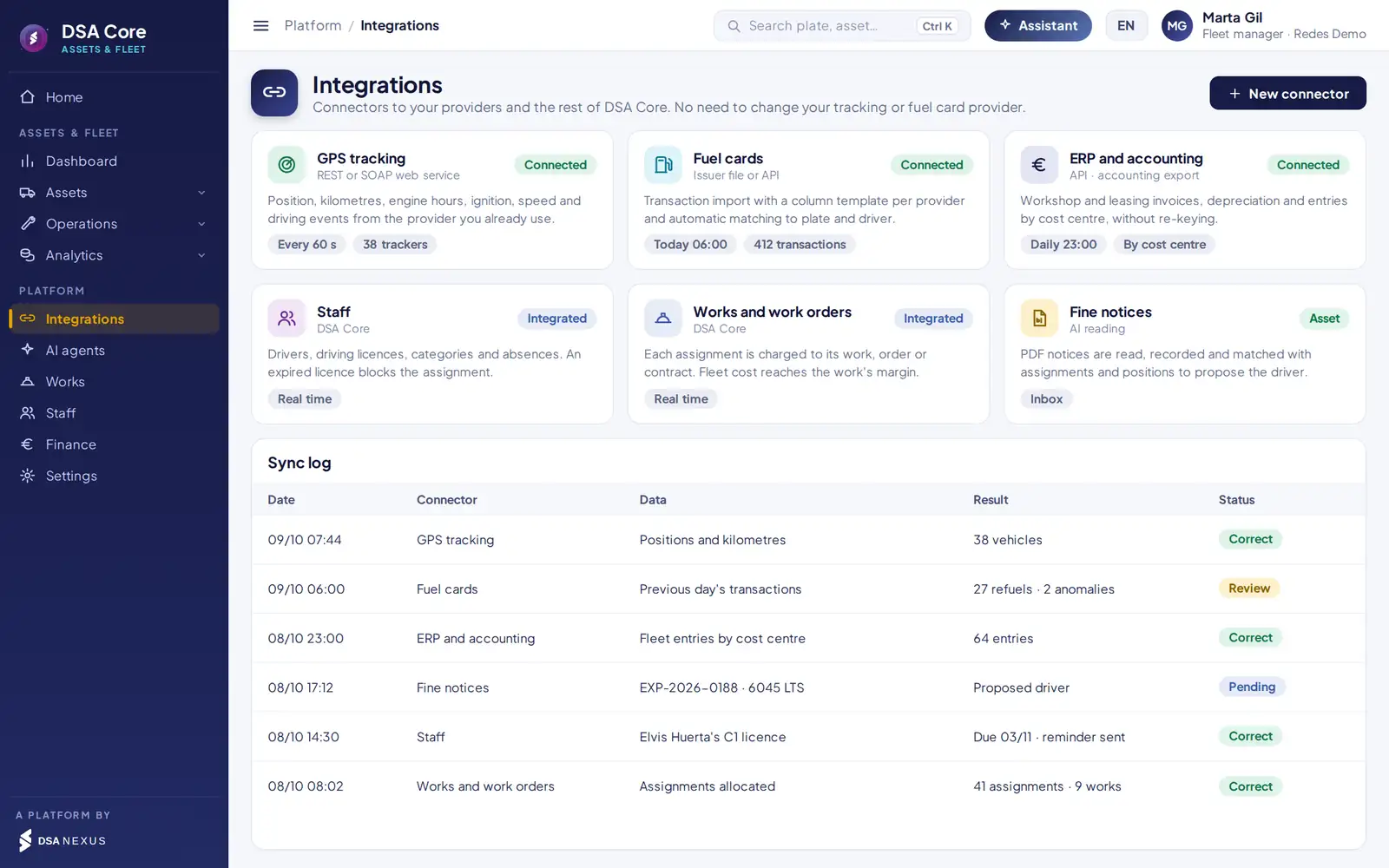
Position, mileage, engine hours and driving events from the tracking provider.
Arrival and departure times at jobs and sites, and vehicles stopped on site.
Out-of-hours use, speeding and prolonged idling.
Kilometres feed maintenance, consumption and cost per km.
Automation
360° assistance for the fleet manager.
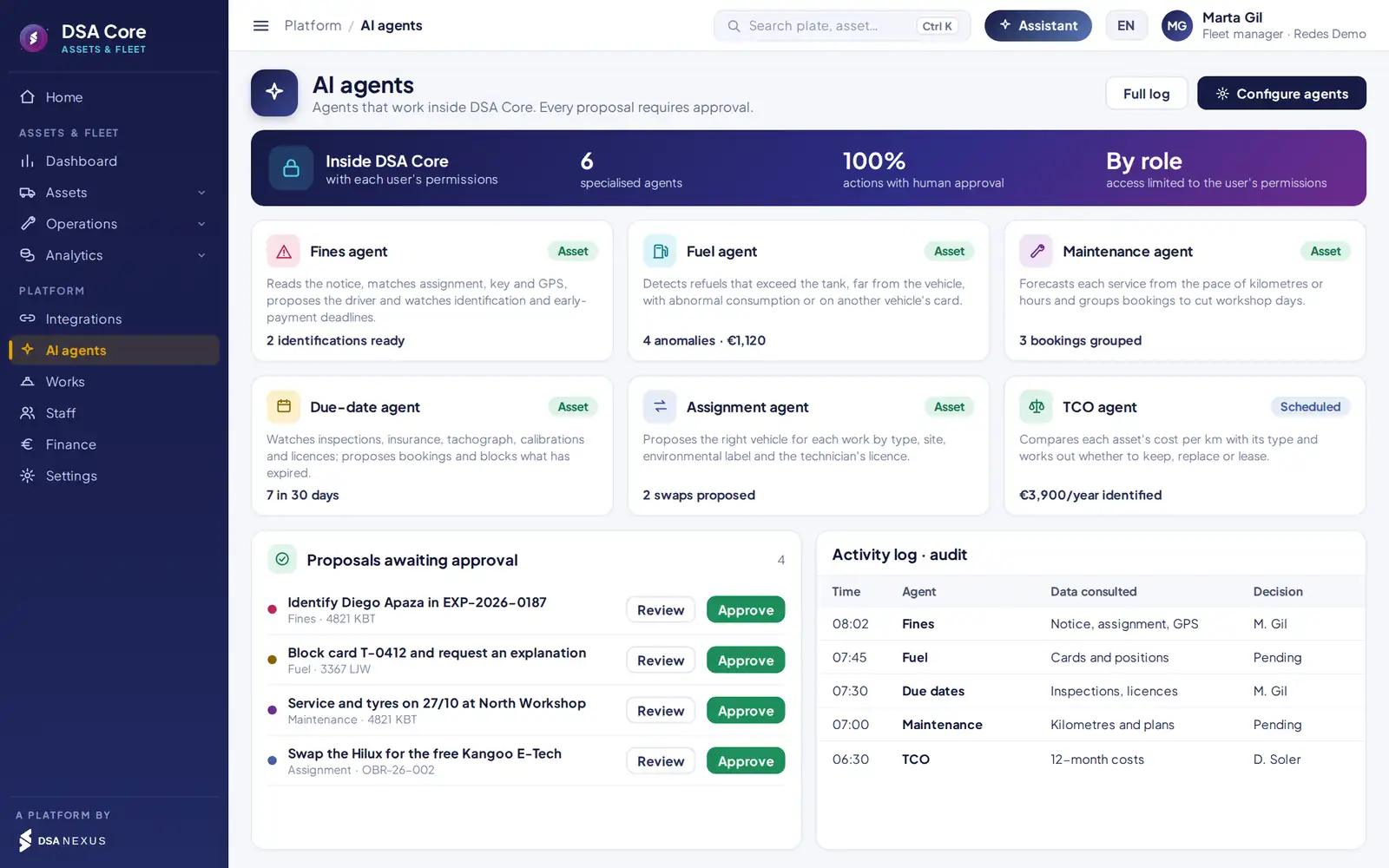
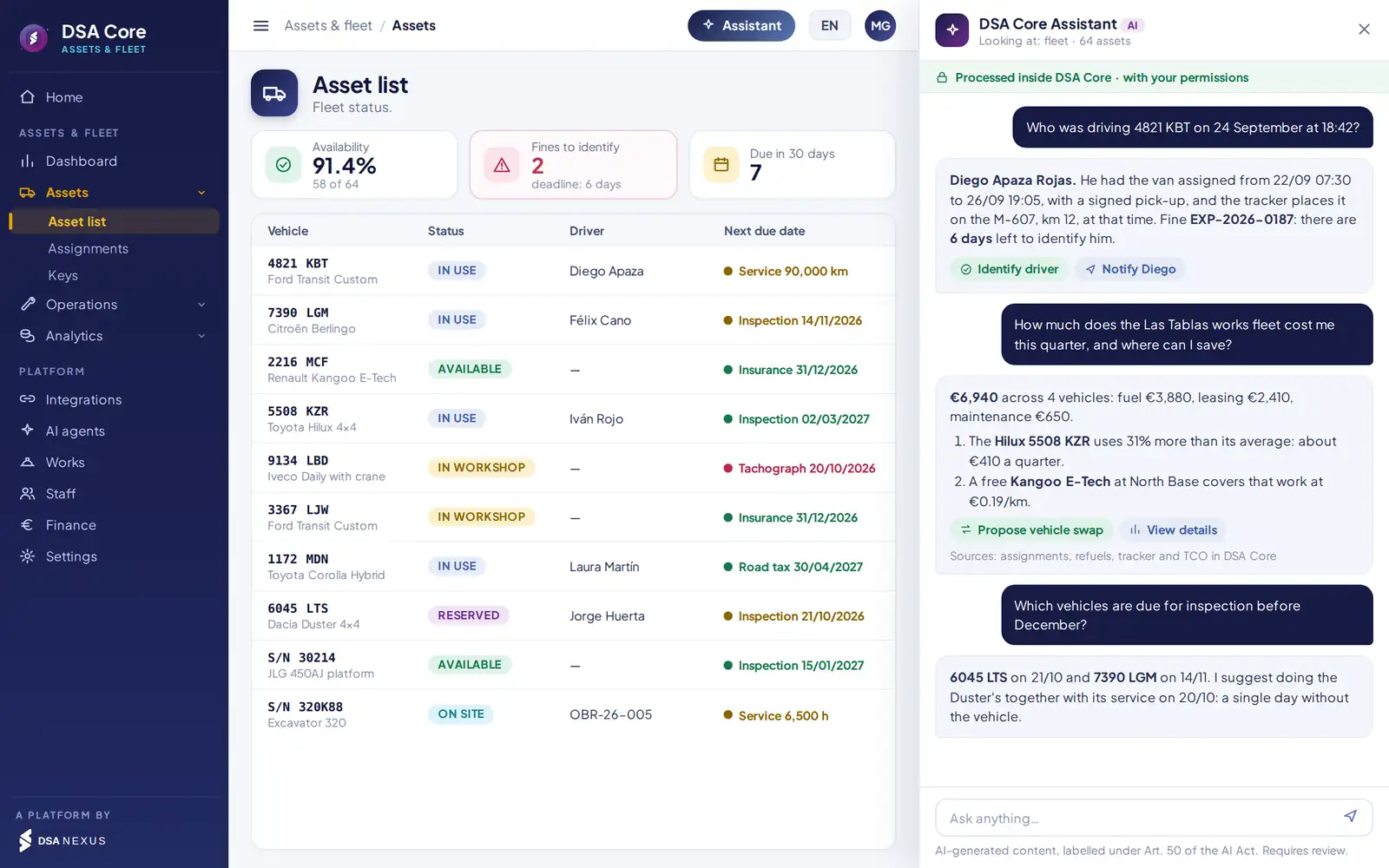
Six specialised agents watch fines, fuel, maintenance, due dates, assignments and cost. They work inside DSA Core, with each user’s permissions, and every proposal requires human approval.
Available agents
Reads the notice, proposes the driver and watches identification and early-payment deadlines.
Detects refuels beyond the tank, away from the vehicle or on another vehicle’s card.
Forecasts each service from real pace and groups bookings to cut workshop days.
Watches inspections, insurance, calibrations and licences; proposes bookings and locks what has expired.
Proposes the right vehicle by type, site, environmental label and the technician’s licence.
Compares cost per km with its type and works out whether to keep, replace or lease.
AI governance
Vehicle, driver and cost data are processed inside the DSA Core ecosystem.
Each agent only accesses information the user is authorised to see.
Agents propose; no action is executed without approval.
Every query and proposal is logged; content labelled under Art. 50 of the AI Act.
Beyond fleet control
What it brings to operations, finance and management.
Record, pick-up, checklist and breakdown by scanning the vehicle or equipment.
Fibre splicers, reflectometers and tools with their calibration.
Excavators, platforms and generators bookable before you hire.
CO₂ from litres, environmental label and alerts in low-emission zones.
Stamped photos at every driver change: every dent has a date and an owner.
History of assignments, keys, readings and changes, ready for an inspection or a dispute.
Due dates configurable by country, multi-currency and in Spanish, English and Portuguese.
Shares data with jobs, work orders, staff and finance.
Comparison
Against the usual approach.
Spreadsheets and trackerDSA Core Assets & Fleet
Vehicle swapNot recordedMileage, stamped photos and signature in the app
Driver ID for finesManual reconstructionMatch of assignment, key and GPS
FuelInvoice reviewCards matched to tank, mileage and position
MaintenanceOn breakdown or calendarBy real use, with next-service forecast
Due datesScattered remindersAssets and drivers, with automatic lock
KeysNo controlCabinet per site, signed handover
Cost per jobNot availableAllocation from assignments
TCO and renewalAnnual estimateCost per km and proposal per asset
Artificial intelligenceNot availableBuilt-in agents, with human approval
Packages
Three ways to get it.
Assignments, mobile app, fines, fuel, maintenance, due dates and keys.
All of the above plus machinery, test equipment, TCO, cost allocation, GPS tracking and rule-based agents.
The complete packageWith allocation to jobs and work orders, and fleet cost in each job’s margin.
SectorsTelecomsEnergy and utilitiesInstallation and maintenanceTransport and logisticsCivil works
ScopeEspañol · English · PortuguêsMulti-currencyMulti-company and multi-country
Frequently asked questions
What people usually ask us before the demo.
Do I have to change my tracking provider?
No. DSA Core connects by web service to the provider you already have and receives position, mileage, engine hours and driving events. No new devices are needed.
How is the driver behind a fine identified?
The date and time of the offence are matched with the signed assignment, the key handed over and the tracker position. The system proposes the driver and warns of the deadline to name them.
What happens when a technician changes vehicle?
They scan the QR, record mileage, fuel and photos, and sign in the app. The previous assignment closes itself and any existing damage is recorded.
Does it also cover machinery and test equipment?
Yes. Machinery by engine hours, platforms and cranes with their inspections, and test equipment with its calibration. Expired equipment is locked for assignment.
Do I have to replace my ERP?
No. DSA Core connects to your ERP and sends it workshop and leasing invoices, depreciation and entries by cost centre.
Do the rule-based agents act on their own?
No. The agents propose and no action is executed without human approval. Each agent only accesses information the user is authorised to see, and every query and proposal is logged.
30-minute demo
We will show you in 30 minutes, with a case like yours.
- Demo with sample vehicles, fines and refuels
- Pilot at one site with your tracker and fuel cards
- Written proposal tailored to your fleet
- Roll-out in phases, without stopping operations
DSA Core connects to your ERP; it does not replace it.

The first meeting is with David Soler, founder.WhatsApp +34 615 160 114 · hola@dsanexus.com