Closed work orders that never make it into the monthly certification.
Lost revenueDSA Core · Contracts & Settlements
Contracts, certification and settlements.
Every work order and project turned into controlled money: price by contract and rate card, production validated with evidence, certification to the client, the invoice in your ERP and settlement to technicians and subcontractors without paying for what is not collected.
- Back-to-backsubcontractors are paid what the client approves
- Onceeach WO in one certification, one invoice and one settlement
- ERPinvoices, self-billing and payroll variables, no retyping
Operating context
Where money is lost between execution and collection.
Contractors working to rate cards for operators, utilities and large clients do the work well. The margin escapes afterwards: in what is never certified, in what the client rejects and in what is paid before it is collected.
Days of cross-checking work reports, rate card and client portal.
10-day closesThe client rejects and nobody can find the photo, reading or signature.
Adjustments accepted blindRate card versions, CPI and zone factors applied by hand.
Valuation errorsEach technician’s production is recalculated in spreadsheets.
Claims and double paymentsSubcontractors are paid what they declare, even if the client rejects it.
Negative marginCertified work is retyped in the sales and purchasing ERP.
Slower collectionYou know contract revenue, not what each work order or zone earns.
Loss-making contractsThe ERP knows what was invoiced and paid. It does not know what completed work is still unbilled or what was paid without being collected.
Financial cycle
From contract to collection and payment, with a single reference record.
The reference record is the valued work order: contract, rate card items, zone factor, evidence, who did it and the certification, invoice and settlement it belongs to. Nothing is recalculated in a spreadsheet or typed twice.
- 1ContractRate card or unit prices, zones, versions and penalties
- 2ExecuteWOs and projects closed in the app with items and evidence
- 3ValidateAutomatic valuation, evidence and duplicate blocking
- 4CertifyBy chapter, with statement, partial approval and disputes
- 5Invoice and collectFrom approved work, in your ERP, with due dates and retentions
- 6SettleTechnicians to payroll and subcontractors to purchasing, back-to-back
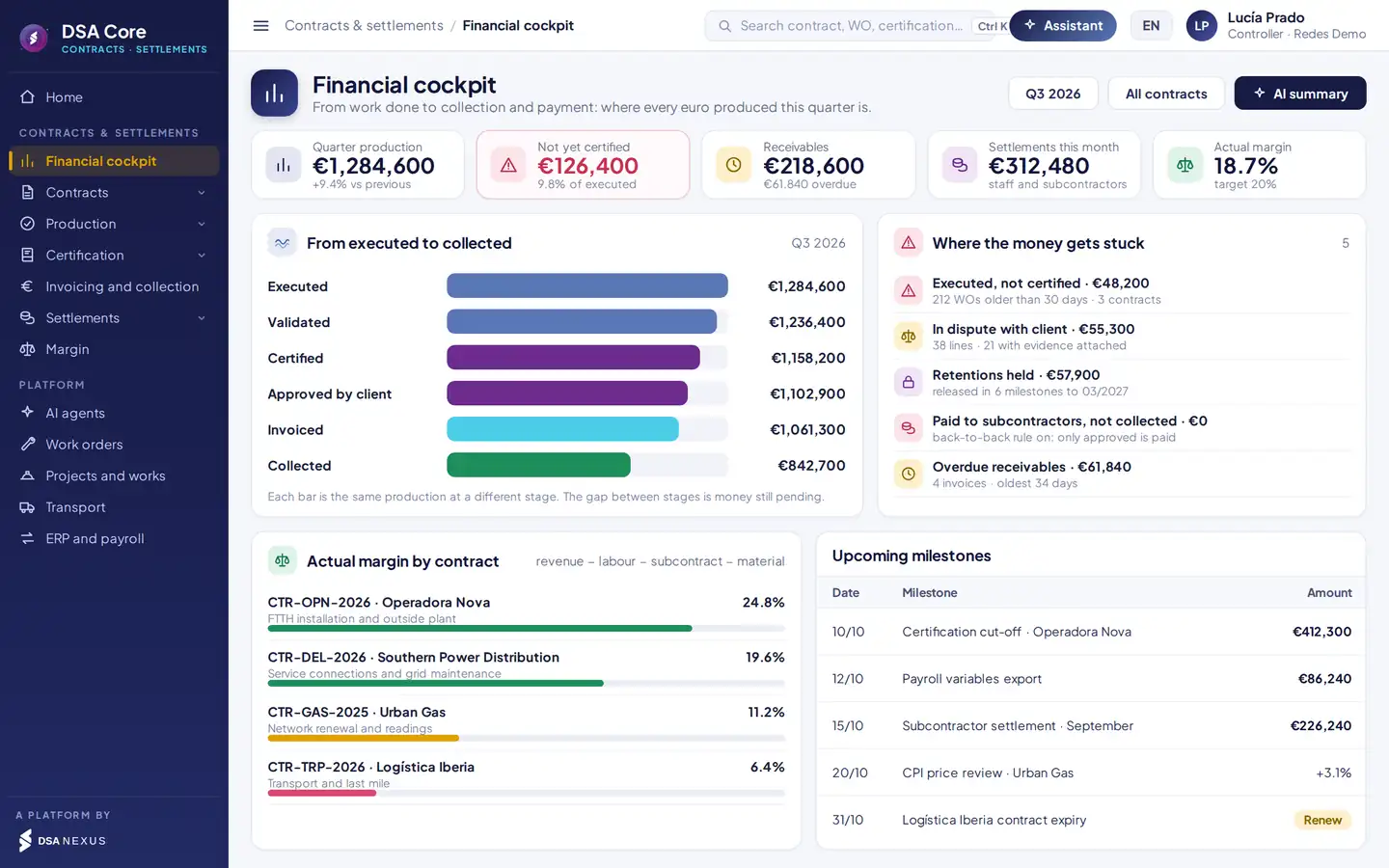
The financial cockpit, every morning.
Where every euro produced sits: not yet certified, in dispute, approved but not invoiced, receivable and settled.
- 1Funnel: executed, validated, certified, approved, invoiced and collected.
- 2Where the money is stuck: uncertified, disputed, retentions and overdue.
- 3Actual margin by contract against target.
- 4Upcoming milestones: certification cut-offs, payroll, settlements and CPI.
One record for four teams. Operations executes, finance certifies and invoices, HR pays and purchasing settles. All four work on the same valued work order.
Contracts, rate cards and unit prices
The price of every job, beyond dispute.
Contracts with clients, with subcontractors and internal ones, each with its pricing model, term, budget, payment terms and retention.
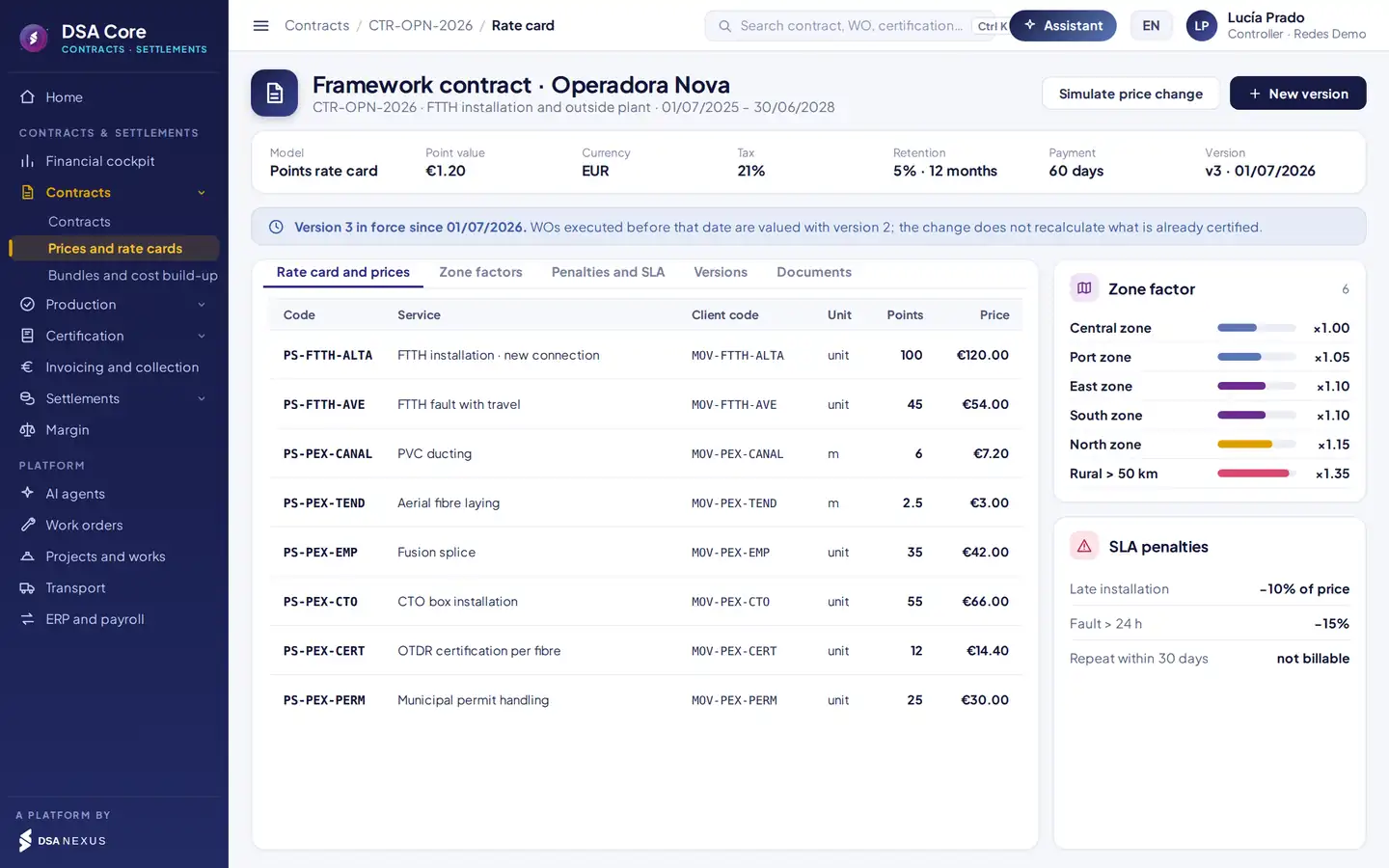
- 1Pricing model, point value, currency, tax, retention and payment terms.
- 2Dated version in force: certified work is never recalculated.
- 3Zone factor applied to each WO by location.
- 4SLA penalties: percentage, amount or no charge.
Points-based rate card, unit price list, per item or per route and stop, in one system. Each item carries the client’s code.
Zone factors, penalties and price reviews applied automatically to each WO. CPI reviews are simulated before they are applied.
Each WO is valued with the version in force on the day it was done. Changing version does not alter anything already certified.
Valued production
Only what can be proven gets certified.
Every work order and project measurement is valued with the rate card in force and the zone, and checked against the evidence required for the job type before it enters the certification.
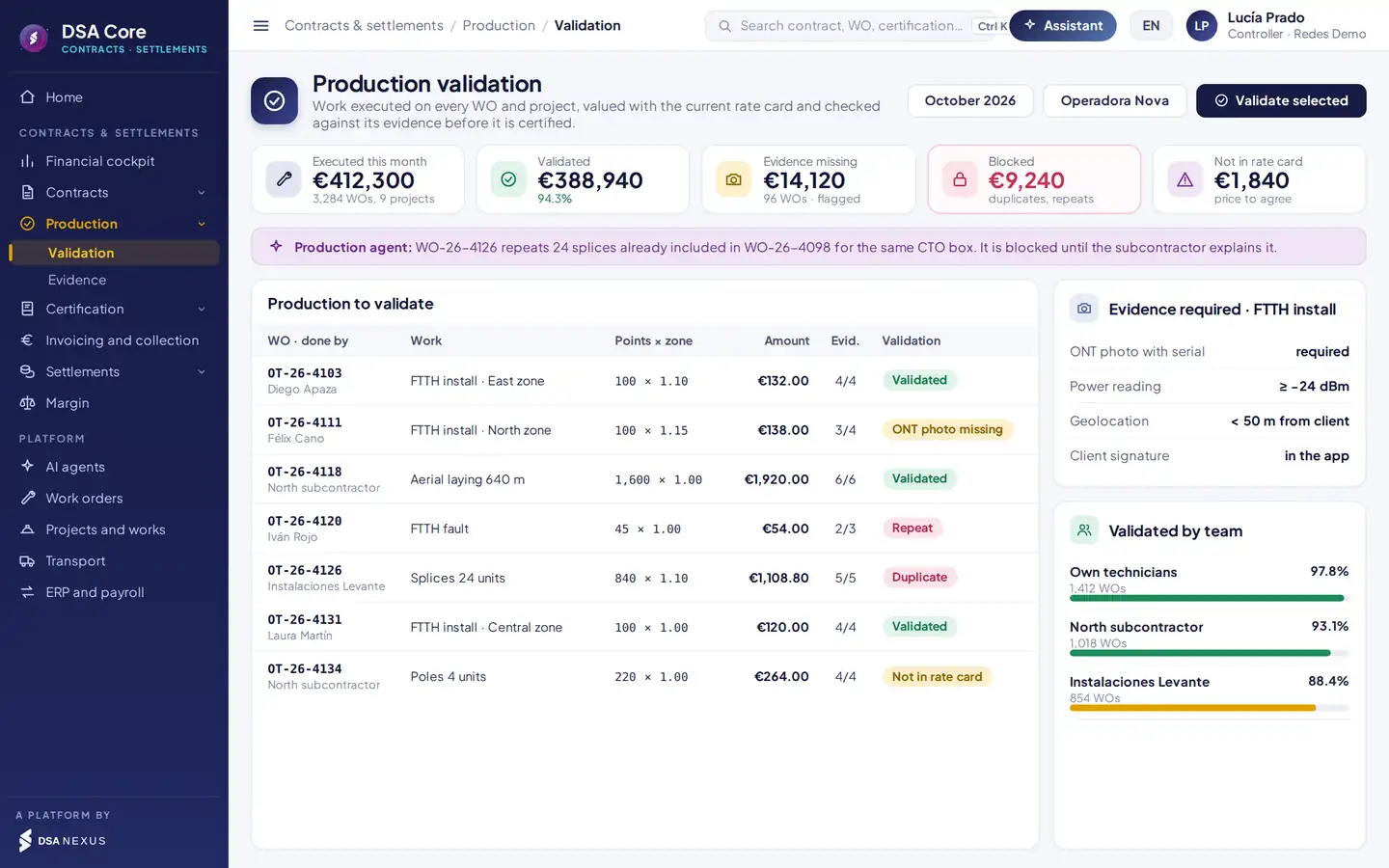
- 1Executed, validated, missing evidence, blocked and outside the rate card this month.
- 2The agent spots work already included in another WO and blocks it.
- 3Status of each WO: validated, missing evidence, repeat, duplicate or outside the rate card.
- 4Evidence required per job type: photo with serial, reading, location and signature.
Project production goes through the same validation as work orders and into the same certification.
If WOs come from the client portal or another tool, they are imported and validated the same way.
When evidence is missing, the technician is alerted on their phone and completes it from the WO.
Mobile app
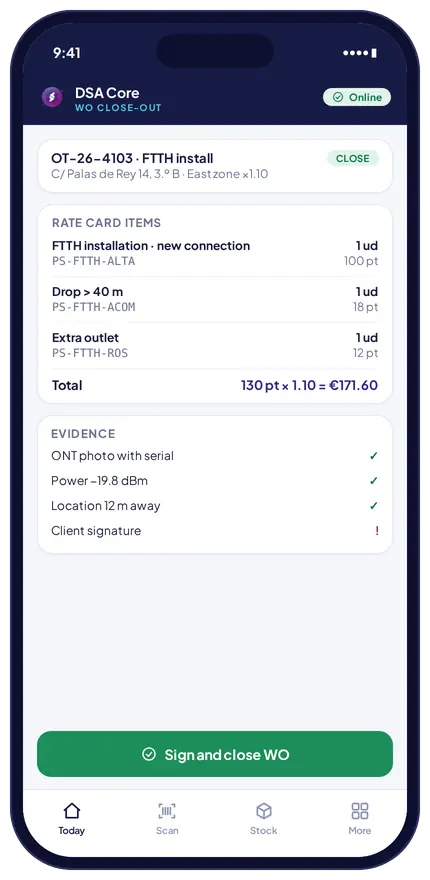
Valuation starts when the work order is closed.
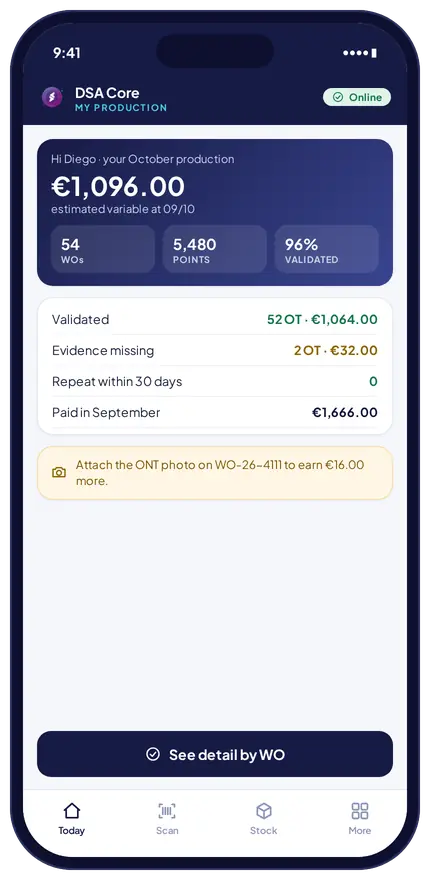
The technician picks the rate card items, attaches the evidence that job type requires and signs the statement with the client. Afterwards they check what they have produced on their phone.
- Close-out statement. Items, quantities, zone factor and calculated amount. The WO cannot be closed if mandatory evidence is missing.
- My production. What is validated, what still needs evidence, repeats and last month’s pay. Technicians know what is missing to get paid.
Automatic checks before certifying and paying.
They hold the affected line and alert the person in charge. Everything else carries on.
The same job declared in two WOs.
Same address or equipment within 30 days.
Item with no price in the contract.
Photo, reading or signature missing.
A zero line with no justified reason.
Factor does not match the location.
Already in another certification.
Held back from the settlement.
WO already settled to the same payee.
Subcontractor insurance or employment documents.
Variable pay above the monthly cap.
A price change never alters anything already certified.
Certification to the client
The monthly certification, in hours, not days.
It is generated from validated production, grouped by contract chapters and tracked until the client approves it and it is invoiced and collected.
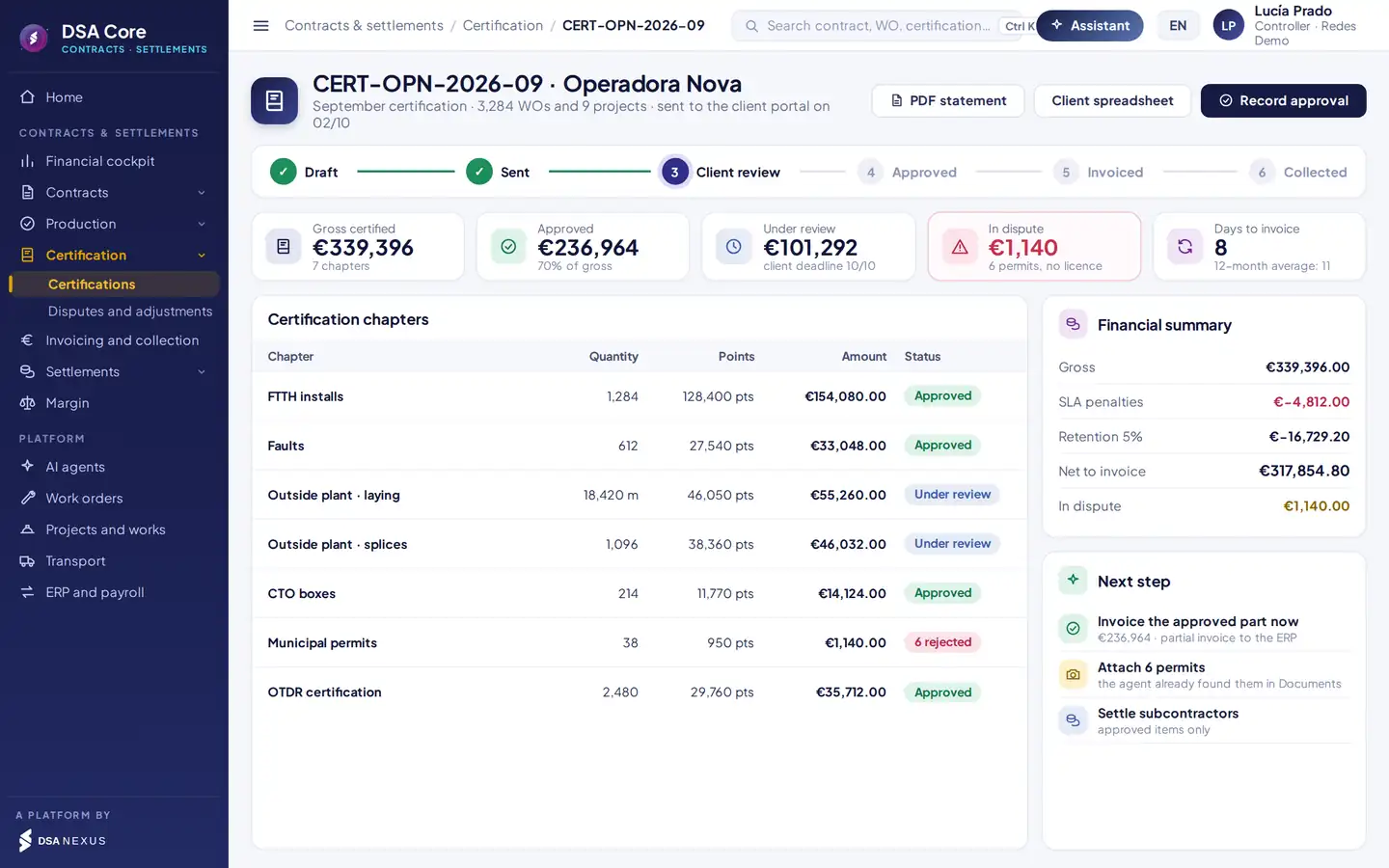
- 1Status: draft, sent, client review, approved, invoiced and collected.
- 2Approval by chapter: approved, under review or rejected.
- 3Gross, SLA penalties, retention and net to invoice.
- 4Next step: invoice what is approved, attach evidence and settle.
Quantity, points and amount, with each WO’s detail one click away.
PDF statement and a spreadsheet in each client’s template, or upload to their portal.
You invoice what is approved without waiting for the rest.
Retention with a release date and SLA penalties calculated.
Invoice sooner, collect sooner. Every day a certification takes to close is another day you are financing your client. The cockpit shows the days from execution to invoice per contract.
Disputes, invoicing and collection
Every rejection defended. Every invoice, no retyping.
Every line the client rejects is recorded with its reason, evidence and outcome. Recovered amounts go into the next certification.
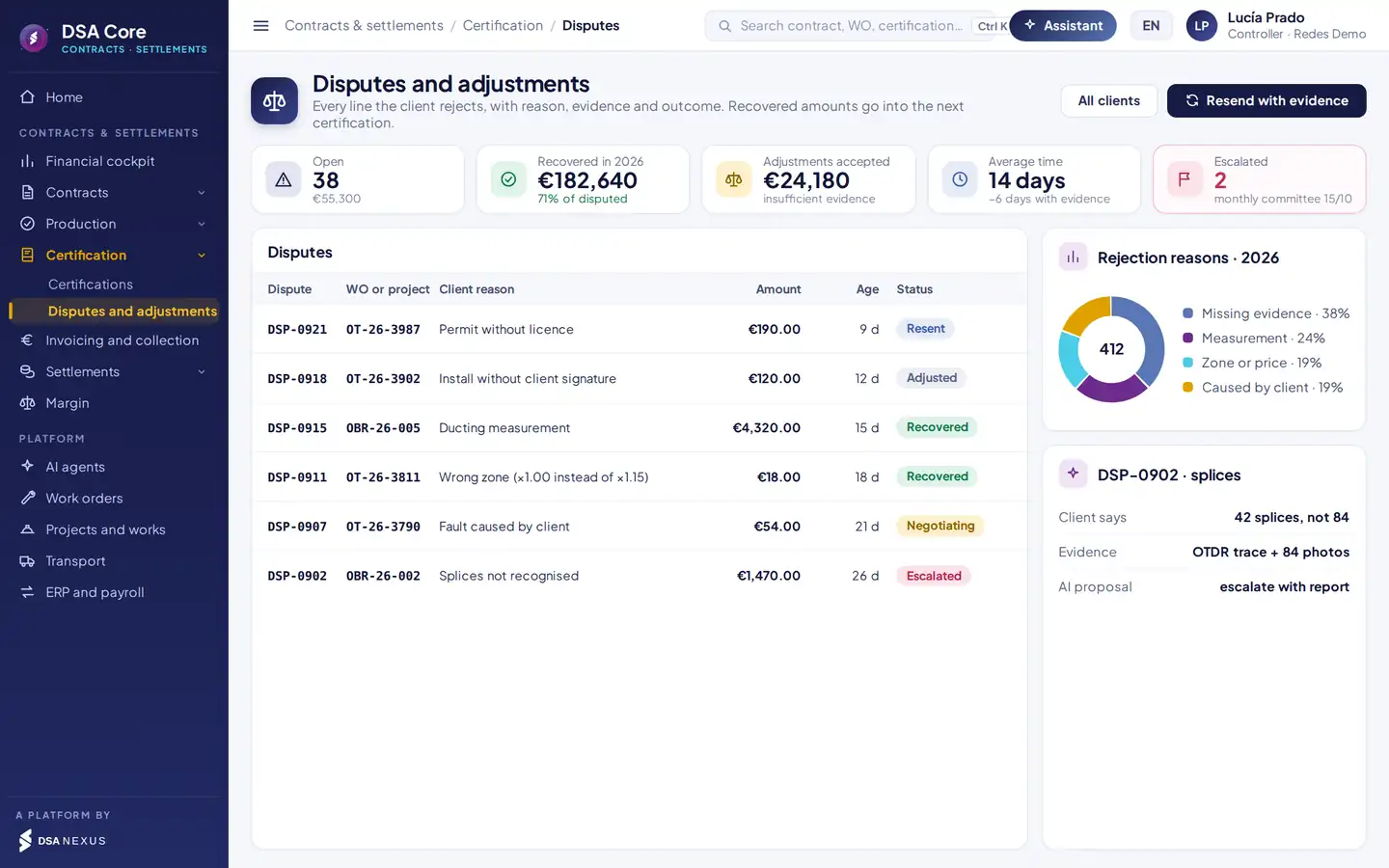
- 1The client’s classified reason for each rejected line.
- 2Age and status: resent, in negotiation, escalated, recovered or adjusted.
- 3Rejection reasons for the year, to fix the root cause.
- 4Evidence located and the agent’s proposed reply.
Invoicing connected to the ERP
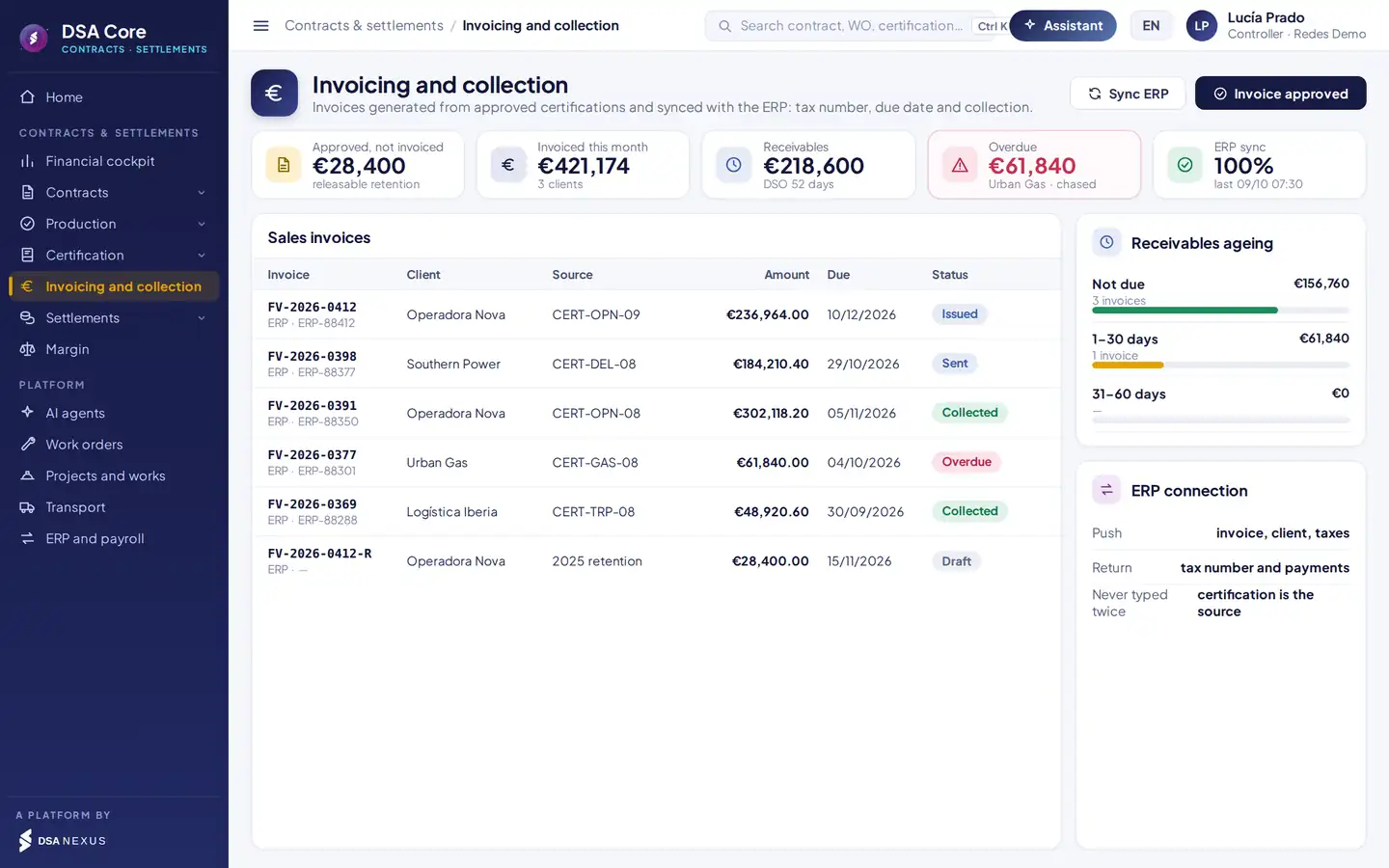
The invoice comes from the approved certification.
- Client, taxes and lines go to the ERP; the tax number comes back.
- Partial invoice from what is approved, without waiting for the rest.
- Issuing company, currency and tax come from the contract.
- Payments returned by the ERP and ageing by client.
- Retentions to release and chasing overdue invoices.
Own technician settlement
Each technician is paid for what they produce, once.
Each technician’s validated production is valued with the internal rate card, quality deductions are applied and variable pay is sent to your payroll system.
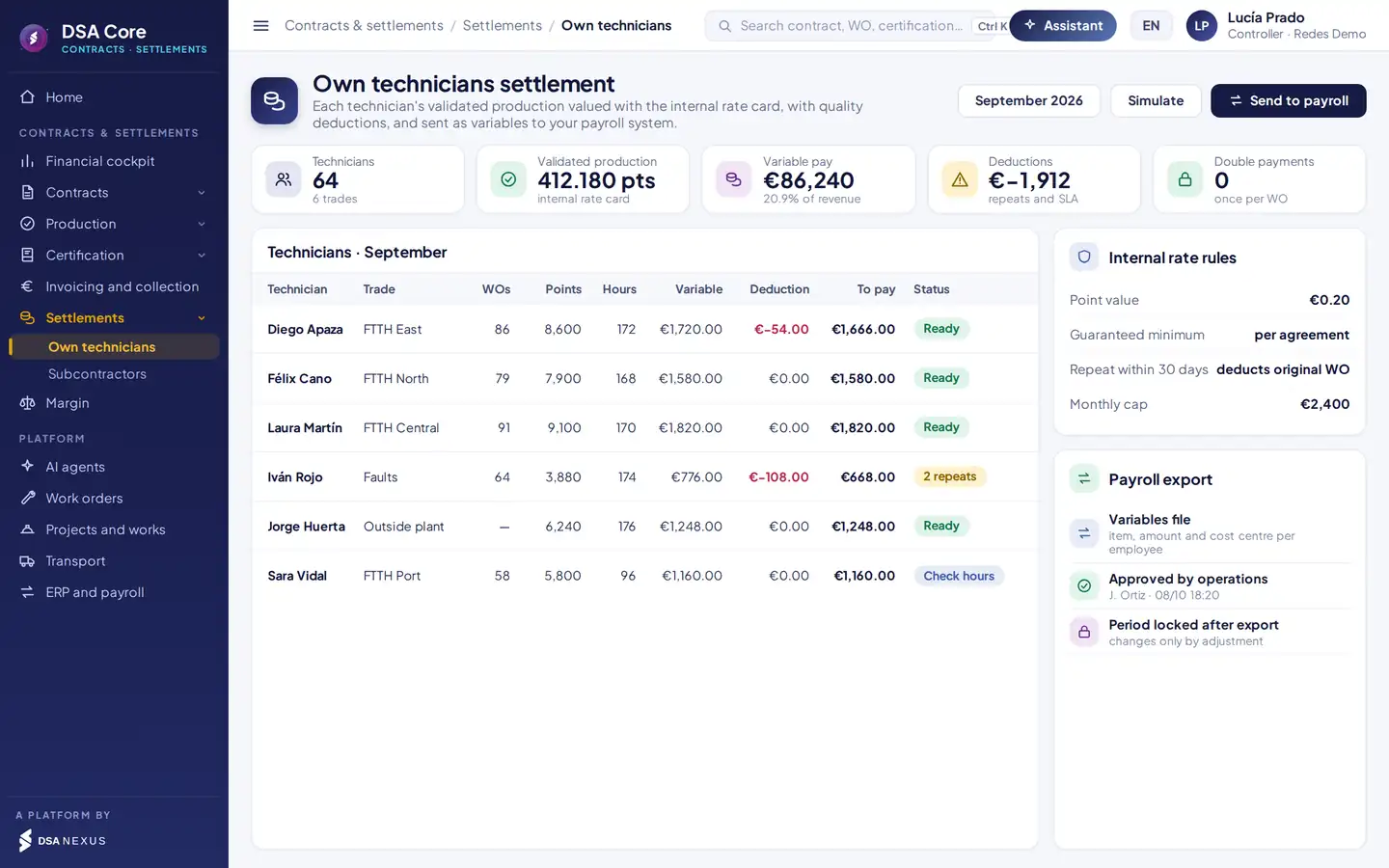
- 1Automatic deductions for repeats within 30 days or SLA breaches.
- 2Double payments: each WO is settled only once.
- 3Internal rate card: point value, guaranteed minimum and monthly cap.
- 4Payroll variables by employee, item and cost centre; period locked after export.
By points or by item, separate from the client’s rate card, with its own point value.
Each WO is settled once and the period locks after export. Later changes go through an adjustment.
Technicians see their production on their phone and know which evidence is missing to get paid.
Subcontractor settlement
You pay what the client has approved.
Each subcontractor’s settlement comes from the same certification: its approved production, at its contract price, with retentions, penalties and valid documents. The self-billing proposal goes to the purchasing ERP.
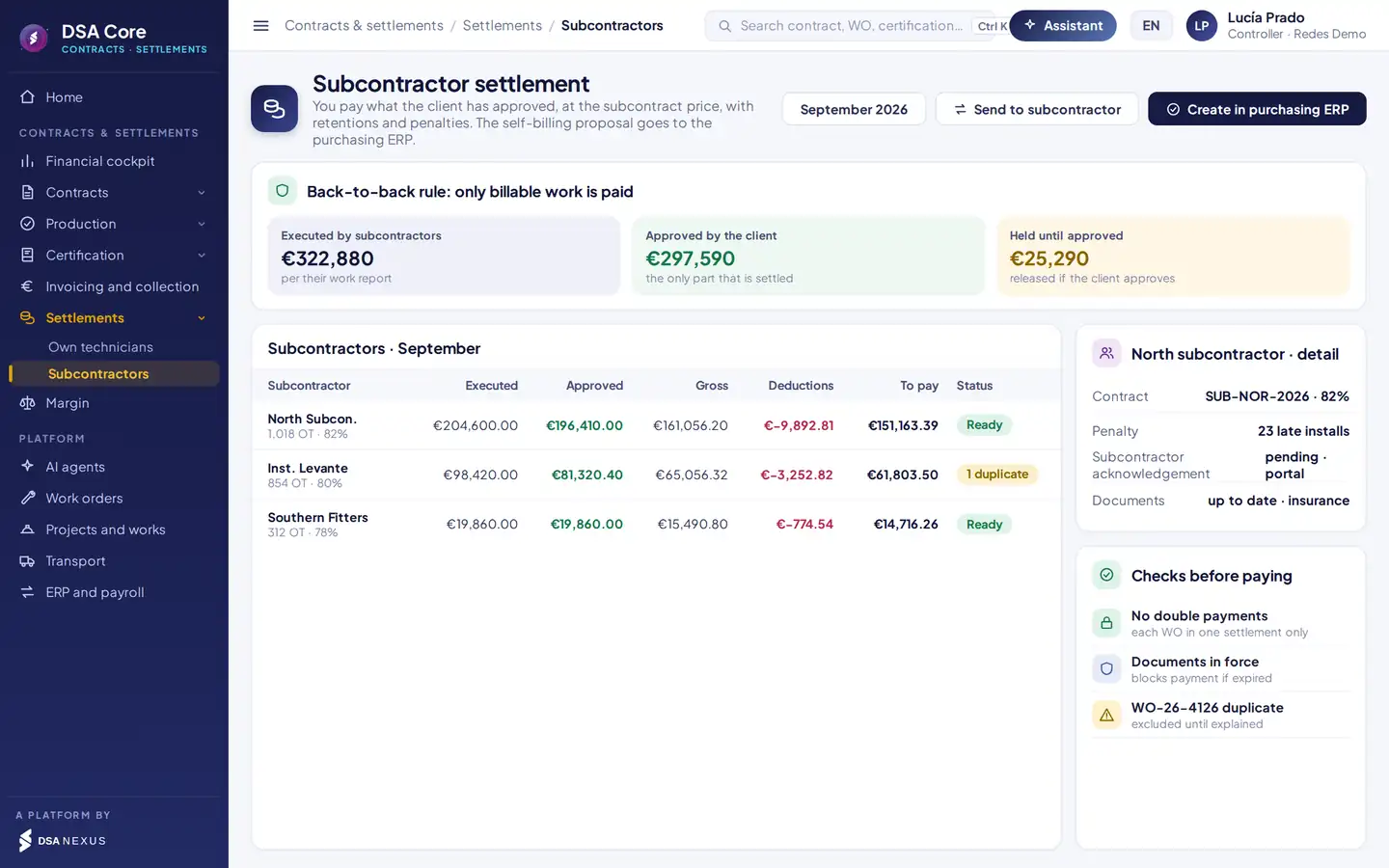
- 1Back-to-back rule: executed, approved by the client and held until approval.
- 2Per subcontractor: executed, approved, gross at its percentage, deductions and payable.
- 3Contract, penalties, subcontractor acknowledgement and documents.
- 4Checks before paying: double payments, documents and duplicate WOs.
Unapproved work is held and released when the client approves it. A subcontractor is never paid more than its percentage of approved work.
Percentage of the client’s rate card or its own price list, with retention and penalties.
The subcontractor accepts the settlement in its portal and the self-billing invoice is validated in the purchasing ERP.
Valid documents before paying. If a subcontractor’s insurance or employment documents expire, its settlement is blocked until they are up to date.
Actual margin
What each contract, zone and work order earns.
Certified revenue minus settled labour, subcontractors, warehouse material and transport, with the actual cost charged to each work order and project.
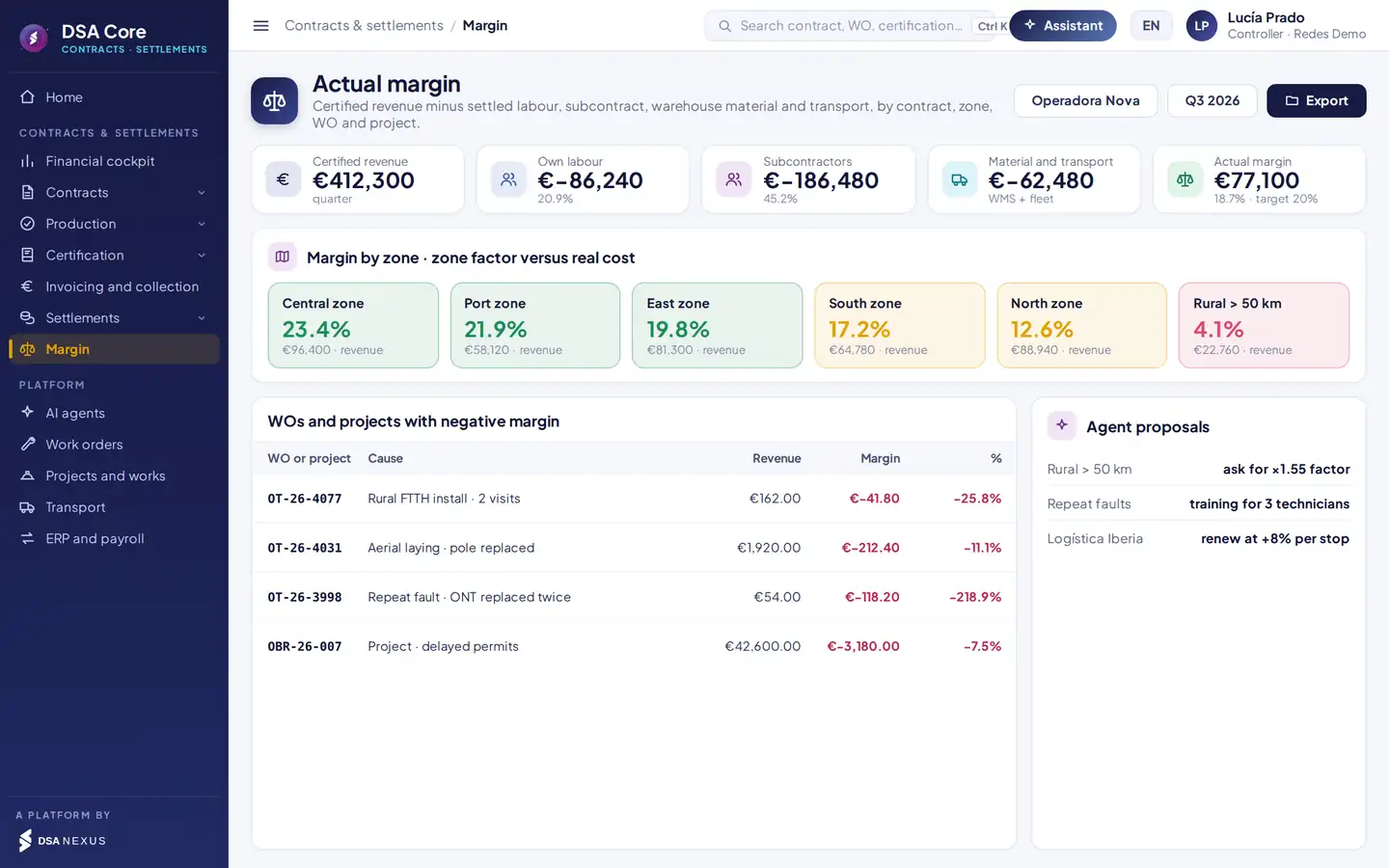
- 1Actual margin against the contract target.
- 2Margin by zone: whether the zone factor covers the real cost of working there.
- 3WOs and projects with negative margin and their cause.
- 4Agent proposals to renegotiate factor, price or training.
Settlements, warehouse material and transport are charged automatically to each WO.
Client price of each bundle against its standard cost and actuals.
Data to renew or renegotiate contracts and prices with each client.
Automation
Six agents watching every euro, with human approval.
They work inside DSA Core, with each user’s permissions. They propose; no certification, invoice or payment runs without approval.
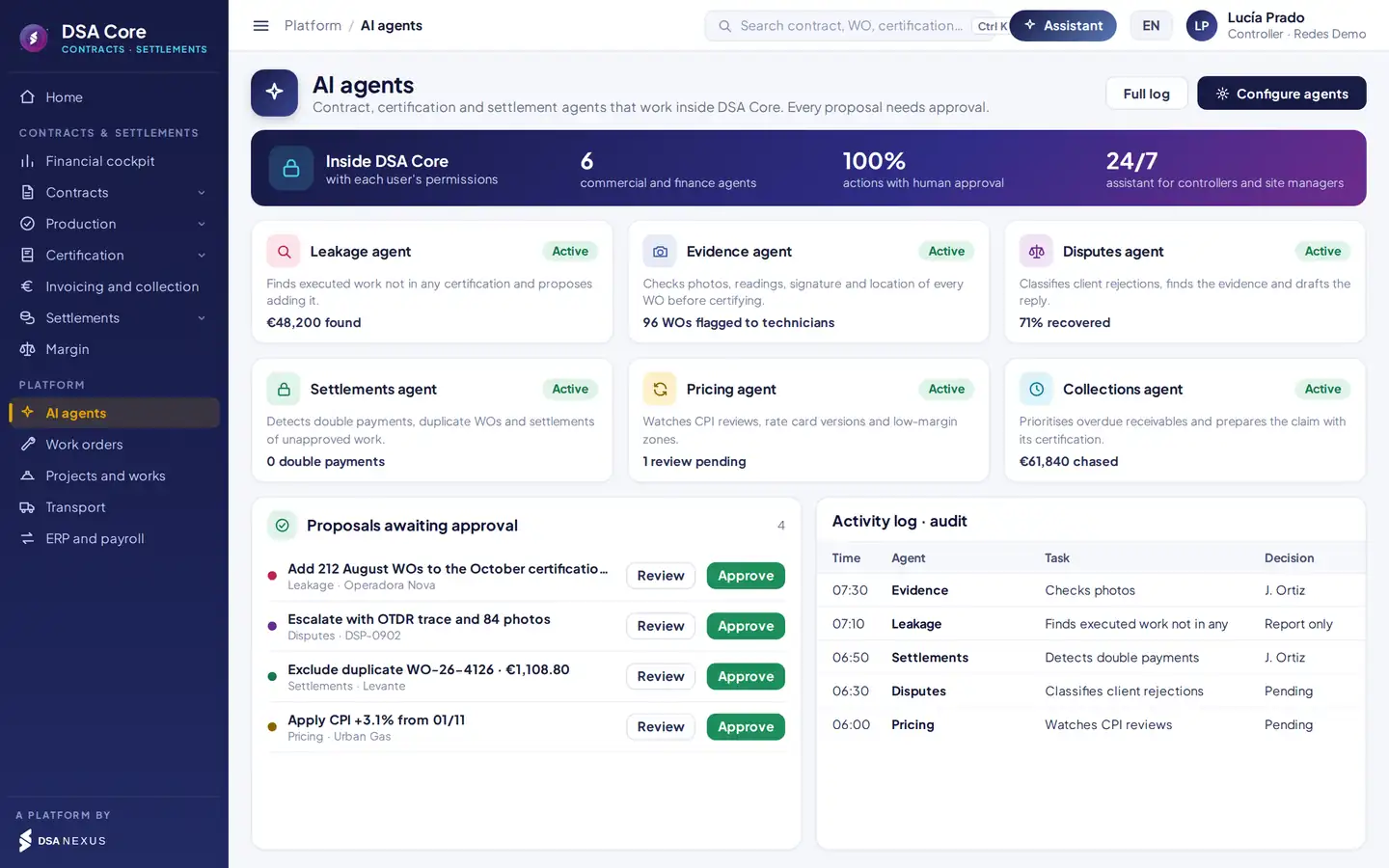
- 1Each agent with its task and what it has achieved.
- 2Pending proposals: nothing is applied until someone clicks Approve.
- 3Activity log: time, agent, task and who decided.
Available agents
Finds executed work that is not in any certification and proposes adding it.
Checks photos, readings, signature and location of each WO before certifying.
Classifies client rejections, finds the evidence and drafts the reply.
Detects double payments, duplicate WOs and settlements of unapproved work.
Watches CPI reviews, rate card versions and low-margin zones.
Prioritises overdue receivables and prepares the claim with its certification.
Ask the assistantWhich August WOs are not certified?How much does Urban Gas owe me and since when?Which zone loses money for Operadora Nova?Which subcontractor has the most rejections?What changes if I apply the 3.1 % CPI?
AI governance
Prices, margins and settlements are processed inside the DSA Core ecosystem, with logged access.
Technicians see their production; subcontractors, their settlement. Each agent only accesses what is authorised.
No certification, invoice or payment runs without approval.
Every query and proposal is logged; content labelled under Art. 50 of the AI Act.
Beyond certifying and settling
What it brings to operations, finance and management.
From the client portal, your current tool or a spreadsheet.
The contract’s company invoices, with its own tax series.
Currency and tax come from each contract.
With a release date and a reminder to invoice them.
Views its settlement and accepts it with an acknowledgement.
Client price against own, subcontract and material cost.
Every price change, approval and payment, with date and user.
Work orders, projects, warehouse, fleet and transport.
Connects with Bids, tenders and contracts, Dashboard and intelligence and Company, HR and subcontractors.
Comparison
Against the usual approach.
Generic ERP and spreadsheetsDSA Core Contracts & Settlements
Contract pricesA spreadsheet per clientVersioned rate cards with zone factors
ProductionPaper reports or messagesValued WO with evidence
CertificationMonthly spreadsheetBy chapter, from validated WOs
Client rejectionsNot trackedDisputes with evidence and outcome
InvoicingRetypedFrom the certification, synced with the ERP
Technician piece rateManual calculationInternal rate card and payroll variables
SubcontractorsPaid what they declarePaid what the client approves
MarginAt year-endBy WO, zone and contract, every day
Artificial intelligenceNot availableBuilt-in agents, with human approval
Packages
Three ways to get it.
Contracts, rate cards, production validation, certification and disputes.
All of the above plus ERP invoicing, technician and subcontractor settlement, margin and rule-based agents.
The complete packageWith work orders, projects, warehouse, fleet and transport on one platform.
SectorsTelecomsEnergy and utilitiesGas and waterInstallation and maintenanceConstructionTransport
ScopeEspañol · English · PortuguêsMulti-currency and multi-taxMulti-company and multi-country
Frequently asked questions
What people usually ask us before the demo.
Do I have to replace my ERP or payroll system?
No. DSA Core sends sales invoices and purchase self-billing invoices to the ERP and receives the tax number and payments back. It sends each technician’s variable pay to the payroll system by employee, item and cost centre.
Does it work if my work orders live in another system?
Yes. Work orders are imported from the client portal, your current tool or a spreadsheet. You can start with certification and settlements and extend to the rest of DSA Core later.
What happens to certified work if I change the rate card or apply CPI?
Nothing. Each work order is valued with the rate card version in force on the day it was done, and a new version does not change anything already certified. CPI price reviews are simulated before they are applied.
How do I avoid paying a subcontractor for work the client has not approved?
With the back-to-back rule: technicians and subcontractors are only paid for what the client has approved. Work done but not approved is held and released when the client approves it.
How do I avoid invoicing or paying for the same work order twice?
Each work order goes into one certification, one invoice and one settlement per payee, once. The system checks this before every document and keeps the record for audit.
Can I invoice a certification that is only partly approved?
Yes. Approval is recorded by chapter and by line, and you invoice what is approved without waiting for the rest. Rejected lines go to disputes with their reason and evidence.
Does it handle points-based rate cards and unit prices?
Yes. Points-based rate cards with a point value, unit price lists, price per item or per route and stop, or a mixed model. With zone factors and SLA penalties applied to each work order.
Do the rule-based agents act on their own?
No. The agents propose and no certification, invoice or payment is executed without human approval. Each agent only accesses information the user is authorised to see, and every query and proposal is logged.
30-minute demo
We will show you in 30 minutes, with a case like yours.
- Demo with a month of sample work orders from your sector
- Loading your rate card and zones
- Pilot with one contract and one subcontractor
- Roll-out connected to your ERP and payroll
DSA Core connects to your ERP and payroll system; it does not replace them.

The first meeting is with David Soler, founder.WhatsApp +34 615 160 114 · hola@dsanexus.com